· 17
Charging lithium battery in the fast charge mode
INCINC
DECDEC
--
++
Start
Enter
Start
Enter
Batt type
Stop
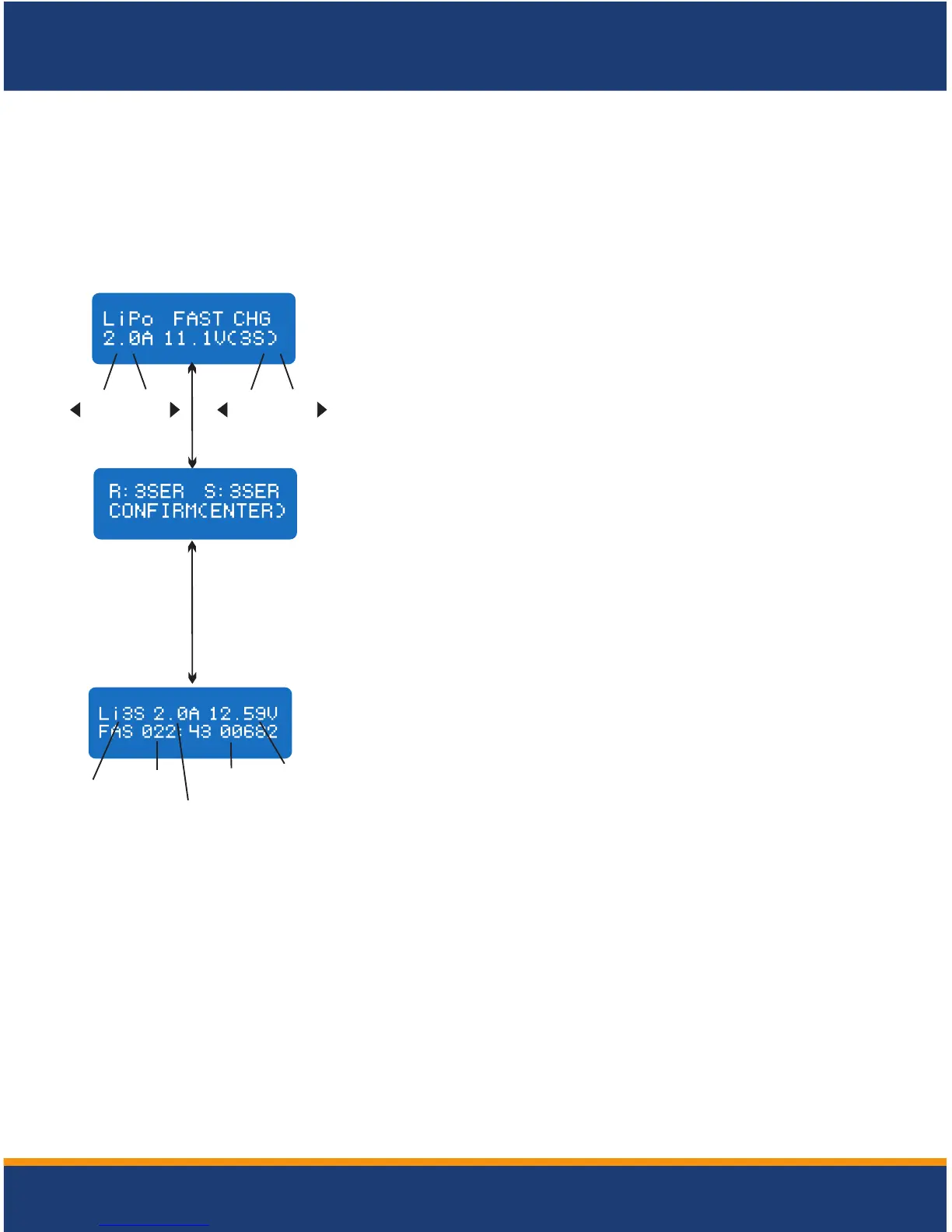
The value on the left side of the second lines sets the
charge current. The value on the right side of the second
lines sets the battery pack's voltage. After setting current
and voltage, press Star/Enter for more than 3 seconds to
start the process.
The charging current is getting smaller as the process goes to the near end term of
Lithium battery charging. To finish charging process earlier, this program eliminate certain
term of CV process. Actually, the charging current will goes to 1/5 from the initial value to
end the process while the normal charging goes to 1/10 during CV term. The charging
capacity may be a bit smaller than normal charging but the process time will be reduced.
This displays the number of cells you set up and the
processor detects. R shows the number of cells detected
by the charger and S is the number of cells set by you at
the previous screen. If both numbers are identical you can
start charging by press Start/Enter button. If not, press
Batt Type/Stop button to go back to previous screen to
carefully check the number of cells of the battery pack
before going ahead.
Current
voltage
battery
Supplied
capacity
Charge
current
Charging
time
Number
of
cells
This screen shows the real-time status during charge
process. Press Batt Type/Stop key once to stop the
charge process.
'> 3 seconds '
CHARGING LITHIUM BATTERY IN THE FAST CHARGE MODE


 To Next Page