22 ·
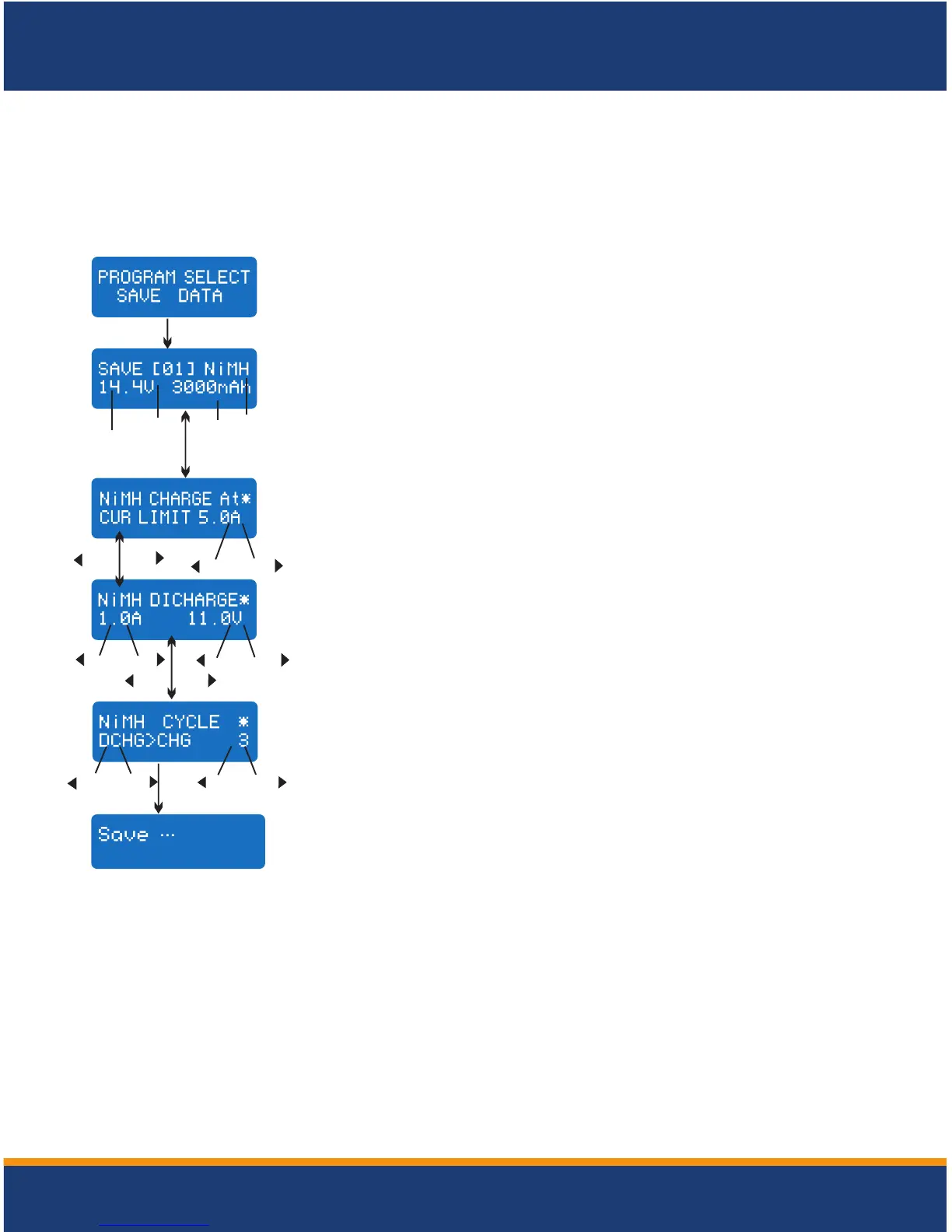
For your convenience, MEGA 400W×2 has a data storage and load program. It can store
ten batteries data representing the respective specifications of batteries. You can call
back the data when charging or discharging without setting up the program again. Press
Start/Enter key to make it blink, and use Inc or Dec to set up the parameter.
Storage data program
Voltage
Data
number
Capacity
Type of
battery
Start
Enter
Setting of the parameter in the screen will not affect the
charge and discharge process. They just present the
specification of the battery. The example is NiMH battery
pack, including 12 cells, the capacity is 3000m Ah.
DEC
INC
DEC
DEC
D E C
-
-
-
INC
INC
INC
+
+
+
Start
Enter
Batt type
stop
Set up the discharge current and final voltage.
Set up the charge current in the manual mode, or current limit
in the auto mode. Press Inc and Dec key simultaneously to
make the current field blink to switch the charge mode.
DEC
INC
Saving the data
DEC
DEC
-
-
INC
INC
+
+
Start
Enter
Set up the charge/ discharge sequence and cycle number.
'> 3 seconds '
'> 3 seconds '
STORAGE DATA PROGRAM


 To Next Page