16
The TurnOnGreen EV700 can be modied to t your preferences. You can adjust your
settings on the LCD touchscreen, and in the EV700 app! Aside from selecting your preferred
charge authentication method, you can change charge authentication methods, Adjust
Amperage Settings and Assign Additional RFID cards!
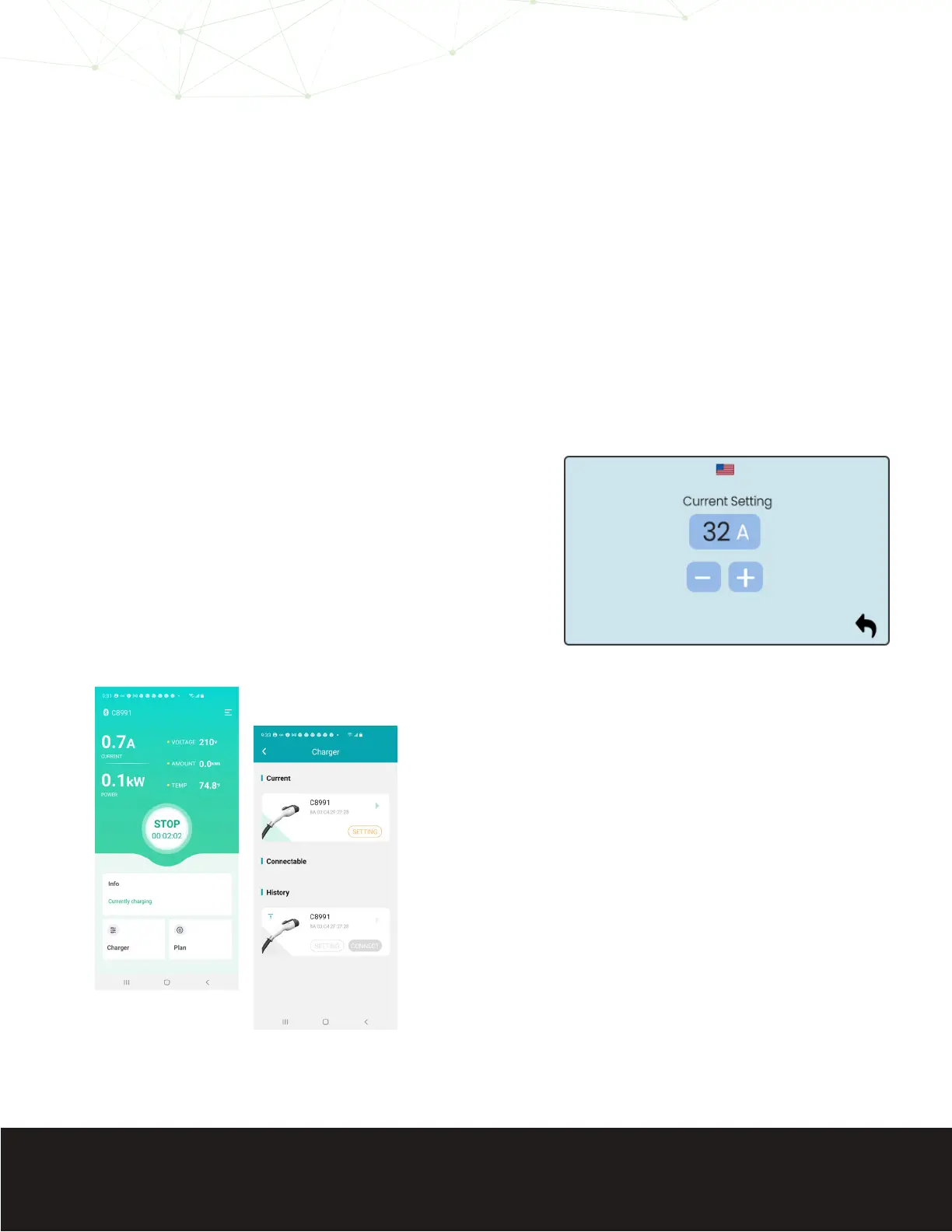
1. Select the gear on the LCD touchscreen
2. Select “Current Setting”
3. Increase or decrease the amperage
setting to your preferrence.
If you plan to charge overnight, it is plausible that fewer amps over 6-10 hours of charging can
accomplish the same amount of battery charge as the standard 32A of the EV700. If you wish to
reduce the EV700’s voltage output follow the steps below.
1. Select the “Charge” section on the bottom, left-
hand side of the app screen.
2. Select “SETTING” on the Current Charger screen.
Modifying The EV700
Adjust Amperage Settings
On EV700 LCD Touchscreen
Mobile Application


 To Next Page