
 Need help?
Do you have a question about the TurnOnGreen EV700 and is the answer not in the manual?
Document serves as a reference guide for charger operation, with rights reserved to change specifications without prior notice.
Guidelines for safe operation, warning against physical defects, unauthorized modifications, and specific environmental conditions.
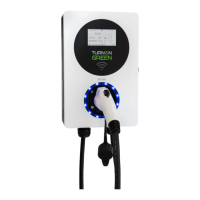
Identifies key physical components of the EV700 charger, including the display, indicators, and charging plug.
Indicates no power received when LED is off and touchscreen is inoperable.
Signifies the EV700 is on standby when the LED light is blue.
Shows the EV700 is actively charging when the LED light is blinking green.
Alerts to an issue when the LED light turns red, prompting contact with TurnOnGreen.
Details 'APP only', 'Swipe Card & App', and 'Auto & App' modes for initiating charging.
Instructions on downloading the EV700 Application from Google Play Store or Apple App Store.
Guides on pairing the EV700 with the app, starting, and stopping charging sessions.
Steps for activating charging by plugging in, following screen prompts, and using RFID or mobile app.
Shows real-time charging stats like Amps, Voltage, Kilowatt Hours, and Charge Time.
Details how to stop charging via Auto & App, Swipe Card & App, or App Only methods.
How to reduce amperage output for overnight charging via touchscreen or mobile app.
Select 'Plan' on the app, choose repeat days, start, and end times for charging.
Option to schedule one-time or custom recurring charging sessions with preferred days and times.
Details on checking for and performing firmware upgrades, including status and reboot.
Steps to access card binding via touchscreen and bind new RFID cards for authentication.
Addresses no power by checking circuit breakers and test buttons.
Lists reasons for failed charging like scheduling, vehicle status, or connection issues.
Explains reduced charging speed due to temperature or vehicle detection.
Mentions updating firmware and checking current selectors for low power issues.
 General
| Input Voltage | 208-240 VAC |
|---|---|
| Operating Temperature | -22°F to 122°F (-30°C to 50°C) |
| Enclosure Rating | NEMA 4 |
| Charging Level | Level 2 |
| Cable Length | 25 ft |
| Charging Connector | J1772 |
| Mounting Type | Wall-mounted |
| Warranty | 3 years |

 To Next Page
