30
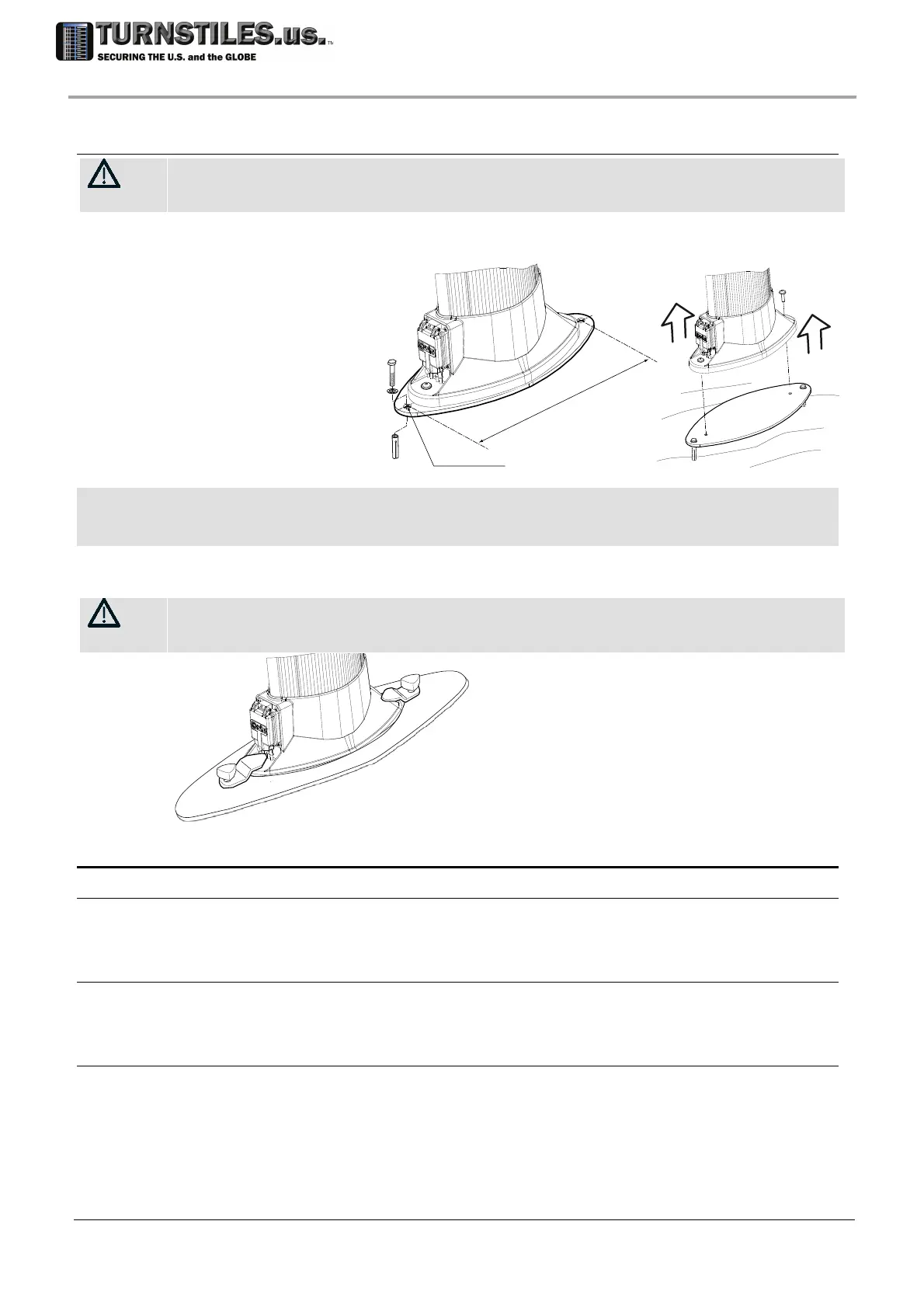
3.6.3 Anchoring with stabilizing plates
In case of removable applications, these plates maintain the archway stability and, acting as an adapter, allow the
archway to be easily relocated. In order to prevent the archway from tipping over in case of bumps, the stable
anchoring to the ground is anyway mandatory
.
Metal version
Anchoring the plates to
the floor
Drill the holes
according to the
illustration
Anchor the plate to
the floor using
expansion plugs.
REMARK: RELOCATION
In case of repetitive relocations, we advise that the archway be detached from the plates, leaving them anchored to the
ground for re-use. In fact, metal screws vp allow several assembly/disassembly operations with higher reliability with
respect to the anchors
Plastic version (mobile use, especially suitable for uneven floor)
WARNING!
User shall take all appropriate precautions to prevent the gate from tipping over due to
bumps or mechanical exertion.
3.7 Personalisation
3.7.1 Settings check
If required by the specifications of the Security Authority change the programming setting to
refine the operating mode. Enter programming as Superuser, entering the password if
necessary. The factory settings is stated by the ‘FAT’ form supplied with the equipment.
3.7.2 Verification of the User Access Level
Enter the UP command Scroll all the functions by pressing ENTER. Check that the functions
enabled by the UP command are exactly those listed in the FAT form. In the case of mismatch,
change the value from Y (accessible) to N (excluded) or vice versa (by pressing UP key).
3.7.3 Protecting operational parameters by password
Definition of a password at user level
Enter programming at user level and define a new password by means of NP command as
indicated by the authorised Security Representative.
Definition of a password at superuser level
Enter programming at superuser level and define a new password by means of NP command as
indicated by the authorised Security Representative.
ø15mm (0.6”)
4
4
0
m
m
(
17
.
3
”
)
vp
vp
303-670-1099



 To Next Page