AudioTron Quick-Start Guide
Page 11
ü If you have a digital phone system… Some multi-line phone systems use a digital
transmission system on standard phone lines. These types of phone lines are not compatible
with AudioTron or with HPNA networks.
ü Do not use a telephone line filter between AudioTron’s HPNA jack and the phone
jack… Transient surge protection is built into the AudioTron HPNA phone and line inputs.
Stereo
System
Analog Phone Line
C
AudioTron
HPNA Connection
PC with
HPNA interface
Phone
HPNA interface
Phone
Wire
RCA or
Optical
audio cable
Phone
Plug
Phone
Wire
Phone
Wire
Phone
Wire
Phone
Plug
Phone
Plug
Phone
Plug
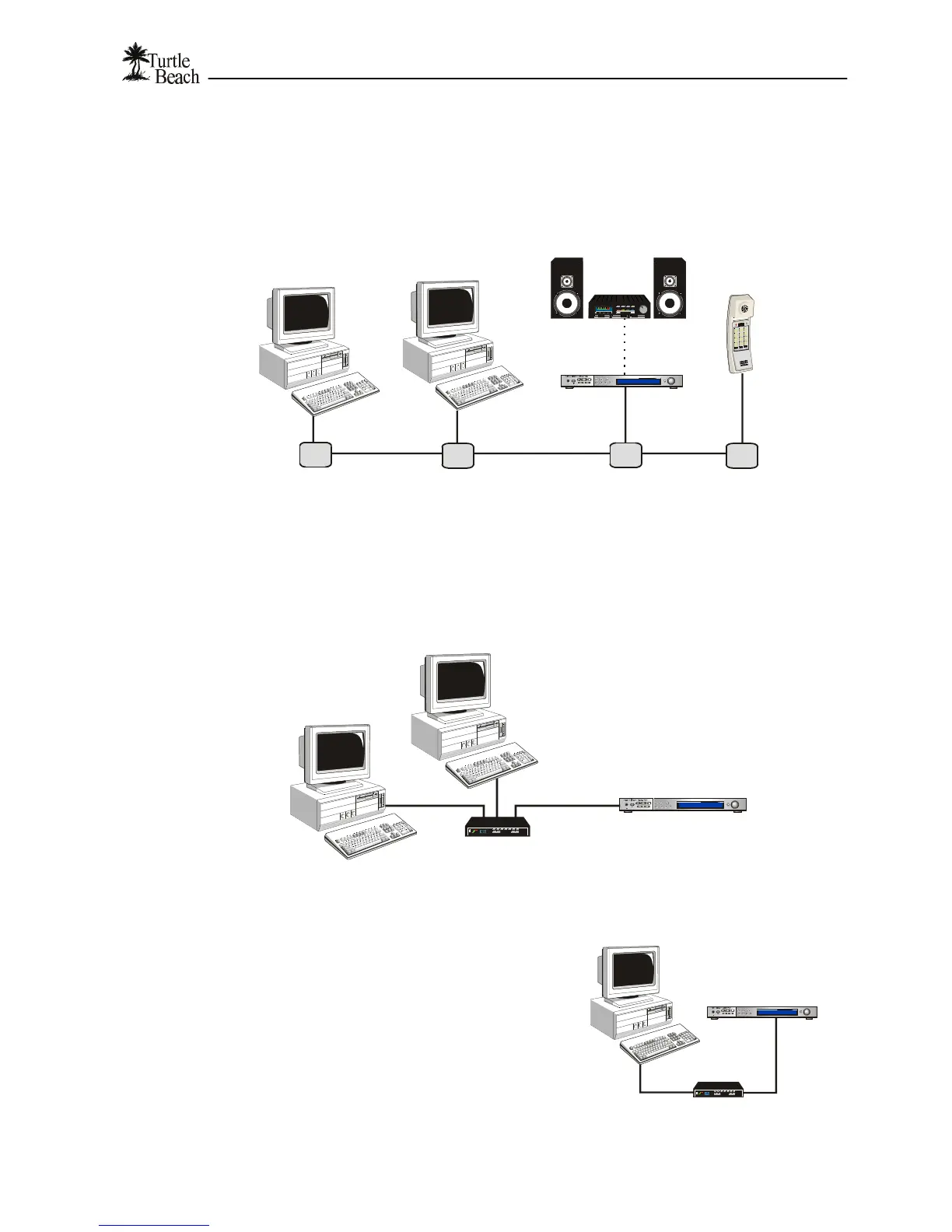
Figure 6 In a multi-PC HPNA network, each device in the network can be connected directly to the phone
line. The normal operation of your telephone is not interrupted by the network activity.
Checklist for Ethernet networks…
ü Ethernet devices must be connected with an Ethernet “Hub”, which distributes the Ethernet
signal between multiple devices and controls the network “traffic”. There are many types of
hubs available, and some have enhanced features, such as built-in switches that intelligently
route data in the network to optimize transfer speeds.
Ethernet
C
PC with
Ethernet interface
Ethernet Cat 5 Cable
PC with
Ethernet interface
AudioTron
Ethernet Connection
Ethernet Cat 5 Cable
Figure 7 Connecting PCs and AudioTrons to an Ethernet network requires an Ethernet Hub.
ü If you’re connecting the AudioTron
directly to an Ethernet-equipped PC,
you’ll need either a hub or a special
Ethernet “cross-over cable” (which is
not the same as the standard Ethernet
cable included with your AudioTron.)
Since a basic hub is not expensive and
the “crossover” cable may be difficult
to find, it is suggested that a hub be
used for making the direct connection
to your PC. See the Reference Manual
for more information.
Ethernet Hub
Ethernet
Cat-5 cable
PC with
Ethernet interface
C
AudioTron
Ethernet Connection
Ethernet
Figure 8 Connecting a single PC to AudioTron also
requires an Ethernet hub.


 To Next Page