www.Turtle-Beach.com
Page 16
AudioTron “Shared Directories” Requirements
When AudioTron is powered on, it searches the network for host PCs, then searches for music
files (MP3, WMA and WAV) and playlists (M3U and PLS) in directories named \My Music,
\Music, \Audio and \My Documents \My Music that reside under a shared directory. AudioTron
does not search the root shared directory for music and playlist files. These naming and share
restrictions are intended to accelerate the search for music files on large hard drives.
The Options menu “Search Whole Share” lets you override the “shared directories” restriction so
that any directory set as a share will be searched for music and playlist files. For details, see the
Reference Manual on the CD.
Ü
You can set a directory to “shared” or “not shared” by right clicking on the directory name in Windows
Explorer and selecting the “Sharing…” menu option. For detailed instructions on how to set up a “shared”
directory, see the Reference Manual on the enclosed CD.
Once AudioTron completes the search, it creates a database of the music file names in its internal
memory so it doesn’t have to search the PC drives each time a song list is requested. If more songs
are added later on, the “Search for New Music” menu in the Options display can be used to add
only the new file names to AudioTron’s local directory, which saves the time of logging all of the
music files it already knows about. If songs are deleted from the network drives, AudioTron must
be re-booted in order to delete the files from its local database.
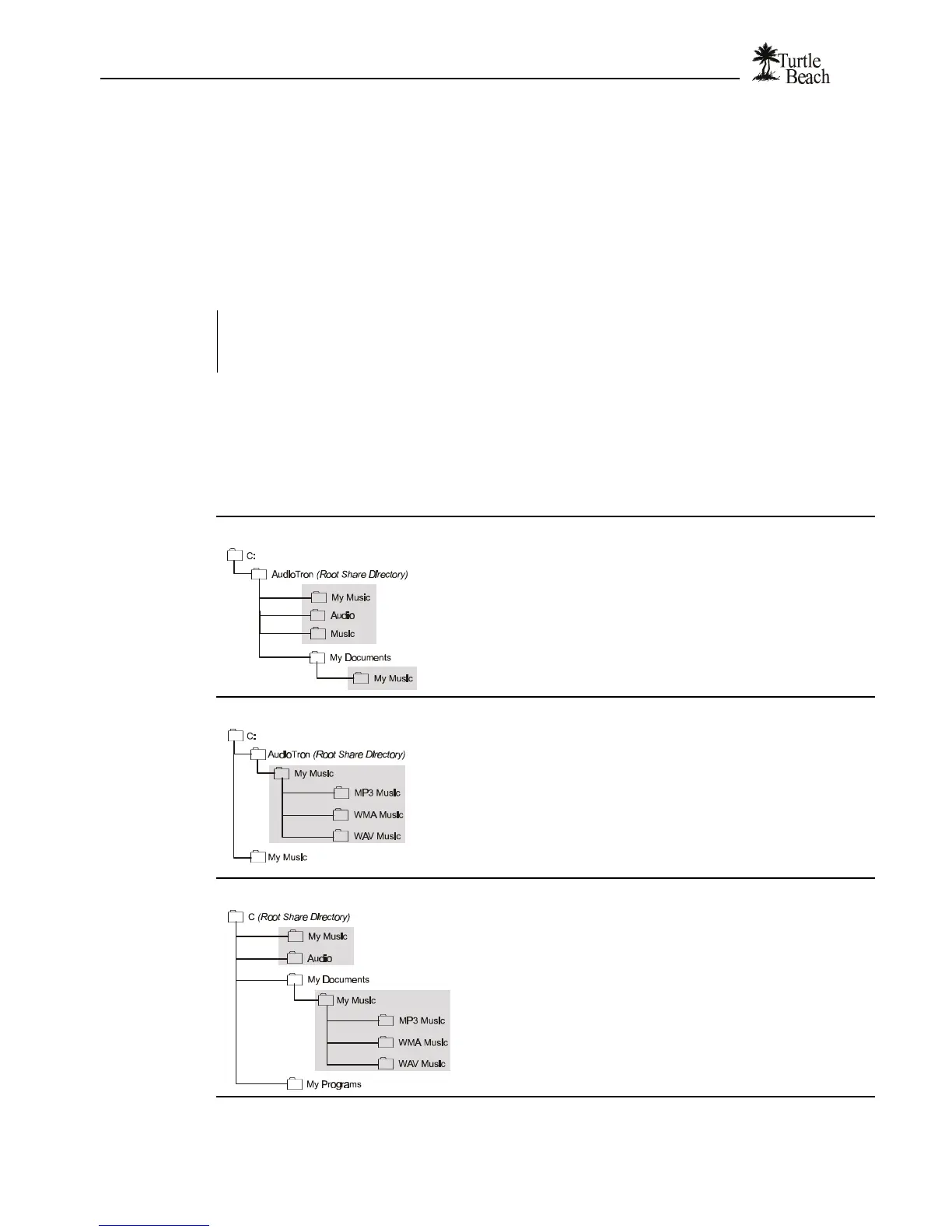
In the following examples, AudioTron would find music stored in the shaded directories:
Example 1:
AudioTron will not find music in \C because it is not under a shared
directory. AudioTron will not find music in \AudioTron because it is the
root share. AudioTron will not find music in \My Documents because it
does not follow the naming convention.
AudioTron will find music in \AudioTron\My Music, \AudioTron\Audio,
\AudioTron\Music and \My Documents\My Music because they follow
the naming convention and reside under the shared directory
\AudioTron.
Example 2:
AudioTron will not find music in \C because it is not under a shared
directory. AudioTron will not find music in \AudioTron because it is the
root share. AudioTron will not find music in \My Music because it is not
under a shared directory (even though it follows the naming
convention.)
AudioTron will find music in \AudioTron\My Music because it resides
under a shared directory and follows the naming convention.
AudioTron will find music in \AudioTron\My Music \MP3Music,
\AudioTron\My Music\WMAMusic and \AudioTron \My Music
\WAVMusic because they reside under \My Music.
Example 3:
AudioTron will not find music in \C because it is the root share.
AudioTron will not find music in \My Programs or \My Documents
because they do not follow the naming convention.
AudioTron will find music in \My Music, \Audio and \My Documents
\My Music because they follow the naming convention and reside
under a shared directory. AudioTron will find music in all directories
under \My Documents \My Music, even though they do not follow the
naming convention (because they reside under \My Music.)


 To Next Page