
 Need help?
Do you have a question about the Turtle Beach Elite Pro and is the answer not in the manual?
The main audio processing and control unit for the headset.
Includes power, optical, chat, and programming cables for various connections.
Covers presets, game/chat balance, noise limiting, mic boost, monitor, and volume.
Details main, stream out, aux in, program, local chat, and optical ports.
Illustrates the basic connection for a standard headset.
Shows the setup for a tournament-grade noise-cancelling microphone.
Steps for connecting to Xbox One controllers with 3.5mm jack or headset audio controller.
Configuration for input/output devices and audio output settings on PS3.
Steps for configuring audio output and format on PS4.
Instructions for setting up game and chat audio devices in Windows.
Details presets for Game, Movie, Music modes, and Surround Off.
Connect TAC to an audio receiver/system for pass-through audio.
Connect a phone/tablet for music or calls while gaming.
Setup for local tournaments and streaming audio to PC/Mac.
Solutions for when people cannot hear you, checking mic mute and settings.
Solutions for when you cannot hear the game, checking balance and connections.
FCC and EU compliance notices, including interference and environmental directives.
Details the one-year warranty, service, and exclusions from coverage.
 General
| Cable length | 1.3 m |
|---|---|
| Headset type | Binaural |
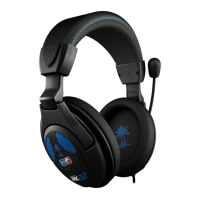
| Product type | Headset |
| Product color | Black |
| Wearing style | Head-band |
| Recommended usage | Gaming |
| 3.5 mm connector | Yes |
| 2x 3.5 mm connectors | No |
| Connectivity technology | Wired |
| Impedance | - Ω |
| Driver unit | 50 mm |
| Ear coupling | Circumaural |
| Headphone frequency | 12 - 22000 Hz |
| Microphone type | Boom |












 To Next Page
