3
About the Tactical Audio Controller
Go to Table of Contents
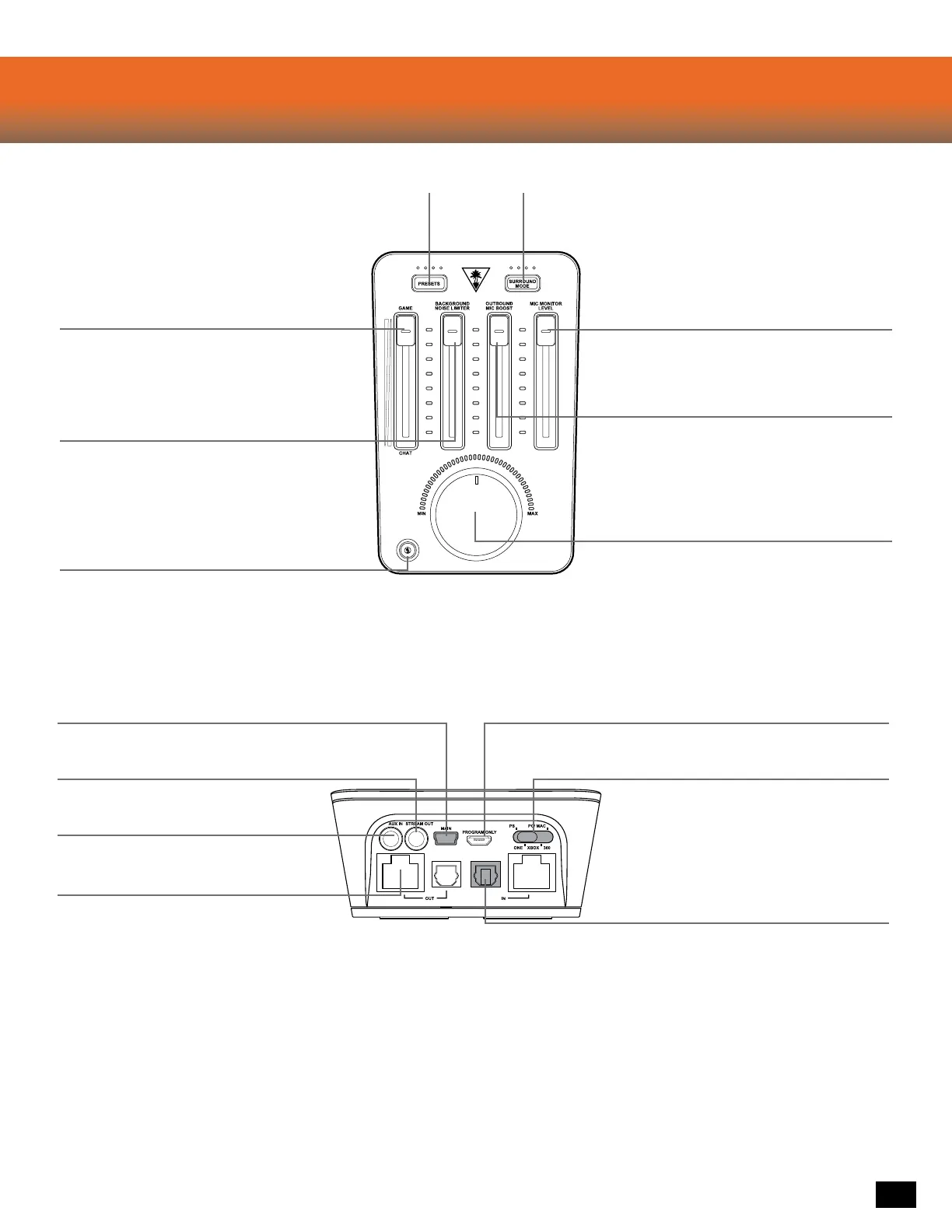
Presets:
Customize your Game Audio with
Turtle Beach Signature Audio Presets
Game/Chat Balance:
Set the perfect balance of Game and Chat Audio so
that you can hear your teammates while focusing on
the game. Move this fader to the top to only hear Game
Audio. Move it to the bottom for only Chat.
Surround Mode:
Adjust your virtual surroundings
with DTS Headphone:X 7.1 Room modes
Outbound Mic Boost:
Tweak this to adjust the level at which others hear
you. This setting will be dependent on which Elite
Pro Microphone and console you are playing with.
Master Volume:
Control the level of everything playing through your headset.
Press to Mute all paths, both incoming and outgoing. This
means you won’t hear the game & chat, and that no-one will
hear you, an emergency stop of sorts.
Mic Mute:
Press to mute your outgoing Mic. A LED will glow red
to indicate no one can hear you.
The Mic Mute LED in the bottom left corner of the TAC
indicates whether others can hear you. While speaking
the Mic Mute LED should glow Blue. If it is not, turn down
the Background Noise Limiter.
Mic Monitor Level:
Adjust how loud your voice plays in the headset so that you
don’t end up yelling.
Background Noise Limiter:
Turn this up so that your teammates don’t have to
listen to your roommate vacuuming. The higher the
setting the less ambient noise your mic will pick up.
Make sure to test out this setting and calibrate it to
your environment.
Aux In:
Mix in music from your Phone or Tablet.
Local Chat In/Out:
Connections for Tournament Chat
Stream Out:
Output your game Game/Chat/Mic audio to
your PC/Mac for recording/streaming.
Main:
Your primary USB port, this should always be connected to
power your device and pass audio on some platforms.
Program Only:
This is used to update your unit when new firmware/presets become
available. Download the Ear Force Audio Hub at turtlebeach.com/Elitepro
Mode Switch:
Always make sure you’re set to the right mode!
This is important for optimal performance.
Digital Optical In/Out:
Connections for your Console Game audio. Use the
Digital Optical Out to pass audio straight through to
another device.













 To Next Page