EasyManua.ls Logo

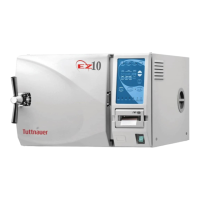
Tuttnauer EZ10 - Service Manual

Tuttnauer EZ10
54 pages
Print Icon
To Next Page IconTo Next Page
Loading...
OPERATION
&
MAINTENANCE
MANUAL
Electronic Tabletop Autoclaves
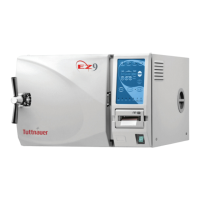
Models EZ9, EZ10, EZ10K
Cat. No. MAN205-0263001EN Rev. E
Tuttnauer USA Co., Ltd., 25 Power Drive Hauppauge, NY 11788 USA, : (800) 624 5836, (631) 737 4850, Fax: (631) 737 0720
e-mail: info@tuttnauerUSA.com

Questions and Answers

  • S
    Sean RiveraSep 9, 2025
    Why is the chamber not filling in my Tuttnauer EZ10 Laboratory Equipment?
    • K
      kimberlyhortonSep 9, 2025
      If the chamber is not filling in your Tuttnauer Laboratory Equipment, check the water level in the reservoir and look for any obstruction at the bottom of the reservoir blocking the pickup tube. Clean the water sensor. You can also try filling the machine manually using the Manual Inlet key.
  • D
    Daniel DelgadoSep 8, 2025
    Why do wrapped items come out wet from my Tuttnauer Laboratory Equipment?
    • S
      Susan CooperSep 8, 2025
      If wrapped items come out wet from your Tuttnauer Laboratory Equipment, the drying cycle may be too short, or the autoclave may be overloaded. Additionally, the chamber strainer or the HEPA filter may be clogged.
  • M
    Mary SandersSep 7, 2025
    Why does my Tuttnauer EZ10 autoclave take too long to heat up?
    • T
      Thomas MartinSep 7, 2025
      If your Tuttnauer Laboratory Equipment autoclave takes too long to heat up, clean the air jet and check for proper voltage at the wall outlet.
  • K
    Kimberly ClarkAug 22, 2025
    How to unclog the drain in my Tuttnauer EZ10?
    • P
      Paul GarciaAug 22, 2025
      To unclog the drain in your Tuttnauer Laboratory Equipment, open the drain by turning it counterclockwise. Place a heavy object over the reservoir cover. Blow compressed air into the drain to force any debris back into the reservoir, and then clean out the reservoir. Alternatively, disassemble the drain valve by turning it counterclockwise past the stop point. Remove the valve, clean it, and blow out the line as needed. Reassemble the valve by turning clockwise, ensuring the large “O” ring is pressed into the groove on the autoclave.
  • T
    Thomas JamesSep 4, 2025
    Why is my Tuttnauer EZ10 Laboratory Equipment leaking at the door?
    • C
      Corey WilliamsSep 5, 2025
      If your Tuttnauer Laboratory Equipment is leaking at the door, make sure the door is tightened enough and the door gasket is sealing the chamber. Replace the door gasket if necessary.
  • R
    robinsonbrettSep 3, 2025
    What to do if my Tuttnauer EZ10 Laboratory Equipment is not responding?
    • W
      William GraySep 4, 2025
      If your Tuttnauer Laboratory Equipment is not responding, ensure the main switch is in the ‘On’ position and the power cord is properly connected to both the machine and the mains. Also, check the reset button on the cut-out thermostat and make sure the circuit breaker hasn't tripped by lifting the circuit breaker lever.
  • D
    Derek ReyesSep 2, 2025
    How to clean very dirty trays and rack in my Tuttnauer EZ10 Laboratory Equipment?
    • A
      Anna MontesSep 2, 2025
      To clean very dirty trays and racks in your Tuttnauer Laboratory Equipment, remove the trays and rack and clean as per instructions.
  • S
    Sarah LeeSep 1, 2025
    How to clean a very dirty chamber in my Tuttnauer Laboratory Equipment?
    • S
      sschneiderSep 1, 2025
      To clean a very dirty chamber in your Tuttnauer Laboratory Equipment, use Chamber Brite™. Very dirty machines may require two cleanings.
  • S
    Shannon SloanAug 31, 2025
    What to do if my Tuttnauer Laboratory Equipment displays ‘Low Heat’?
    • M
      Melissa RodriguezAug 31, 2025
      If your Tuttnauer Laboratory Equipment displays ‘Low Heat’ during heat up, it indicates a bad temperature sensor. It could also mean the heating elements are remaining on instead of cycling on and off. In either case, call for a technician.
  • L
    lnguyenAug 29, 2025
    What to do if water does not exit chamber of my Tuttnauer EZ10 due to clogged outlet strainer?
    • N
      Nathan WoodsAug 30, 2025
      If water does not exit the chamber of your Tuttnauer Laboratory Equipment due to a clogged outlet strainer, clean the strainer according to instructions.

Summary

GENERAL

Incoming Inspection

Checks for damage to the shipping carton and autoclave upon receipt.

Warranty

Details the two-year warranty for components and labor, excluding routine maintenance.

Warranty Statement

Instructions for warranty activation and repair authorization process.

TECHNICAL DATA

Introduction

Overview of the autoclave's purpose, design, and basic operation.

Standby Heating Mode

Explains the energy-saving standby mode feature for specific models.

Environmental Emission Information

Provides data on peak sound level and heat output.

Operating Conditions

Specifies conditions for indoor use, altitude, temperature, and humidity.

Utilities

Lists power supply requirements (voltage, amperage).

Construction

Details the materials used for the autoclave's main parts.

Symbol Description

Explains common symbols used in the manual and on the device.

Electrical Data

Provides detailed electrical specifications like amperage, wattage, and fuse ratings.

Specifications

Lists overall dimensions, reservoir volume, and pressure limits.

Technical Specifications

Details shipping volume, weight, cassette capacity, tray dimensions, and chamber size.

Standards

Lists compliance with technical and quality standards like ASME and ISO.

Water Quality

Specifies physical characteristics and contaminant limits for distilled/mineral-free water.

KEYBOARD (Keys and Display)

Front Panel Keyboard Overview

Visual layout and labeling of the autoclave's front panel controls.

Indicator Light Description

Explains the function of various indicator lights on the control panel.

Program Keys Description

Details the function and use of the main sterilization program selection keys.

Other Keys Description

Explains the function of keys like TEMP, TIME, UP/DN, CLOCK, Water Inlet, START, STOP.

Display Panel Description

Explains how the display panel shows parameters, messages, and status.

Displayed Messages and Safety Measures

Details error messages and safety indicators like Door Unlock, Man. Stop, Add Water.

Error Messages and Causes

Explains common error messages like Low Heat, Low Pres, High Pres, Low Temp, High Temp.

System Status Messages

Explains messages like Power Dn., CYC Finish, and their implications.

STERILIZATION PROGRAMS

Program 1: Unwrapped Instruments

Details default settings and operations for unwrapped instrument sterilization.

Program 2: Wrapped Instruments and Porous Loads

Details settings and operations for wrapped items and porous loads.

Program 3: Glassware

Details settings and operations for glassware sterilization.

Program 4: Accessory (Dry Only)

Explains the use of the accessory program for enhanced drying.

PRINTER (Optional)

Printer Operation

Describes the printer's function, output, and data logging capabilities.

Printer Handling

Step-by-step instructions for loading paper and performing printer tests.

INSTALLATION INSTRUCTIONS

Electrical Connection

Guidelines for safe and compliant electrical hookup, including safety relays.

Water Filling

Procedures for automatic and manual water filling, and checking the fill level.

Lifting and Carrying

Safety precautions and procedures for moving the autoclave.

Loading and Unloading the Device

Guidelines for safely loading, unloading, and securing the autoclave.

Filling the Water Reservoir

Instructions on how to properly fill the water reservoir with distilled water.

PREPARATION BEFORE STERILIZATION

Instrument Cleaning and Preparation

Steps for cleaning, rinsing, and preparing instruments for sterilization.

Packaging and Loading Techniques

Methods for packaging items and loading trays for effective sterilization.

Instrument Spotting and Discoloration

Explains causes and solutions for spotting and discoloration on instruments.

OPERATING INSTRUCTIONS

Initial Setup and Program Selection

Steps for powering on, setting clock, and selecting a sterilization program.

Cycle Execution and Door Sealing

How to start a cycle, ensure proper door seal, and interpret stage indicators.

MAINTENANCE INSTRUCTIONS

Preventive and Scheduled Maintenance

Outlines daily, weekly, and periodic maintenance tasks.

Replacing the Air Filter

Step-by-step guide for replacing the HEPA air filter.

Draining the Reservoir

Procedure for safely draining the water reservoir.

Cleaning the Air Jet

Instructions for cleaning the air jet to prevent spore test failures.

Replacing the Door Gasket

Guide on how to remove and install a new door gasket.

Checking the Safety Valve

Monthly procedure to ensure the safety valve is not blocked.

Replacing the Fuse

Instructions for safely replacing blown fuses.

Cleaning Water Outlet Strainer

Procedure for cleaning the water outlet strainer.

Cleaning with Chamber Brite

Step-by-step guide for cleaning the autoclave chamber using Chamber Brite.

Water Sensor Cleaning

Weekly procedure for cleaning the water sensor in the chamber.

TROUBLESHOOTING FOR THE OPERATOR

Machine Not Responding; Low Heat

Solutions for issues like the machine not responding or displaying 'Low Heat'.

Low Water; Low Pres; Low Temp

Solutions for 'Low Water', 'Low Pres', and 'Low Temp' error messages.

High Temp; High Pres; Printer Issues

Troubleshooting for 'High Temp', 'High Pres', and printer problems.

Leaks, Slow Cycles, and Dirty Components

Solutions for door leaks, slow exhaust, chamber/tray cleaning.

Tuttnauer EZ10 Specifications

General IconGeneral
TypeAutomatic Autoclave
Frequency50/60Hz
Max Temperature273°F (134°C)
Sterilization Temperature Range250°F - 273°F (121°C - 134°C)
Warranty1 year parts and labor
Chamber Volume6 Gallons (23 Liters)
Voltage120V
Sterilization Cycle TimeApprox. 20-30 minutes
Power Requirements230V
Chamber Dimensions10 x 19 inches
Chamber Size10.2" x 18.1" (260mm x 460mm)
Standard Cassettes Capacity3 Full / 3 Half

Related product manuals