51
9.6.3 ‘Aspect adjust’ = ‘Pixel’
These menu items work together to specify the exact co-ordinates and size of
the source image (within the video source) and the position and size of where
this is placed in the output video signal – in other words the ‘In’ and ‘Out’
positions and sizes.
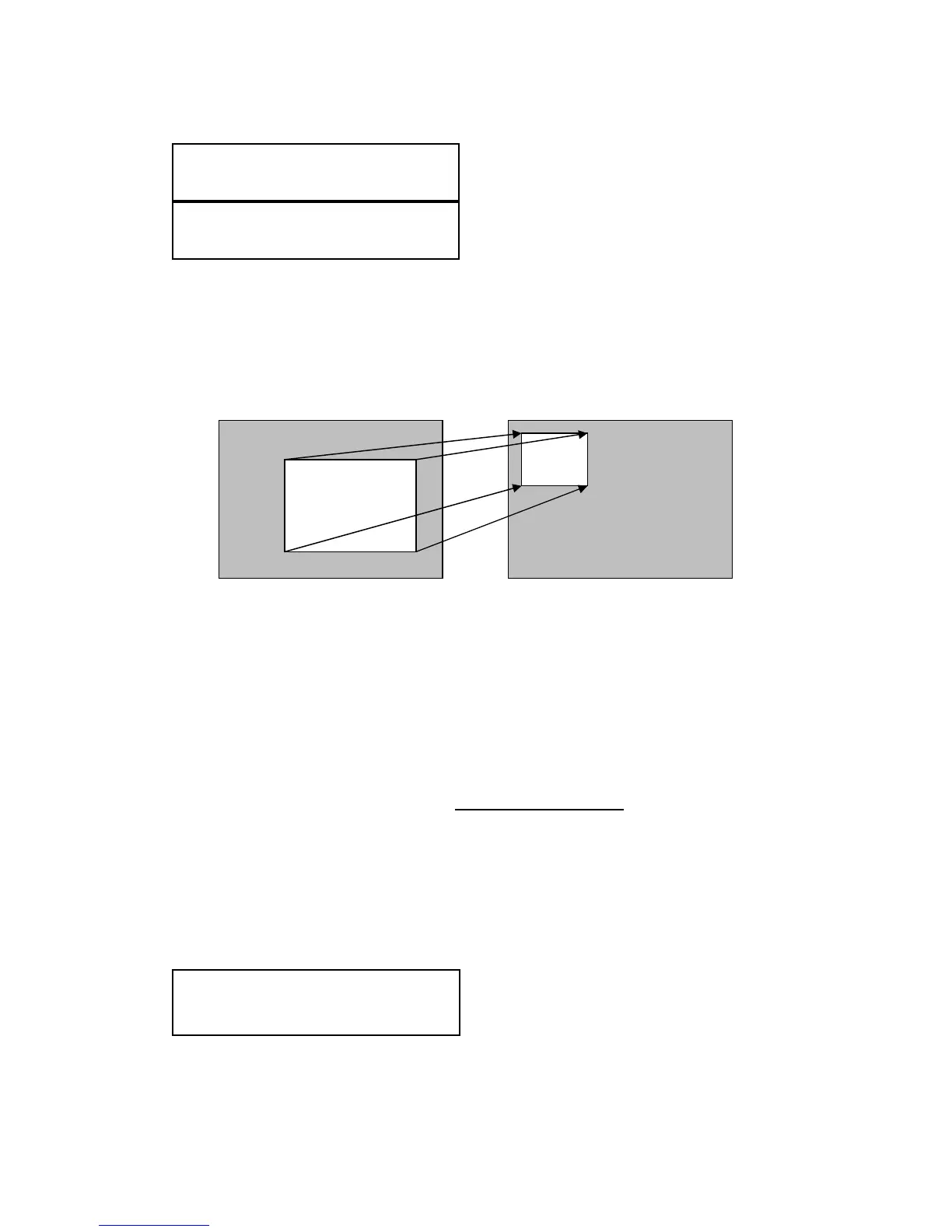
The diagram below should help to clarify the function of these values:
In the example above, ‘In’ has been set to 300,150 as its top-left source co-
ordinate, with a size of 750,400. ‘Out’ has been set to 50,50 (i.e. close to the
top left) with a size of 250,300.
The scaler will then ensure that the whole of the source (of size 750 by 400) is
scaled to the required output (of size 250 x 300).
9.7 Items Associated with the Adjust keyers group
Please note that not all units have this sub-menu – it is only present on units
with overlaying abilities.
Towards the end of this manual you will find a section titled ‘COMMON
OPERATIONS’ – this gives a step-by-step guide to keying out a particular
color.
This menu item turns keying On or Off for the current foreground. A keyed
image is in essence one image superimposed over another – such that
portions of the top image are made transparent (keyed out), so that the
Adjust keyers
Keyer enable [Off]
Adjust windows
Out [ 50] , 50 250, 300
Adjust windows
In [ 300] , 150 750, 400
IN
OUT
0 1024 0 1024


 To Next Page