29
LaserGRBL Software
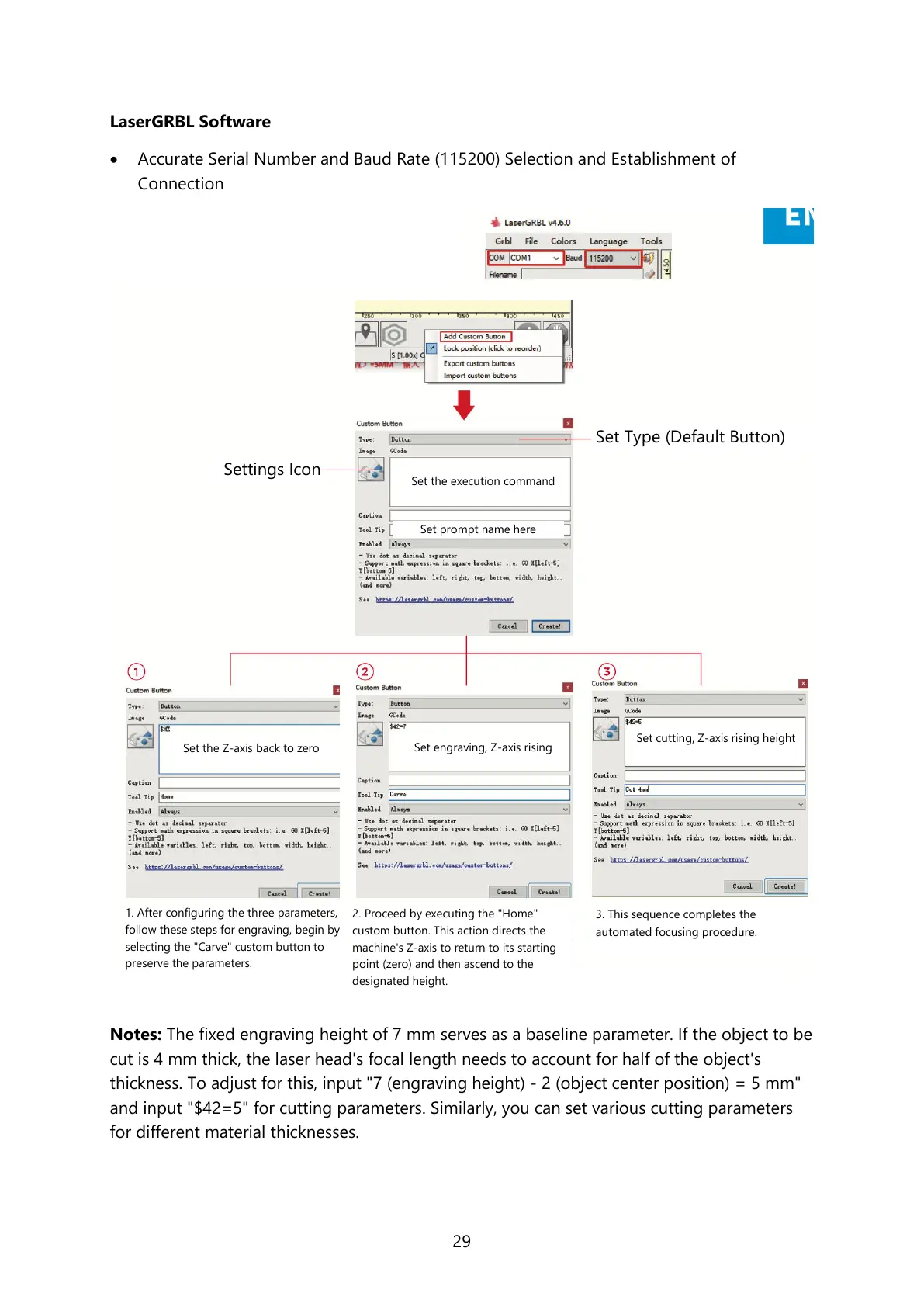
Accurate Serial Number and Baud Rate (115200) Selection and Establishment of
Connection
Notes: The fixed engraving height of 7 mm serves as a baseline parameter. If the object to be
cut is 4 mm thick, the laser head's focal length needs to account for half of the object's
thickness. To adjust for this, input "7 (engraving height) - 2 (object center position) = 5 mm"
and input "$42=5" for cutting parameters. Similarly, you can set various cutting parameters
for different material thicknesses.
1. After configuring the three parameters,
follow these steps for engraving, begin by
selecting the "Carve" custom button to
preserve the parameters.
2. Proceed by executing the "Home"
custom button. This action directs the
machine's Z-axis to return to its starting
point (zero) and then ascend to the
designated height.
3. This sequence completes the
automated focusing procedure.
Set Type (Default Button)
Set the execution command
Set the Z-axis back to zero
Set engraving, Z-axis rising
Set cutting, Z-axis rising height



 To Next Page