EasyManua.ls Logo

Tycon Power Systems TP3000WC - Page 32

Tycon Power Systems TP3000WC
73 pages
Print Icon
To Next Page IconTo Next Page
To Previous Page IconTo Previous Page
Loading...
8000060 Rev 3 19-Feb-19 TyconSystems.com
32
Connect the console to Wi-Fi (Android)
1.1 Android user:
Now activate the application you have downloaded on your mobile
device. The following instructions will generally show screenshots for the
Android application side by side.
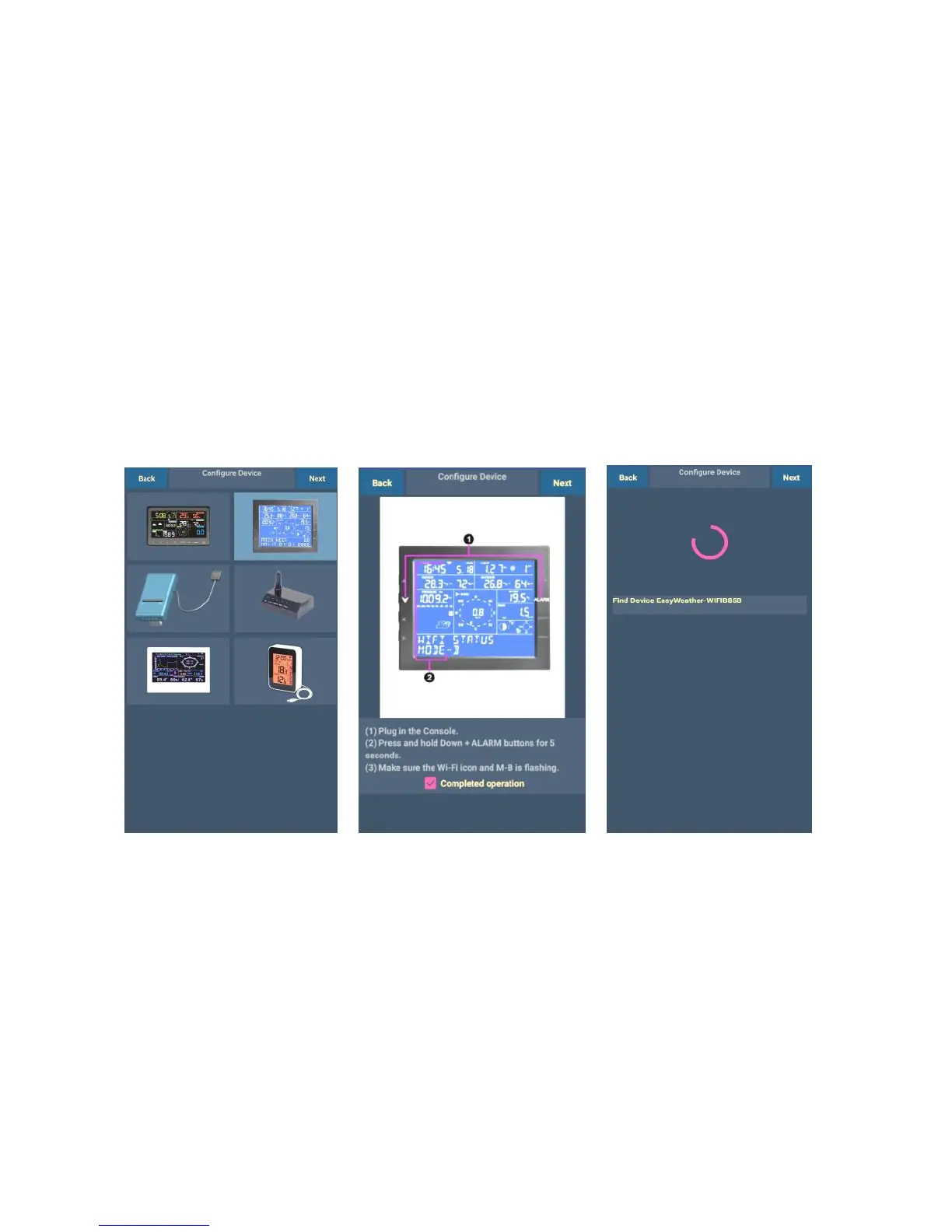
Configure Device
Note: If you own a dual band router (2.4 GHz and 5.0 GHz), make sure
you connect to the 2.4 GHz band, otherwise the Weather Station will fail
connecting to Wi-Fi.

1)
Select the device
you have from the
device list, then
press Next
2)
Operate as per the
information, tick the box
to confirm “completed
operation”, press Next.
3)
The app would then search
for the ProWeatherStation
console:
The device named
“EasyWeather-WI-FI
followed by four
characters.