TYPHOON BLUETOOTH™ 56K WIRELESS MODEM KIT
Article Number: #20006
Version 2.0 All specifications and information are subject to changes without further notices
25
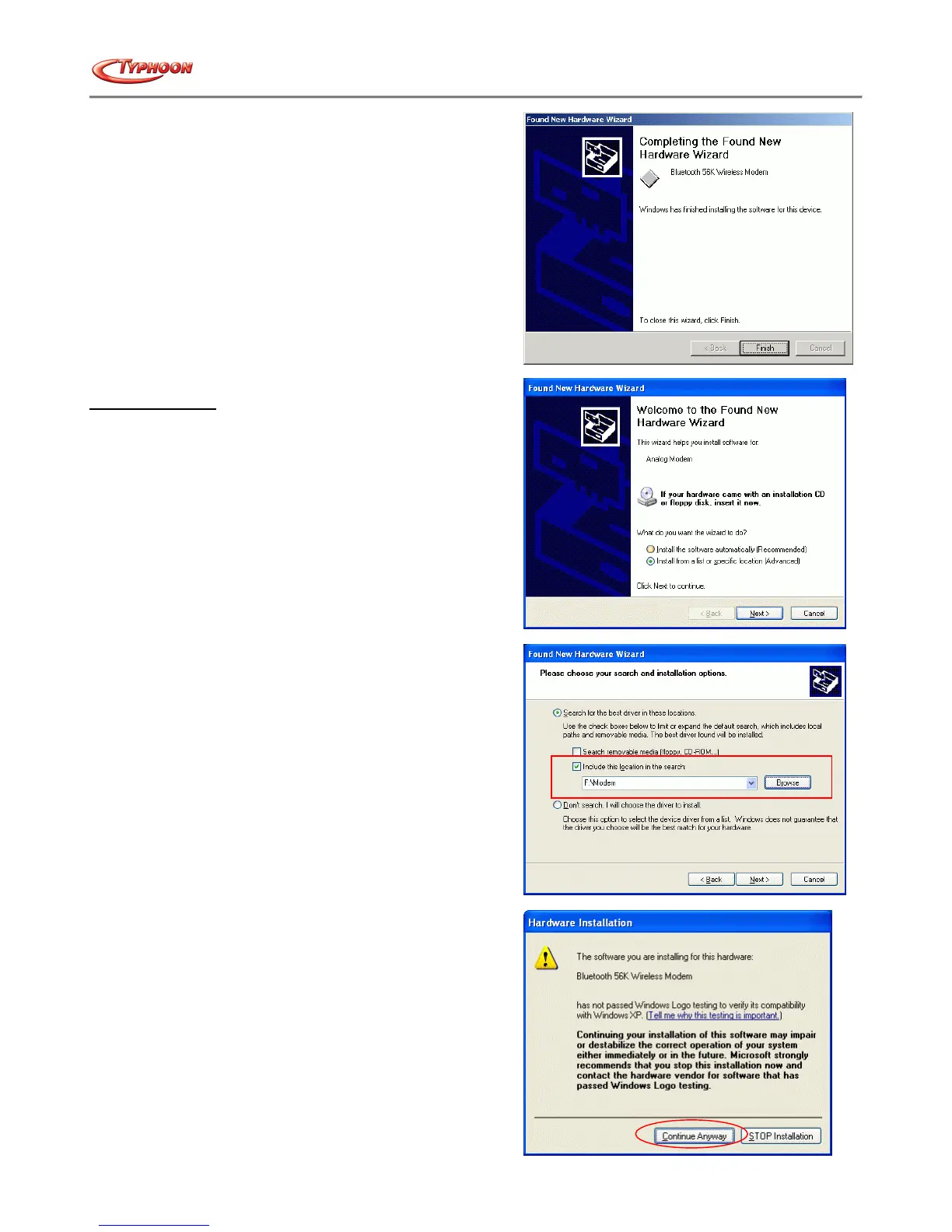
g. After completing the process, click the "Finish" button to
end the installation process.
For Windows® XP
a. Start the computer and launch Windows® XP. Windows
will detect the new device and launch the "Found New
Hardware Wizard" installation process. Select "Install
from a list or specific location (Advanced)" option,
insert the driver CD into the drive and click the "Next"
button.
b. Select the "Search for the best driver in these
locations" option and check the "Include this location in
the search:" box. Type "x:\Modem" (where x:\ is the
path of your CD-ROM drive) in the location or
alternatively you can click the "Browse" button to locate
the file in the CD drive. Click on the "Next" button to
proceed.
c. Windows will search and recognize the driver of the
device, and display the Windows logo test message. Click
on the "Continue Anyway" button to start the driver
installation. Windows will then automatically copy the
driver and related files into the system.



 To Next Page