6
Page.
/ 8
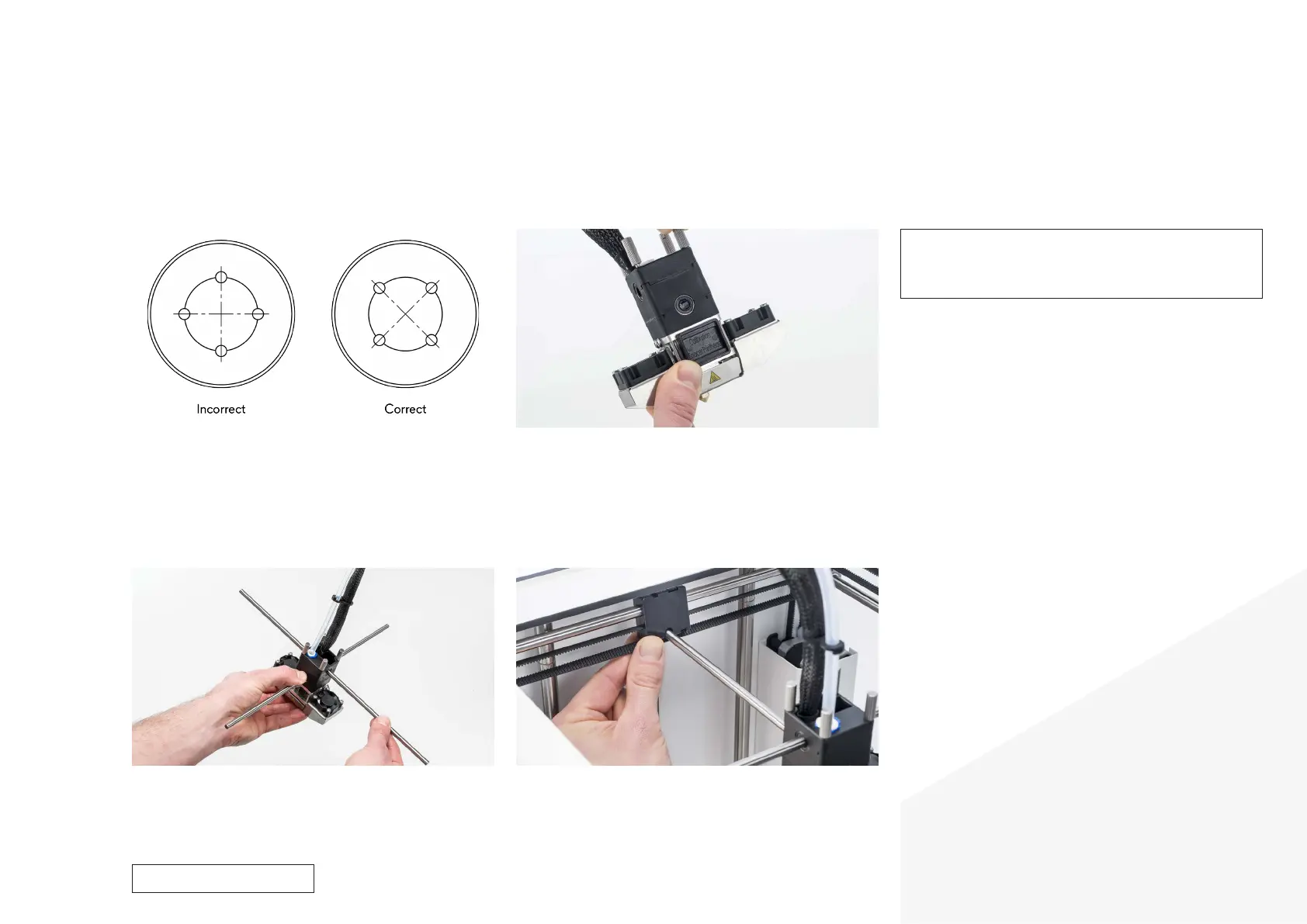
10. Align the linear bearings
• Look at the inside of the linear bearings and rotate them until they
are correctly orientated.
• The linear balls inside the bearing should be in an X shape. This is
to more equally divide the weight and pressure of the print head
over the bearings, which benefits printing quality.
Reassembly
11. Tighten the thumb screws
• Completely tighten the two thumb screws in the back by hand.
• To tighten the front two thumb screws, use the calibration spacer.
Place the tool in between the aluminum plates of the hot end.
• Tighten the front two thumb screws until the tool fits securely
between the plates, but can still easily be removed.
Caution: The print head alignment aid is very important to set
the correct pressure on the hot end. Securing the print head too
loosely may lead to leakages, while overtightening the thumb
screws will decrease the lifespan of the TFM coupler.
12. Insert the print head shafts through the print head
• The longer axle is the X print head shaft, it goes through the upper
linear bearing.
• The shorter axle is the Y print head shaft, it goes through the lower
linear bearing.
13. Place the print head back in the gantry system
• Put the print head in its original position and align the print head
shafts with their sliding blocks.
• Make sure that the ends of the axles are all in between the belts.
For internal use only



 To Next Page