11
REMOTE CONTROL BUTTONS
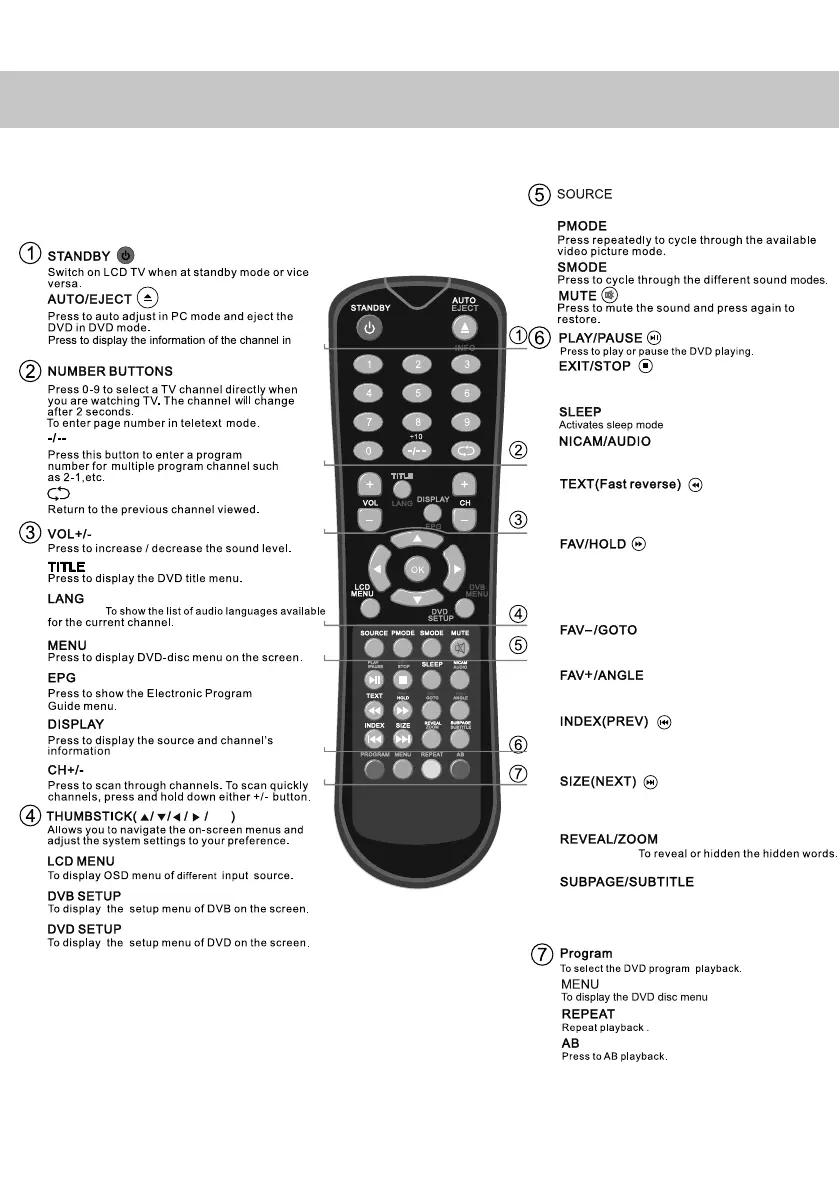
Digital mode: Exit the DVB menu.
DVD mode: Stop the DVD playing.
DVD mode: select the zoom of DVD playback.
Teletext mode: change the display size.
DVD mode: press to advance forward to the next
chapter.
Teletext mode: request the index page.
DVD mode: press to reply the current program from
the previous chapter.
Digital mode: decrease fav channel.
DVD mode: press to goto in DVD.
Digital mode: press to display FAV menu.
Teletext mode: press hold on or off for current page
display.
DVD mode: press to play a DVD program in fast
forward mode
Teletext mode: press to enter the teletext mode.
DVD mode: press to play a DVD program in fast
rewind mode.
Analogue mode: press to select NICAM.
DVD mode: press to select DVD audio channels.
Teletext mode: Sub coded page access
Digital Mode: To switch dialogue on/off at the
bottom of the screen.
Teletext mode:
Digital mode
DVD mode:
OK
Press to display the source menu
Digital mode: increase fav channel.
DVD mode: select different angle of DVD
19_18 english manual 11.pdf 6. 5. 2009 11:00:13


 To Next Page