14
DIGITAL TV (FREEVIEW) MENU OPERATION
Within Digital TV (DVB) mode there is also
a channel settings menu. This is provided
so you can search for new channels,
change the picture format, create favourite
lists and apply a pin code to limit access.
The menu is very user friendly.
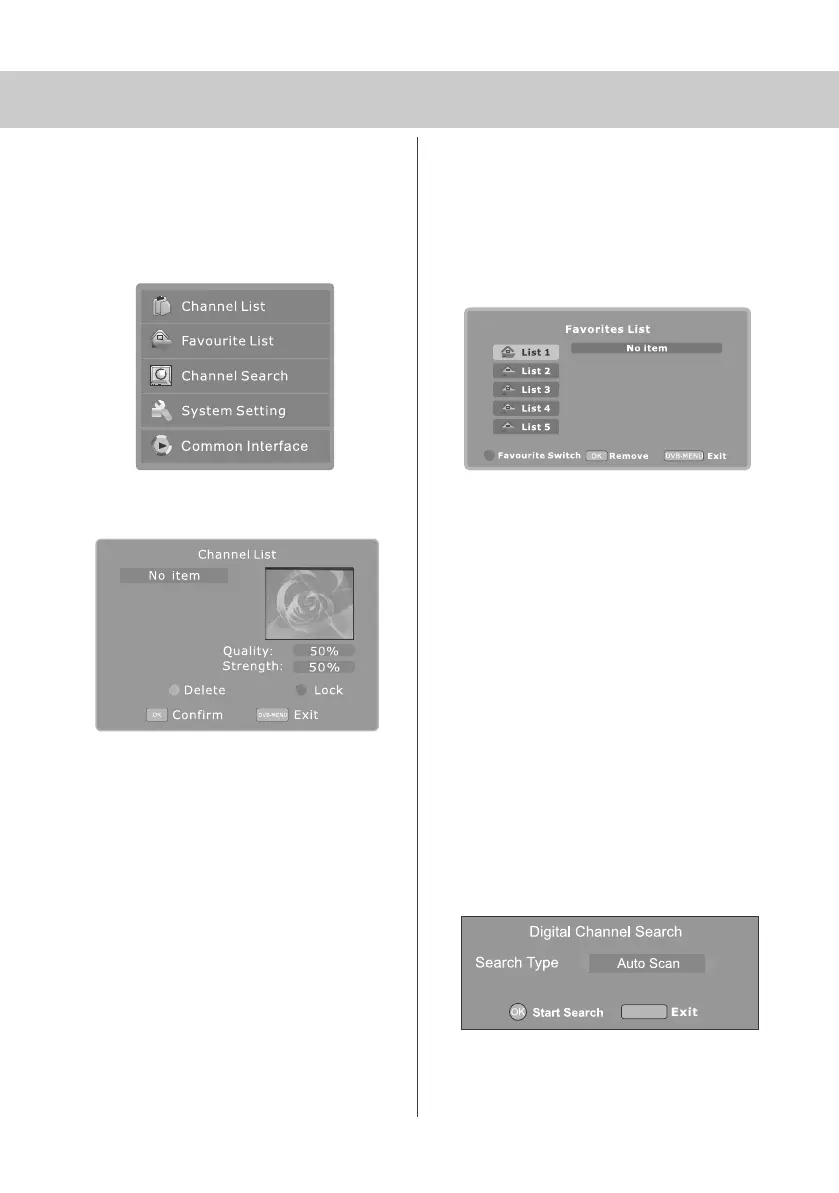
Channel List
1) Press [DVB-MENU]
2) Press [OK]
This tells you various information about
each channel
To delete stations
Press [\/] or [/\] to select the station
Press [YELLOW] to delete the stations.
To lock stations
You may wish to lock channels so they
can’t be viewed - i.e. Adult content.
Press [\/] or [/\] to select the station
Press [BLUE] to lock the selected
channel
Enter the pin code and then press [OK]
See page 11 for ‘Pin Code’ function
3) Press [DVB-MENU] twice to exit
Create/Edit Favourite List
You may wish to create a favourite list so you can
easily access the channels you enjoy.
1) Press [DVB-MENU]
2) Press [\/] to select favourite list
3) Press [OK]
You can create favourite lists for up to 5 users
4) Press [\/] or [/\] to select the station you wish to add.
It will be highlighted in light blue.
5) Press [OK] to add
Repeat this process until you have added all the
channels you want
You can store up to 100 stations in the favourite list
6) Press [RED] to move the next Favourite list.
7) Press [DVB-MENU] twice to exit
To use the favourite list. Press [FAV] and select the
list you require to use.
Search for New Channels
Every so often new digital channels are launched.
You can search for these as follows.
1) Press [DVB-MENU]
2) Press [\/] twice to select Channel Search
3) Press [OK]
4) Press [OK] to start search
When it has finished it will return to digital TV
DVB-MENU
19_18 english manual 14.pdf 4. 5. 2009 9:39:57


 To Next Page