20
TV MENU OPERATION
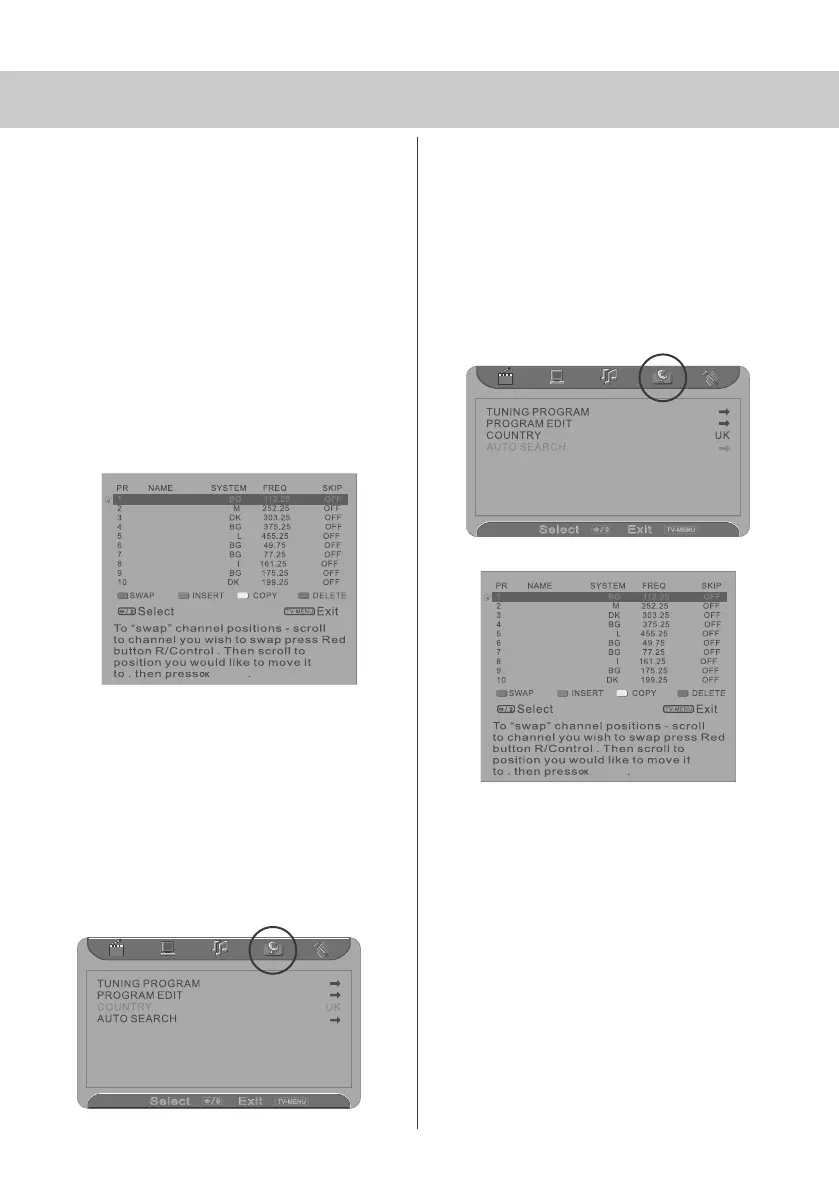
Program Edit / Changing Analogue
Channel Position
You can change the analogue channel
position to suit your requirements.
1) Press [LCD-MENU] to enter menu
2) Press [>] twice to go to Tuning menu
3) Press [\/] twice to select Program Edit
4) Press [>] to enter menu
5) To swap an analogue channel
Press [RED]
6) Move to the location you would like to
place it
Press [OK]
Repeat the process with all analogue
channels.
7) Press [LCD-MENU] to exit
Changing Country Settings
If you are moving the TV to another
country you will need to change the region.
The TV’s default is UK.
1) Press [LCD-MENU] to enter menu
2) Press [>] twice to go to Tuning menu
3) Press [\/] 3 times to select Country
4) Then press [>] or [<] to change between
the countries
5) Press [LCD-MENU] twice to exit
Auto Search
Scan for all analogue channels based
on the current settings
1) Press [LCD-MENU] to enter menu
2) Press [>] twice to go to Tuning menu
3) Press [\/] 4 times to select Auto Search
4) Then press [OK]
5) Press [<] to highlight ‘OK’ and then Press [OK]
The TV will now tune in.
6) The program edit screen will now appear
7) To swap a channel Press [RED]
Move to the location you would like to place it
Press [OK]
Repeat the process with all analogue channels.
Press [LCD-MENU] to exit
19_18 english manual 20.pdf 4. 5. 2009 9:49:32


 To Next Page