HDMI VGA SCART S-VIDEO YPBPR VGA AUDIO RF IN
13
INPUTS & CONNECTIONS
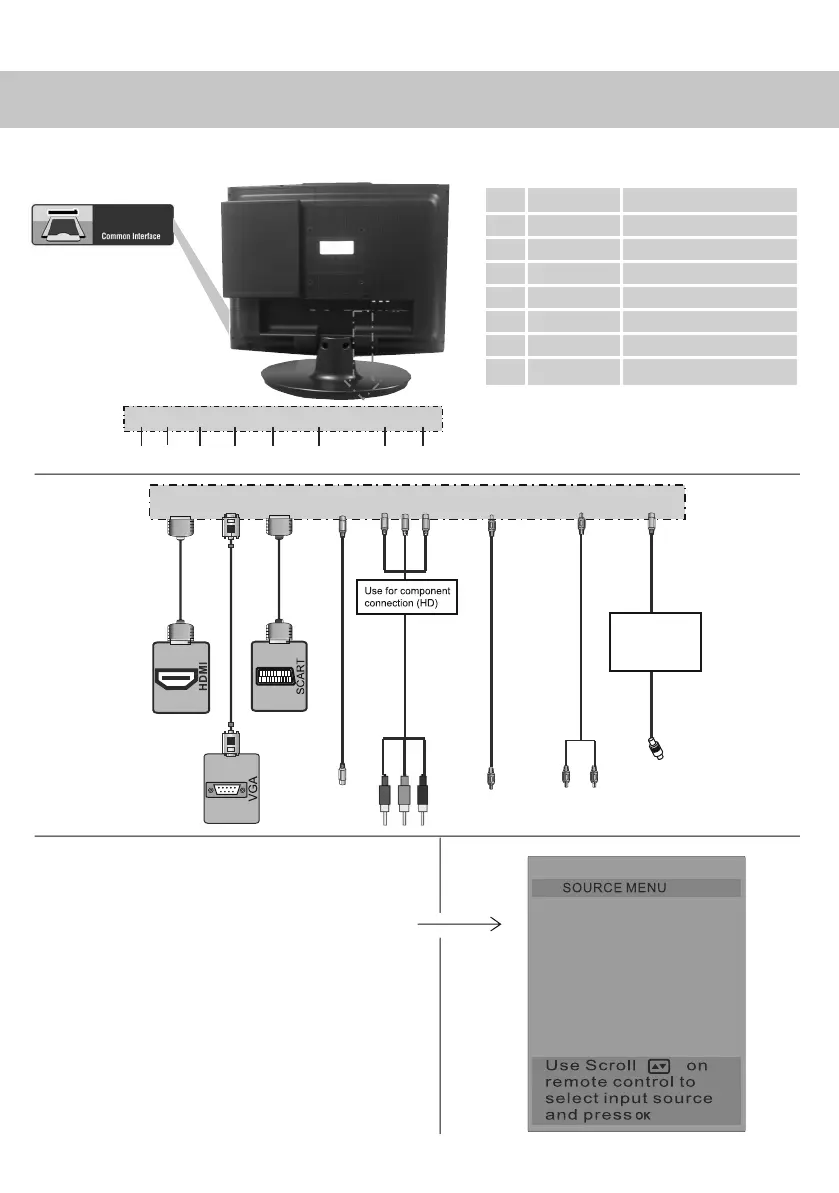
REAR CONNECTIONS
Choosing Mode/Source
To switch between the different connections
is very easy.
1) Press [SOURCE] - The following will appear
2) Press [\/] or [/\] to select the input you
require.
3) Press [OK]
Connecting HD Ready Devices
There are two options for HD.
1) By connecting via HDMI cable (not included)
– this provides both HD picture and sound.
2) By connecting via Component (YPbPr)
cable (not included) – this provides
HD picture. Source should be set to YPbPr.
HDMI input
VGA input
SCART
S-VIDEO input
Component input
PC Audio input
YPbPr / S-video Audio
RF input
A
B
C
D
E
F
G
H
HDMI VGA SCART S-VIDEO YPBPR VGA AUDIO YPBPR/S-VIDEO RF IN
A B C D E F G H
CI Port
DVB
TV
S-VIDEO
SCART
YPBPR
HDMI
DVD
PC-RGB
HDMI
VGA
SCART
S-VIDEO
YPBPR
VGA AUDIO
YPBPR/S-VIDEO
RF IN
Use to connect to TV
Aerial to receive
analogue TV or
Digital/Freeview
TV stations
YPBPR/S-VIDEO
AUDIO
19_18 english manual 13.pdf 6. 5. 2009 12:30:22


 To Next Page