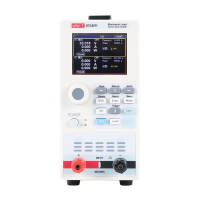
The UNI-T UTL8200 Series Electronic Load is a versatile DC electronic load available in two models: UTL8211 (single channel) and UTL8212 (dual channel). It features a 2.8-inch LCD display for convenient operation and supports independent testing for dual-channel models. This electronic load is designed for a wide power measurement range, offering high-speed voltage and current measurements up to 40 kHz, with a resolution of 1mV/1mA. It provides various test functions and modes to cater to different user needs and can be configured with an RS232 communication module for on-site testing and integration with automated production lines and automatic test systems (ATS).
Function Description:
The UTL8200 series electronic load serves as a programmable load for testing power supplies, batteries, and other electronic components. It can simulate various load conditions to evaluate the performance and characteristics of the device under test. The device supports four basic test modes: Constant Current (CC), Constant Voltage (CV), Constant Resistance (CR), and Constant Power (CP). Additionally, it offers advanced test modes such as Dynamic Test, List Test, and Battery Test.
Important Technical Specifications:
Models:
- UTL8211: Single channel, 0~150V, 0~40A, 0~400W
- UTL8212: Dual channel, 0~150V, 0~20A, 0~200W (per channel)
Measurement Range:
- Voltage: 0~150V
- Current:
- UTL8211: 0~4A, 0~40A
- UTL8212: 0~2A, 0~20A
- Power:
- UTL8211: 400W
- UTL8212: 2x200W
Resolution:
- Voltage: 1mV, 10mV (CV mode)
- Current: 1mA, 10mA (CC mode)
- Power: 10mW (CP mode)
Precision:
- CV mode: ±(0.05%+0.1% FS)
- CC mode: ±(0.05% + 0.05%FS)
- CR mode: 0.1% + 0.5%FS
- CP mode: 0.1% + 0.5%FS
- Voltage readback: ± (0.05% + 0.1%FS)
- Current readback: ± (0.05% + 0.1%FS)
- Power readback: ± (0.1% + 0.5%FS)
Dynamic Current:
- T1&T2: 100μS~3600S
- Precision: 5 µS±100 ppm
- Slope: 0.001~0.15 Α/µS
- Minimum rise time of dynamic current test: 500us
Basic Protection:
- Power protection: ≥Set value x 1.01 (delay protection), max 404W (UTL8211), max 202W (UTL8212); ≥Set value x 1.1 (immediate protection), max 440W (UTL8211), max 220W (UTL8212)
- Current protection: ≥Set value x 1.01 (delay protection), max 40.4A (UTL8211), max 20.2A (UTL8212); ≥Set value x 1.1 (immediate protection), max 44A (UTL8211), max 22A (UTL8212)
- Voltage protection: ≥Set value x 1.01 (delay protection), max 152V; ≥Set value x 1.1 (immediate protection), max 165V
- Temperature protection: ≥95°C
- Anti-reverse connection protection
- Over-voltage/under-voltage/over-current/over-power/overheat protections
Physical Specifications:
- Product size (WidthHeightDepth): 88mm×174mm×300mm
- Product weight: 3.6kg (net weight)
- Voltage: 110V±10% 50~60Hz or 220V±10% 50~60Hz (selectable via rear panel switch)
- Power: 50W
- Fuse: 250V/0.5A (for 110V input), 250V/0.25A (for 220V input)
Operating Environment:
- Temperature: 0°C~40°C
- Humidity: 20%~80% (Non-condensing)
- Storage temperature: -10°C~60°C
- Altitude: ≤2000m
- Degree of pollution: II
Usage Features:
User Interface:
- 2.8-inch LCD display: Shows operating status, measurement parameters, and mode.
- Buttons: For mode selection (CC, CV, CR, CP, Dynamic, List, Battery), menu navigation, parameter input, and operating functions.
- Pulse knob: For adjusting parameters and moving the cursor.
- Power button: To power on/off the device.
- Input terminals: Dedicated terminals for connecting power supply, with protection against inverse connection.
- Running indicator: A red light on the ON button indicates loaded status.
Test Modes:
- Constant Current (CC) Test: Maintains a constant current regardless of input voltage.
- Constant Voltage (CV) Test: Adjusts current consumption to maintain a set input voltage.
- Constant Resistance (CR) Test: Acts as a resistance, changing input current with voltage to maintain constant resistance.
- Constant Power (CP) Test: Consumes constant power, adjusting current based on voltage changes.
- Dynamic Test: Switches between two set parameter values (e.g., current) based on operating modes (Continues, Pulse, Reverse) and durations.
- List Test: Allows setting up to 16-step different loading modes, customizing stepping, and defining upper/lower limits for test judgment. Supports saving up to 60 groups of list files.
- Battery Test: Discharges batteries in CC/CR/CP mode, automatically stopping at a set voltage and displaying battery capacity.
- Short Circuit Test: Simulates a short circuit condition (when input voltage is at least 0.5V) to test the device's response.
System Configuration:
- Language: Chinese/English interface.
- Knob active: Enables immediate parameter change upon knob rotation.
- Warn sound/Key sound: Toggle on/off.
- Initial mode: Default (boots into CC mode) or Last (boots into the last test mode).
- Restore factory setting: Resets all parameters to factory defaults.
- Communication settings: Baud rate (9600/19200/38400/57600/115200) and address (001~032) for RS232 communication.
- Parameters can be input via the pulse knob or direction buttons.
- Out-of-range parameters will not be saved.
- The ON1/ON2 button controls the load input switch.
Communication:
- RS232 interface: Standard DB9 female interface for remote control via a computer COM port.
- Supports upper computer software for remote control and monitoring.
Maintenance Features:
Cleaning:
- The housing and panel should be cleaned with a soft damp cloth, ensuring it is completely dry.
- Do not use solvents such as alcohol or gasoline.
- Do not clean the inside of the instrument.
Fuse Replacement:
- Unplug the external power cable.
- Open the fuse slot under the power interface.
- Replace the old fuse with a new one (250V/0.25A for 220V AC, 250V/0.5A for 110V AC).
- Install the fuse slot back.
Warranty Service:
- One-year warranty from the date of purchase.
- Lifetime maintenance provided by the company.
- Warranty does not cover damage from improper operation, accidental damage, wear and tear, or use outside specifications.
- Power cords, accessories, and fuses are not included in the warranty.
Environmental Compliance:
- Environmental-Friendly Use Period (EFUP): 40 years, indicating safe use regarding hazardous substances.
- Waste Electrical and Electronic Equipment (WEEE) Instruction 2002/96/EC: Do not dispose of the product and its accessories in trash bins.
- Proper grounding is essential; use the provided cable and ensure the product is grounded.
- Ensure the main supply voltage is within 10% of the rated operating range.
- Use only the dedicated UNI-T power cord.
- Check the AC input method (110V/220V) and fuse installation.
- Do not use or store the instrument in inflammable, explosive, high-temperature, high-humidity, or strong magnetic field environments.
- The cooling fan speed is intelligently adjusted based on the cooling fin's temperature during operation.
Alarm Prompts:
- Overvoltage protection
- Overcurrent protection
- Power protection
- Polarity error
- Undervoltage protection
- Data overrange
- Position error (voltage/current position setting error)
- Logic error (input data non-conformance)

 Need help?
 General

 To Next Page