25
HX120
Baudrate settings
■
This option allows to set the baudrate of Transmitter, Extender Receiver/VideoWall Receiver manually.
Make sure the settings must match with the RS-232 device you have connected. By default, the system
settings are as following:
Baudrate: 115200 Data bits: 8 Parity: None Stop bits: 1
■
Click the Apply once the baudrate settings have been changed. OSD control
Two OSD control are provided, both operations are almost the same. One is using the remote control
(optional), and the other is through HDMI CEC. For more operations, refer to the description below.
Remote control (optional)
The description below is an example for switching between different channels. The operation may vary
depending on actual usage and connection. Before using the function of remote control, refer to the
chapter of Connection - Remote control to set the desired display mode (1 to 1, matrix or video wall).
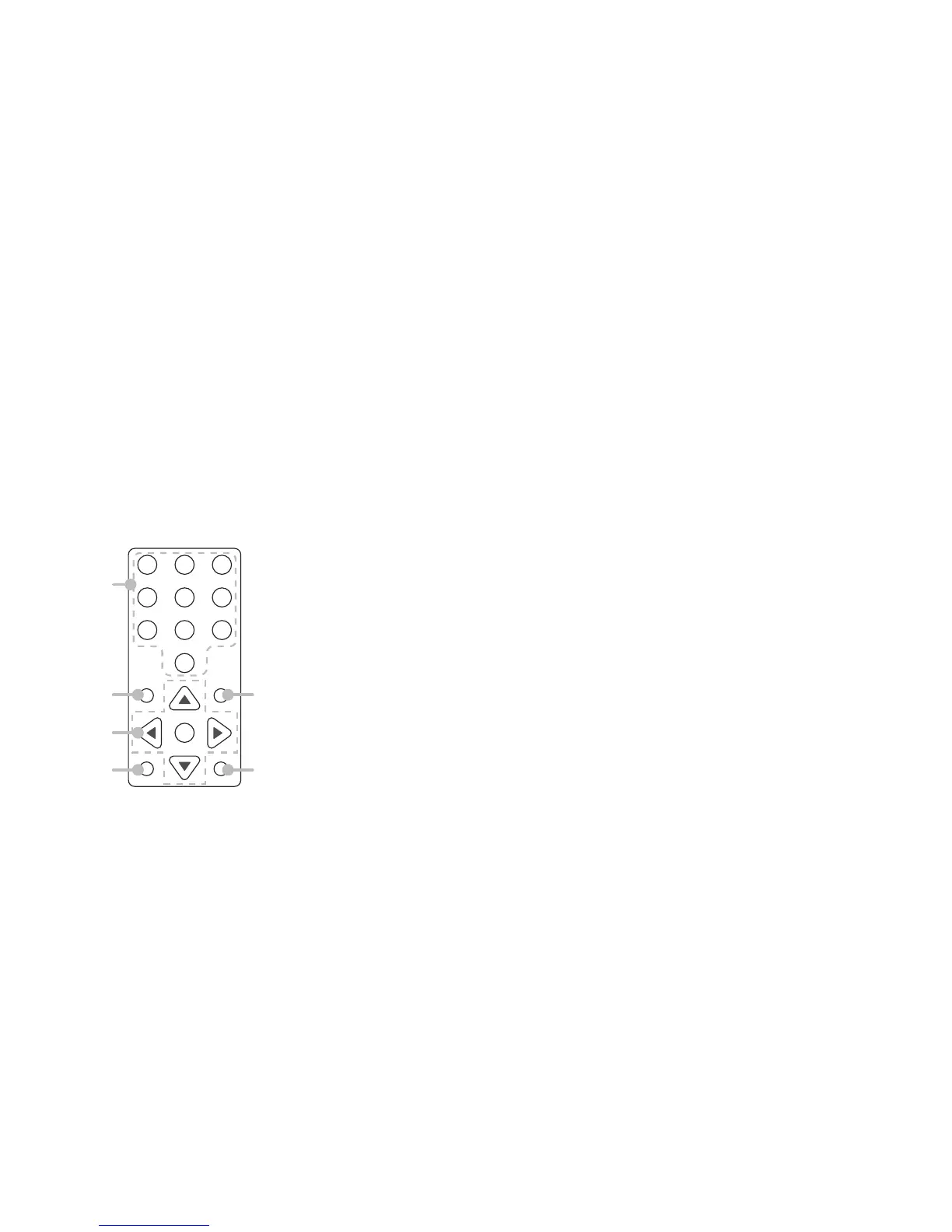
Remote controller
1 2 3
4 5 6
7 8 9
0
OK
MENU
BACK
CH UP
CH DOWN
1
2
3
4
5
6
1. Numeric buttons*
2. MENU button
3. Cursor and OK buttons:
Cursor buttons: Move the cursor up, down, right, and left.
OK: Confirm the selection.
4. BACK button: Return to the upper page.
5. CH UP*: Tunes up one channel.
6. CH DOWN*: Tunes down one channel.
* These functions are available depending on the models.


 To Next Page