6
HX120
Connection
Before connecting the HDMI AV Matrix Extender with an Ethernet Hub/Switch, please read the notices
mentioned below
1. When grouping the network of HDMI AV matrix Extender/Video wall, a Gigabit Ethernet Hub/Switch
is necessary due to the requirement of bandwidth. The required bandwidth for each channel may up
to 200mb/sec. To ensure the better quality of transmission, a reputable name brand hub/switch is
recommended.
2. Gigabit Ethernet Switch/HUB with feature of Jumbo Frame is required, other specs like IGMP
Snooping, IGMP Querier, IGMP v2 and IGMP Fast Leave are strongly recommended. If more than one
transmitter connects to the same network segment without support of IGMP Querier by Switch/Hub,
the HDMI AV Matrix Extender may work incorrectly. For more setting details of these functions, refer
to the Hub/Switch's instruction manual.
Note: The diagrams below are examples, the actual applications may vary.
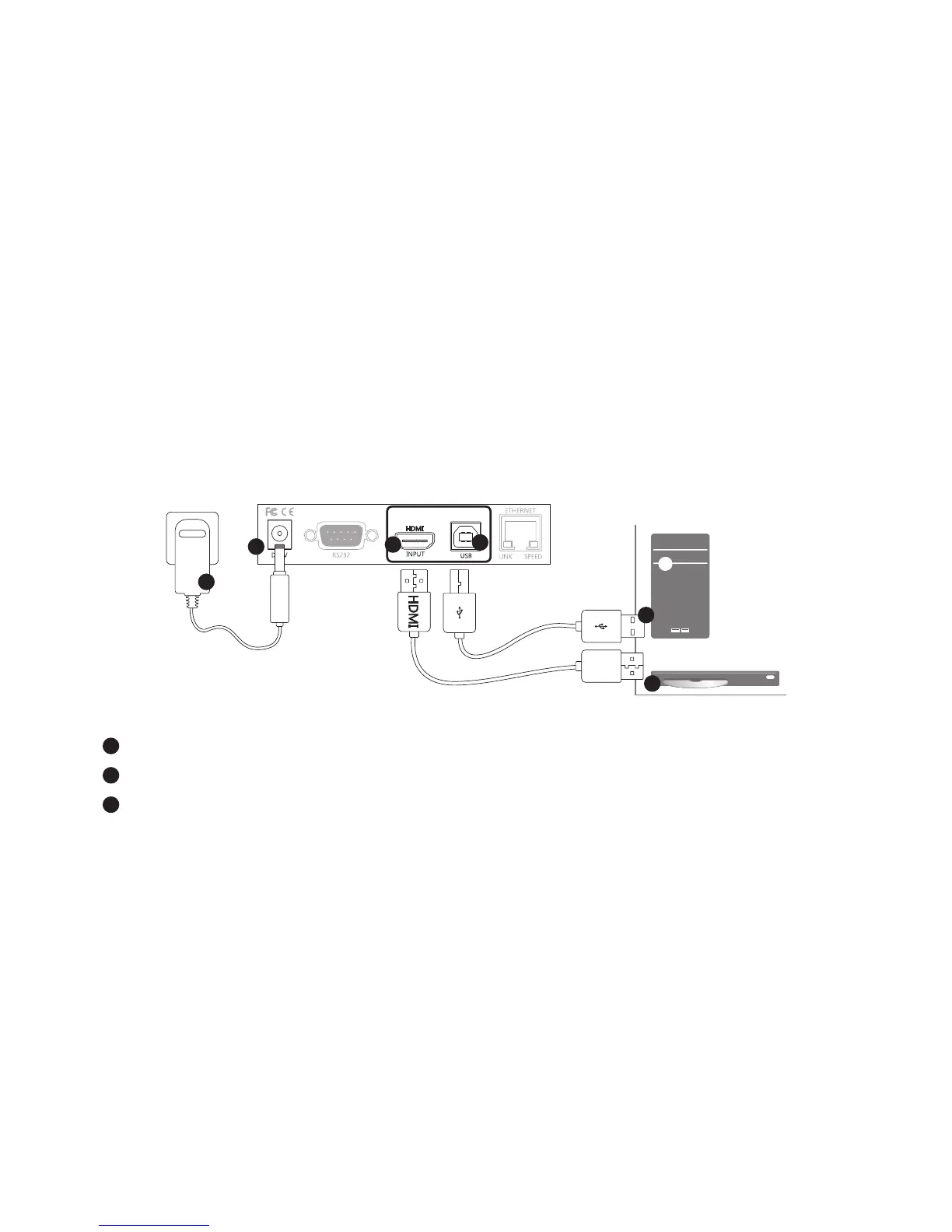
Connecting the local unit (Transmitter)
1
1
2
2
3
3
or
1
Connect the power adapter to a wall outlet.
2
Connect a video source to HDMI input of Transmitter using a HDMI cable.
3
Connect a computer to USB type B connector of Transmitter using a USB cable.


 To Next Page