EasyManua.ls Logo

Unitronics Vision120 - User Manual

Unitronics Vision120
8 pages
Print Icon
To Next Page IconTo Next Page
Loading...
Unitronics 1
Vision™ OPLC™
Installation Guide
Vision120™
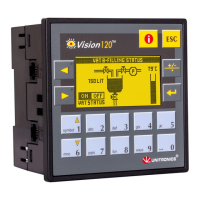
This guide provides basic information for Unitronics’ Vision120™.
General Description
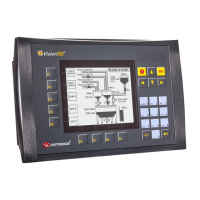
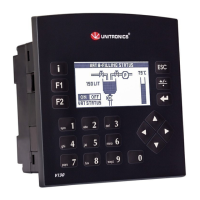
V120 OPLCs are micro-OPLCs, rugged programmable logic
controllers that comprise an:
On-board I/O configuration
Built-in operating panel containing a graphic LCD
screen and a keypad
Communications
All V120 controllers comprise 2
RS232/485 ports
Certain models comprise a
CANbus port
I/O Options
On-board I/O configuration
Model-dependent; may include
digital, high-speed, and
analog I/Os
I/O Expansion Modules
Via I/O expansion port adapter,
connect up to 128 additional I/Os
per controller
Programming
Write both the HMI and Ladder control application using VisiLogic freeware.
The Vision120 User Guide and the product’s technical specification sheet contain additional
information. These documents are located on the Unitronics’ Setup CD. They may also be
downloaded from the Technical Library at www.unitronics.com
.
Standard Kit Contents
V120 controller Programming cable + RS232 adapter
Mounting brackets (x2) Rubber seal (mounted in back of panel)
I/O connectors (x2) Unitronics’ Setup CD
5-pin CANbus connector and CANbus network termination resistor (CANbus models)
Question and Answer IconNeed help?

Do you have a question about the Unitronics Vision120 and is the answer not in the manual?

Summary

General Description

Communications

Details controller communication ports like RS232/RS485 and CANbus.

I;O Options

Details onboard and expansion I/O configurations for controllers.

Programming and Kit Contents

Programming

Describes the use of VisiLogic freeware for HMI and Ladder control.

Standard Kit Contents

Lists the items included in the standard controller kit.

Safety and Environmental Considerations

Danger Symbols

Explains the meaning of Danger, Warning, and Caution symbols.

Environmental Guidelines

Precautions regarding installation environment and ventilation.

Mounting and Dimensions

Controller Dimensions

Provides physical dimensions of the Vision120 controller.

Panel Mounting

Step-by-step guide for mounting the controller in a panel.

Mounting, I;O, and Wiring

DIN-rail Mounting

Instructions for mounting the controller on a DIN rail.

I;O Modules

Information on controller I/O configurations and expansion modules.

General Wiring Precautions

Warnings about live wires and connecting unused pins.

Power Supply and Serial Communications

Power Supply Requirements

Details controller power supply requirements and conditions.

Serial Communications

Details on setting ports to RS232 or RS485 via jumper.

Earthing and Pinouts

Earthing the Power Supply

Procedure for grounding the power supply to avoid interference.

Serial Port Pinouts

Pin configurations for RS232 and RS485 ports.

Jumper Settings Configuration

Accessing Jumpers

Steps to open the controller and access the PCB board.

ESD and Handling Precautions

Safety measures for handling electronic components.

RS232;RS485 Jumper Settings Details

COM Port Jumper Settings

Table for RS232 and RS485 jumper configurations for COM1 and COM2.

RS485 Termination Jumper Settings

Table for RS485 termination jumper settings.

CANbus Interface

CANbus Wiring Guidelines

Instructions for connecting CANbus devices using twisted-pair cable.

CANbus Connector Pinout

Details the pin assignments for the CANbus connector.

Overview

The Unitronics Vision120™ OPLC (micro-OPLC) is a rugged programmable logic controller that integrates an on-board I/O configuration and a built-in operating panel with a graphic LCD screen and a keypad. It is designed for both HMI and Ladder control applications, which can be programmed using the VisiLogic freeware.

Function Description:

The Vision120 OPLC serves as a compact and robust control solution, combining the functionalities of a programmable logic controller and a human-machine interface. It allows for the execution of control logic and the display of operational data through its integrated graphic LCD and keypad. The device supports various communication protocols and I/O options, making it versatile for different automation tasks.

Important Technical Specifications:

General:

  • Controller Type: Micro-OPLC
  • Programming Software: VisiLogic freeware (for both HMI and Ladder control applications)
  • Documentation: User Guide and technical specification sheet available on Unitronics' Setup CD or at www.unitronics.com.

Communications:

  • Serial Ports: All V120 controllers include two RS232/485 ports. These ports are RJ-11 type and can be configured for either RS232 or RS485 via internal jumpers. By default, they are set to RS232.
    • RS232: Used for downloading programs from a PC and communicating with serial devices and SCADA applications.
    • RS485: Used for creating multi-drop networks with up to 32 devices.
    • Isolation: The serial ports are not isolated. Caution is advised when connecting to non-isolated external devices to avoid potential voltages exceeding ±10V.
  • CANbus Port: Certain models include a CANbus port, which is galvanically isolated. This port can be used to create a decentralized control network of up to 63 controllers using Unitronics' proprietary CANbus protocol or CANopen.
    • CANbus Wiring: Requires twisted-pair cable (DeviceNet® thick shielded twisted pair cable is recommended).
    • Network Terminators: Supplied with the controller, these must be placed at each end of the CANbus network, with a resistance of 1%, 121Ω, 1/4W.
    • Grounding: Connect the ground signal to earth at only one point, near the power supply.

I/O Options:

  • On-board I/O: Model-dependent, may include digital, high-speed, and analog I/Os. The specific wiring diagrams are detailed in the controller's technical specification sheet.
  • I/O Expansion Modules: Up to 128 additional I/Os can be connected per controller via an I/O expansion port adapter. Relevant wiring diagrams for these modules are found in their technical specification sheets.

Power Supply:

  • Requirement: External 12 or 24VDC power supply, depending on the controller model. Exact specifications are in the controller's technical specification sheet.
  • Non-isolated Power Supply: Can be used if a 0V signal is connected to the chassis.
  • Protection: Requires an external circuit protection device and circuit breaker.
  • Earthing: For optimal system performance and to minimize electromagnetic interference, mount the controller on a metal panel and earth the controller's power supply. Connect one end of a 14 AWG wire to the chassis signal and the other end to the panel. The earthing wire should not exceed 10 cm in length.

Usage Features:

Mounting:

  • Panel Mounting:
    1. Create a panel cut-out measuring 92 x 92 mm (3.622" x 3.622"). The mounting panel thickness should not exceed 5 mm.
    2. Slide the controller into the cut-out, ensuring the rubber seal is in place.
    3. Push the two mounting brackets into the slots on the sides of the controller.
    4. Tighten the bracket screws against the panel, holding the bracket securely against the unit.
    5. The controller should be squarely situated in the panel cut-out when properly mounted.
  • DIN-rail Mounting:
    1. Snap the controller onto the DIN rail.
    2. The controller should be squarely situated on the DIN-rail when properly mounted.

Wiring:

  • General Guidelines:
    • Do not touch live wires.
    • Unused pins should not be connected to avoid device damage.
    • Use crimp terminals for wiring (26-14 AWG wire, 0.13 mm²–2.08 mm²).
    • Strip wires to a length of 7±0.5mm (0.250–0.300").
    • Unscrew terminals to their widest position before inserting wires.
    • Insert wires completely into terminals for proper connection.
    • Tighten enough to prevent wires from pulling free.
    • Do not exceed a maximum torque of 0.5 N·m (5 kgf·cm) to avoid wire damage.
    • Do not use tin, solder, or any substance on stripped wire that might cause the wire strand to break.

Maintenance Features:

RS232 to RS485 Jumper Settings:

  • Accessing Jumpers: Requires opening the controller and removing the module's PCB board.
  • Procedure:
    1. Turn off power, disconnect, and dismount the controller.
    2. Locate the four slots on the sides of the controller.
    3. Gently pry off the back of the controller using a flat-bladed screwdriver.
    4. Carefully remove the top PCB board by holding its top and bottom connectors with one hand, and grasping the controller (while holding the serial ports) with the other hand. Steadily pull the top board off.
    5. Locate the jumpers and change settings as required (jumper settings are detailed in the manual).
    6. Gently replace the PCB board, ensuring pins fit correctly into their receptacles. Do not force the board.
    7. Close the controller by snapping the plastic cover back into place.

Environmental Considerations:

  • Installation Environment: Do not install in areas with excessive or conductive dust, corrosive or flammable gas, moisture or rain, excessive heat, regular impact shocks, or excessive vibration.
  • Ventilation: A 10mm space is required between the controller's top/bottom edges and enclosure walls.
  • Protection: Do not place in water or allow water to leak onto the unit.
  • Debris: Do not allow debris to fall inside the unit during installation.
  • Interference: Install at maximum distance from high-voltage cables and power equipment.

Safety Guidelines:

  • Read Documentation: Users must read and understand the product documentation before use.
  • Qualified Personnel: Only qualified service personnel should open the device or carry out repairs.
  • Parameter Limits: Do not attempt to use the device with parameters exceeding permissible levels.
  • Power On/Off: To avoid damaging the system, do not connect/disconnect the device when power is on.
  • Electrostatic Discharge: Before performing actions that involve opening the controller or handling the PCB, touch a grounded object to discharge any electrostatic charge. Avoid touching the PCB board directly; hold it by its connectors.
  • Disposal: Dispose of the product according to local and national standards and regulations.

Unitronics Vision120 Specifications

General IconGeneral
BrandUnitronics
ModelVision120
CategoryController
LanguageEnglish

Related product manuals