MSC-400 Reference Manual
Rev 4
20
Master/Slave Systems
Two MSC-400 Controllers can be linked together for control of up to 22 Connected Devices via IR (22) or
IR and RS232 (the number of IR devices will vary by system, 10 RS232 devices max). Other than using
IR/RS232 Port 12 for a Smart Macro Control Buss between Controllers, both Controllers are fully capable
of all functions. All Sensor Ports are available for Device Status Sensing of up to 12 devices, all Relays
are available for up to 4 switch closure connections and both Controllers can be connected to Media
Center PCs. When making connections in a Master/Slave system, follow all previous instructions and
include the following connections: See section: PROGRAMMING MASTER/SLAVE SYSTEMS for
additional information.
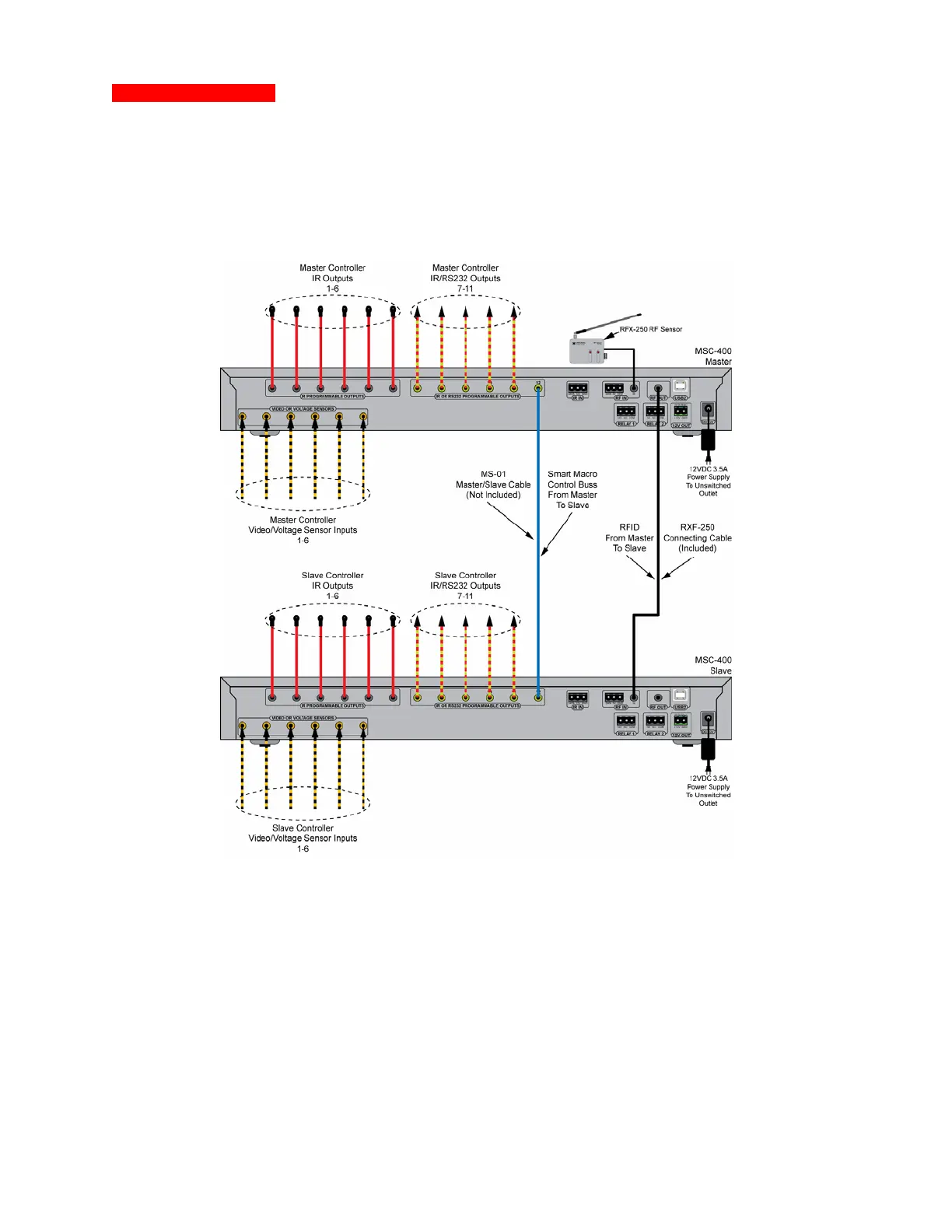
K Master/Slave System Connections
1. Make all connections for Status Sensing, IR and RS232 Control, Switch Closures etc., per Section:
CONNECTIONS. In addition:
2. Connect the RFX-250 RF SENSOR to the MASTER CONTROLLER.
3. Connect a MS-01 MASTER/SLAVE CABLE (4-circuit, 3.5 mono mini plug cable, not included)
between MASTER IR/RS232 PORT 12 and SLAVE IR/RS232 PORT 12 as shown in .
4. Connect a RFX-250 CONNECTING CABLE, (3-circuit, 3.5 mono mini plug cable, included) between
the MASTER RF OUT MINI JACK and SLAVE RF IN MINI JACK. (The RF IN three pin plug-in
terminal on the Slave can also be used for the RF IN Connection on the Salve end.)
5. Connect one 12VDC 3.5A POWER SUPPLY (included) to EACH CONTROLLER after all system
connections have been made and confirmed. POLARITY: PIN=+12V; SLEEVE=GND



 To Next Page