MSC-400 Reference Manual
Rev 4
44
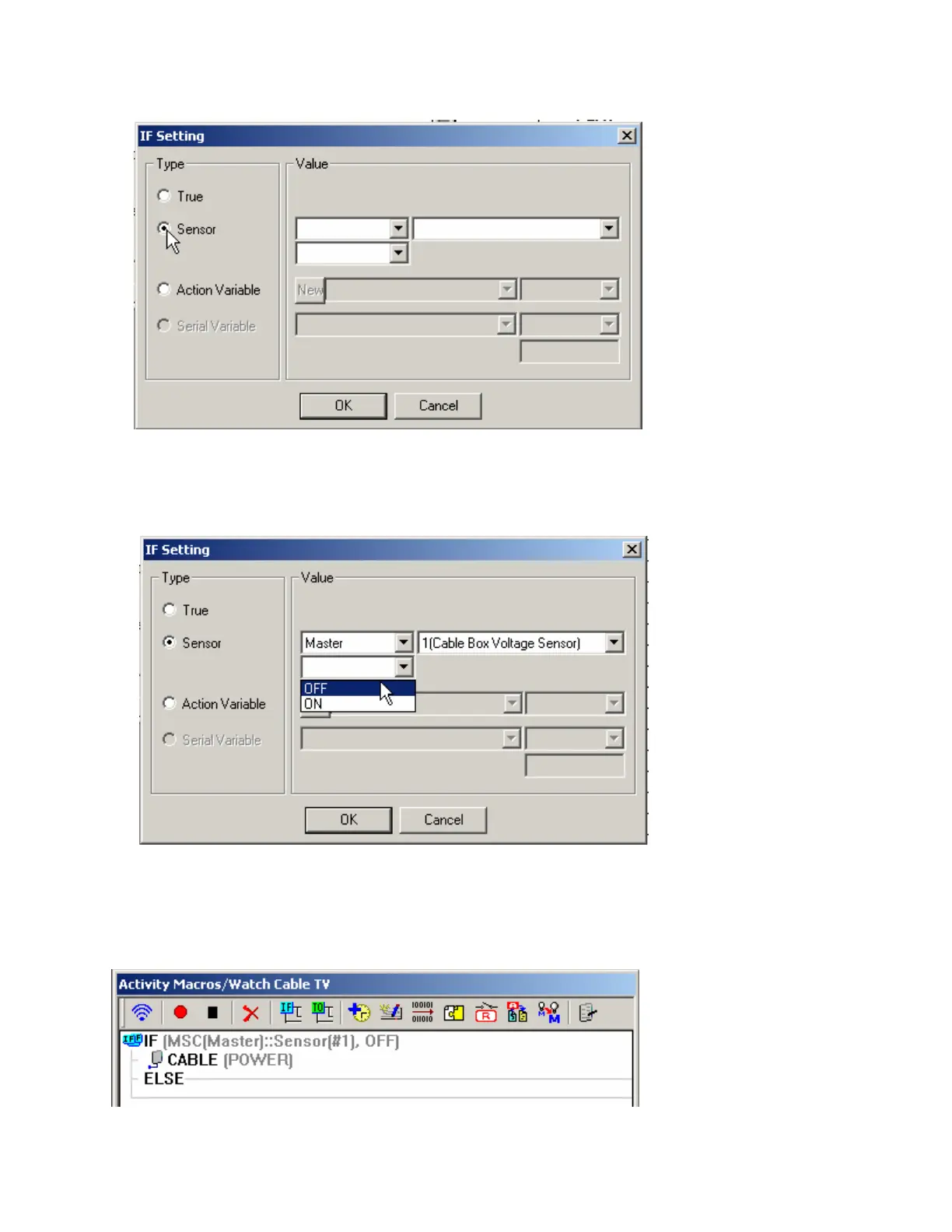
7. Double click the IF LINE in the macro window. The IF SETTING WINDOW will appear.
8. In the Type area , select the SENSOR radio button.
9. In the VALUE area, using the PULL-DOWN List boxes, do all of:
a) Select MASTER (You would select Slave only in a double MSC-400 system when you wanted to
use the sensors of the 2
nd
or slave MSC-400)
b) Select the SENSOR you want. (Sensor 1, CABLE Voltage Sensor)
c) Select which state should trigger the IF action. (If the Cable box is OFF), then Click OK. The
configuration will appear in the IF LINE in the MACRO WINDOW.
With these selections, when the Watch Cable TV Macro is triggered, the MSC-400 will look at Master
Controller Sensor Input 1 to determine if the Cable box is OFF. If it is, the MSC-400 will output the TV
Power Command. If the Cable Box is already ON, the MSC-400 will execute the empty ELSE statement
(since it is empty, nothing will happen and the Cable Box will stay on)..
Here’s how it looks in the Macro window now:



 To Next Page