MSC-400 Reference Manual
Rev 4
70
Embedding RS232 Commands in Smart Macros
On occasion, it may be necessary to place a single RS232 Command in a Smart Macro. Typically,
creating a Connected Device then recording a command to the macro is the preferred method but
embedding a single command can be done when required. To embed a RS232 Command in a Smart
Macro:
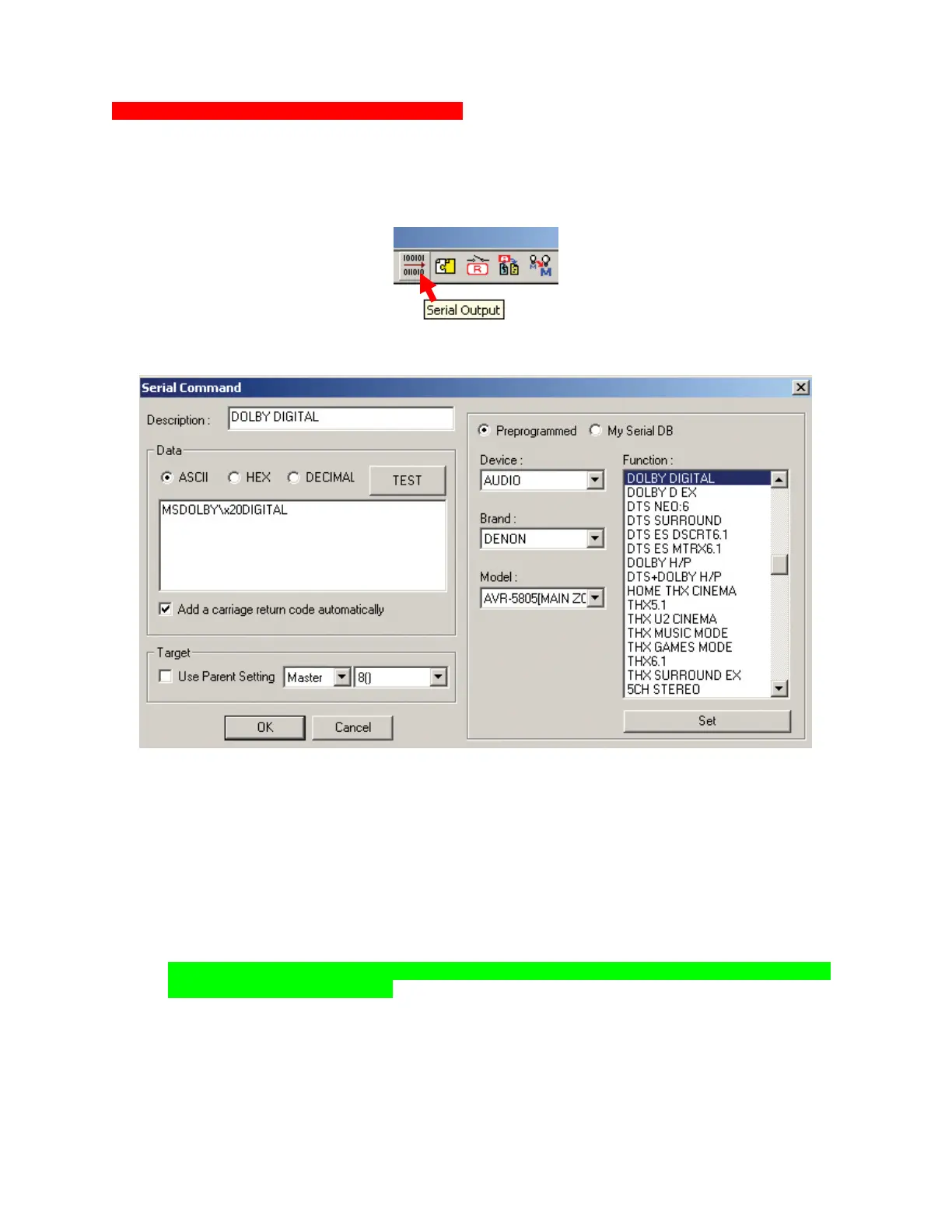
1. In the SMART MACRO WINDOW TOOL BAR, click the SERIAL OUTPUT ICON.
a. The SERIAL COMMAND WINDOW will appear. Embedding a RS232 command
Embedding a RS232 Command
2. If a command is NOT available in the SERIAL DATABASE:
a) In the DESCRIPTION BOX, type the Function Name as it is to appear in the SMART MACRO
FUNCTION LIST.
b) In the DATA BLOCK, select ASCII, HEX or DECIMAL as specified in the manufacturer’s protocol.
c) Type the COMMAND STRING into the DATA BOX, up to 256 characters.
d) Check ADD A CARRIAGE RETURN, if appropriate, per manufacturer’s protocol.
e) In the TARGET BLOCK select MASTER/SLAVE and the SERIAL PORT as appropriate.
f) To test, with the PC connected to the MSC-400 USB1 PORT and the device connected to the
proper MSC-400 SERIAL PORT, click the TEST BUTTON.
NOTE - Serial Port Settings must be downloaded to the MSC-400 before attempting to test
Embedded RS232 Commands.
g) Click OK. The command will appear in the SMART MACRO FUNCTION LIST, where it can be
moved and used in SMART MACROS or IF/ELSE STATEMENTS as with any other command.
2a
2b
2c
2d
2e
2f
2g



 To Next Page