MSC-400 Reference Manual
Rev 4
75
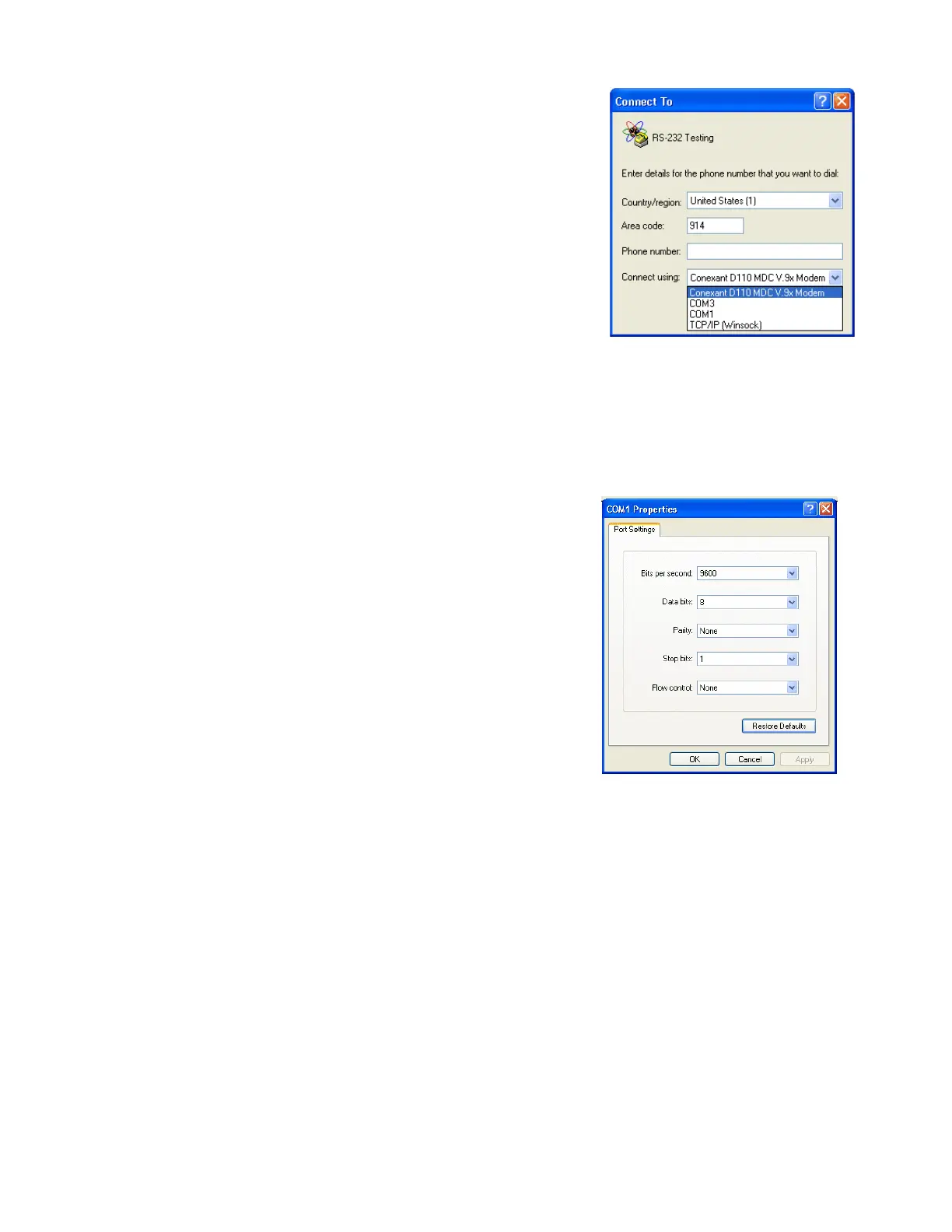
Click on Ok, which will bring up a new option that asks
you to select a phone number. We aren’t using a modem,
so a phone number won’t be necessary. Just click on the
drop down menu labeled “Connect Using” and select an
open COM port (you may have more or less COM ports
than you see in the example below). To check which
COM ports you have available, see Note below
NOTE:If you have a number of COM ports listed and wish to know which is available,
there is a way to examine all ports. Follow these clicks:START>CONTROL
PANEL>SYSTEM> This will open the System Properties Box. Select the HARDWARE
tab, then select DEVICE MANAGER. Click on PORTS (COM & LPT) and look for the
port labeled COMMUNICATIONS PORT.
4. After selecting your COM port, click on OK. This
brings up a new box, COM1 PROPERTIES (if you
are using a different COM port its name will
appear instead of COM1).
The default values will appear. If you have different
communications requirements (as provided in the
manufacturers documentation) you can enter them here.
Click on OK to accept the settings.



 To Next Page