MSC-400 Reference Manual
Rev 4
86
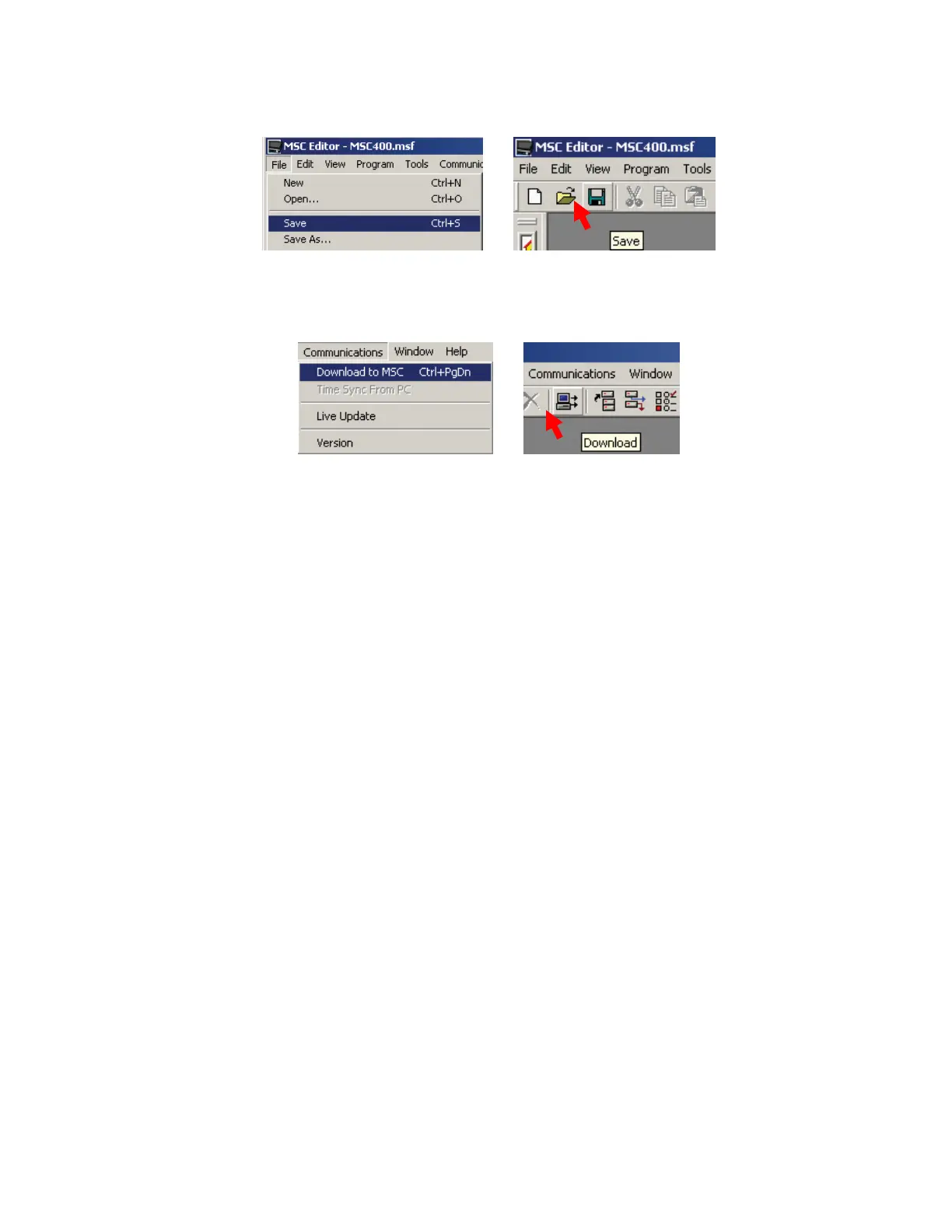
a) In the MSC EDITOR MENU BAR, click FILE, then click SAVE.
b) In the MSC EDITOR TOOL BAR, click the SAVE ICON.
10a
10b
11. To download to the MSC-400 MASTER CONTROLLER, with the PC connected to the USB1 PORT
on the MSC MASTER, DOWNLOAD by doing either of:
a) In the MSC EDITOR MENU BAR, click COMMUNICATIONS, then click DOWNLOAD.
b) In the MSC EDITOR TOOL BAR, click the DOWNLOAD ICON.
11a
11b
12. To program and download to the MSC-400 SLAVE CONTROLLER, repeat STEPS 5-12 with the
following changes:
a) In STEP 5, set the MSC BASESTATION to SLAVE.
b) In STEP 6, set the RFID to one NOT used in STEP 7 from ID 11 to 1F.
c) In STEP 7, set the RFIDS to any other two NOT used in STEP 8, ID 01 to 0F.
d) In STEP 11, connect the PC to the USB1 PORT on the MSC SLAVE.



 To Next Page