MSC-400 Reference Manual
Rev 4
87
Configuring The Remote for a Master/Slave System
Programming a remote for use with a Master/Slave system is essentially the same as the programming
for a system with a single MSC Controller. The main differences are setting the RFIDs for two Receivers
(MSC Controllers) and configuring the Port settings for Master/Slave. Devices controlled via RS232 will
have their Flasher settings set to NONE when using RFIDS 10 to 1F.
All other setup, programming, dragging Smart Macro Triggers, etc., is exactly the same as is done for a
single controller system. To Con the MX/TX RF Settings:
1. In MX/TX EDITOR, open the PROJECT for the MSC MASTER/SLAVE system being programmed.
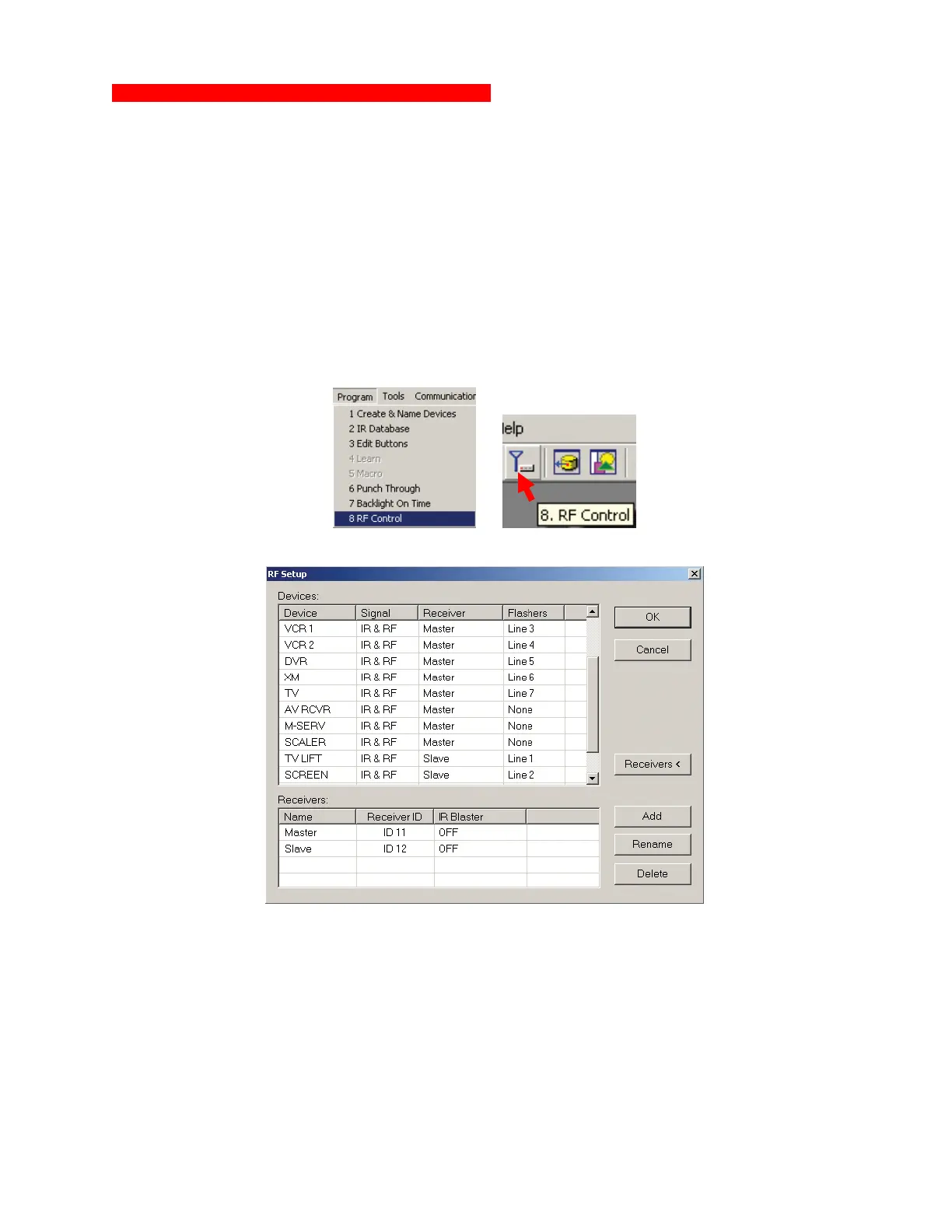
2. To open the RF SETTINGS WINDOW, do either of:
a) In the MX/TX EDITOR MENU BAR, click PROGRAM, then click RF CONTROL.
b) In the MX/TX EDITOR TOOL BAR click the RF CONTROL ICON.
2a
2b
c) The RF SETUP WINDOW will appear. MX/TX Editor RF Settings Master/Slave System
2c
MX/TX Editor RF Settings Master/Slave System
3. In the RF SETUP WINDOW, click the RECEIVERS< BUTTON. The window will expand to show the
default Receiver settings.
4. Click the DEFAULT RECEIVER LINE.
5. To set RFID when using TX-1000 or MX-900:
a) Click the RENAME BUTTON. The RENAME WINDOW will appear.
b) Type MASTER in the Box and click OK.
3
4
5a
5b
5c



 To Next Page