MSC-400 Reference Manual
Rev 4
89
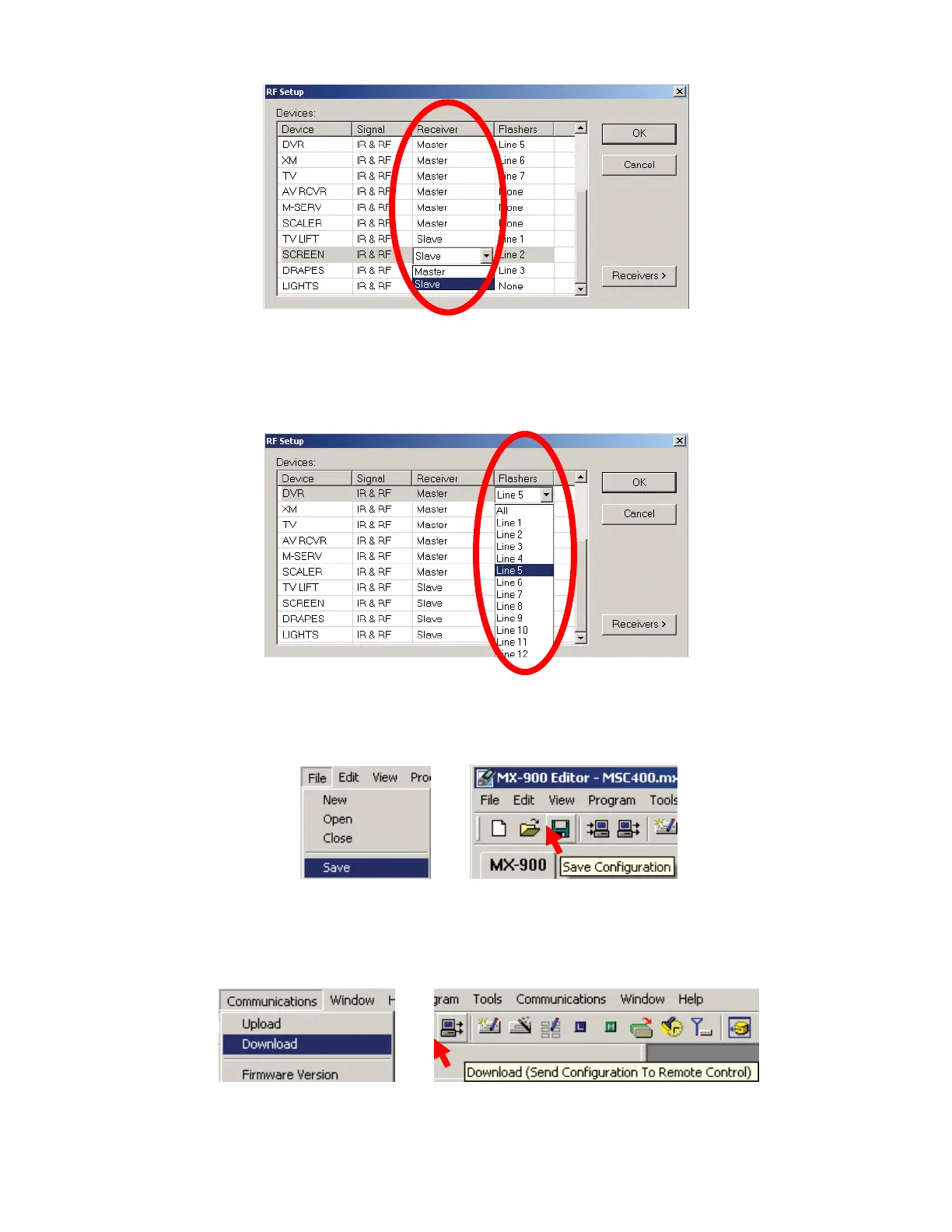
9. Under FLASHERS, line by line, click under FLASHERS and select the appropriate PORT for that
DEVICE. In a MASTER/SLAVE system, BOTH Controllers use the SAME Port numbers, that is
BOTH the MASTER and SLAVE will have a PORT 1, 2, 3 ETC (Line1 = MSC Port 7, 2 = 8 etc). Be
sure these settings are correct. If they are not, some device’s IR commands will not be output by the
MSC Controllers. Set any DEVICES controlled via RS232 to NONE.
10. Click OK, when all RFID, RECEIVER and FLASHER settings are set and confirmed.
11. To SAVE, do either of:
a) In the MX/TX EDITOR MENU BAR, click FILE, then click SAVE.
b) In the MX/TX EDITOR TOOL BAR, click the SAVE ICON.
11a
11b
12. To TEST all MASTER/SLAVE SETTINGS, DOWNLOAD the MX/TX PROJECT to the REMOTE and
test all functions. To Download do either of:
a) In the MX/TX EDITOR MENU BAR, click COMMUNICATIONS, then click DOWNLOAD.
b) In the MX/TX EDITOR TOOL BAR, click the DOWNLOAD ICON.
12a
12b
8
9
10



 To Next Page