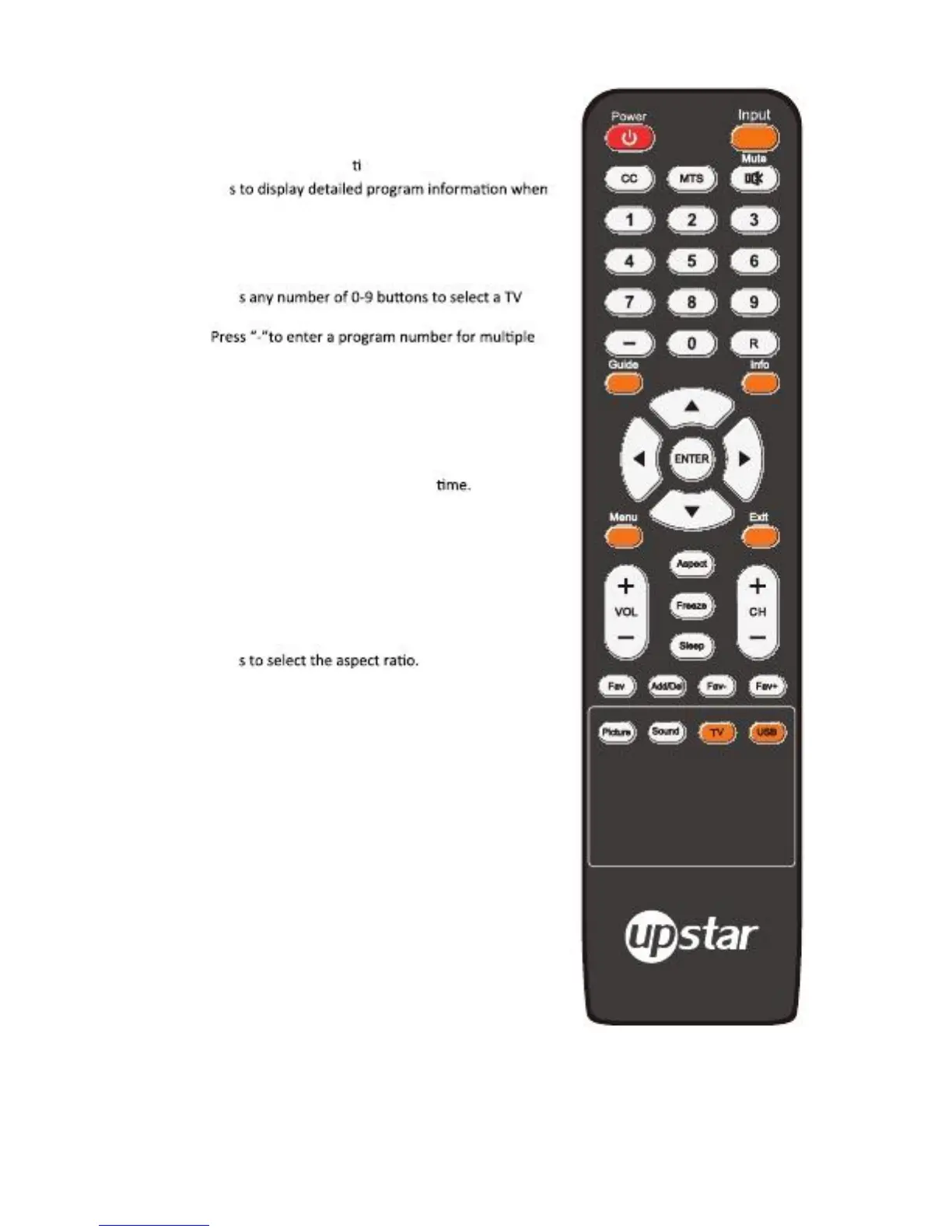
Remote Control
1. POWER: Turns the TV on and off.
2. INFO: Press to display informal on to the TV screen.
3. Guide: Pres
Viewing a digital TV program.
4. MUTE: Press to temporarily cut off the sound.
5. MTS: Press to choose stereo, mono or Separate Audio
Program (SAP broadcast).
6. 0-9 /- : Pres
Channel, also can be used in teletext Page choosing.
Program channel, such as 2-1 act.
7.
R: Press to switch between the current and the previous
Channel.
8. INPUT: Press to display and select the available video
Sources.
9.
10.
11.
12.
13.
14.
15.
16.
17.
18.
MENU: Press to display the main on-screen menu.
SLEEP: Press to set up the TV auto turn off
EXIT: Press to exit the menu.
▲/▼/◄/►/ENTER: Use to select on-screen menu items
And change menu values.
VOL+/-: Press to increase or decrease the volume.
CH+/-: Press to change channels.
FREEZE: Press to freeze picture. It’s not available on DTV
Mode.
Aspect: Pres
Freeze: Freeze picture, press again to restore normal viewing.
Fav: Press to open the favorite channel list.
19.
20.
21.
22.
23.
24.
25.
Add/Del: Press Add/Del to add or delete Favorite channel.
Fav-: Press FAV- to change forward Fav channel for TV.
Fav+: Press FAV+ to change backward Fav channel for TV.
Picture: Press to select Dynamic, Standard, Movie, User mode.
Sound: Press to select Dynamic, Soft, Movie, User mode.
TV: Press to select the TV mode directly.
USB: Press to select the USB mode directly.
TV
25.
CC:
Press to turn closed caption on or off, when your TV set
Is in TV, AV or S-Video source.
English -4



 To Next Page