Laptop Model
Brand Model
Note: Please check if the Type-C port of your PC/Laptop supports audio and video signal transmission
(Thunderbolt3). If the Type-C port only supports charging, you need to connect the HDMI port to transmit
signals.
Apple
Google
Lenovo
Dell
HP
ASUS
Huawei
Razer
More Brands
Macbook 12"、Macbook 13" 2017、MacbookPro 2016/2017/2018、New
Macbook Air 2018、iPad Pro 2018
ChromeBook Pixels、PielBook Pen、MagicBook
YogaC930、Yoga 5 Pro、Yoga 6 Pro、ThinkPad XI Carbon2017、Miix 720、
Legion Y7000/Y7000P/Y7000K
XPS13、XPS15、G3/G5/G7、Inspiron 5000/7000
Pavilion X2、EliteBook Folio G1、 EliteBook 1050 G1
Microsoft Surface Book2
U306、U321 series、U4100、ROG series
Matebook D、 Matebook X、Matebook X Pro、Matebook E、Matebook 13
Blade Stealth
Continuous update...
Brand Model
Samsung
Huawei
More Brands
S8、S8+、S9、S9+、S10、S10+、S10e、Note8、Note9
Mate10、Mate10 Pro、Mate20、Mate20 Pro、Mate 20X、Mate P20、Mate P20
Pro、HonorNot10、Mate P30、Mate P30 Pro
Continuous update...
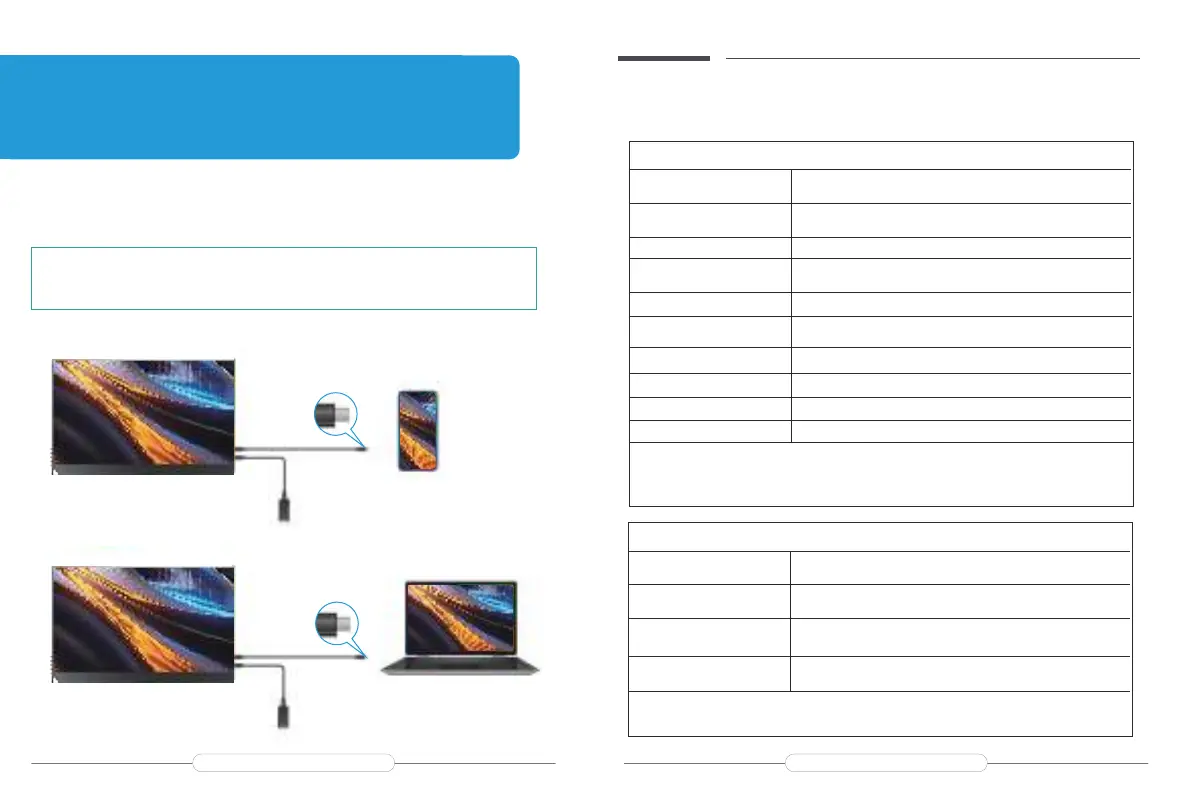
TYPE-C signal transfer
Supported Devices & Models(Type-C )
Note:
For a more stable power supply, it is recommended to use our
original power adapter for power.
Mobile Phone Model
Note: Please check if the Type-C port of the phone supports audio and video signal transmission
(USB 3.1).
Chapter 03
Connecting
Email: support@uperfectmonitor.com Email:support@uperfectmonitor.com



 To Next Page