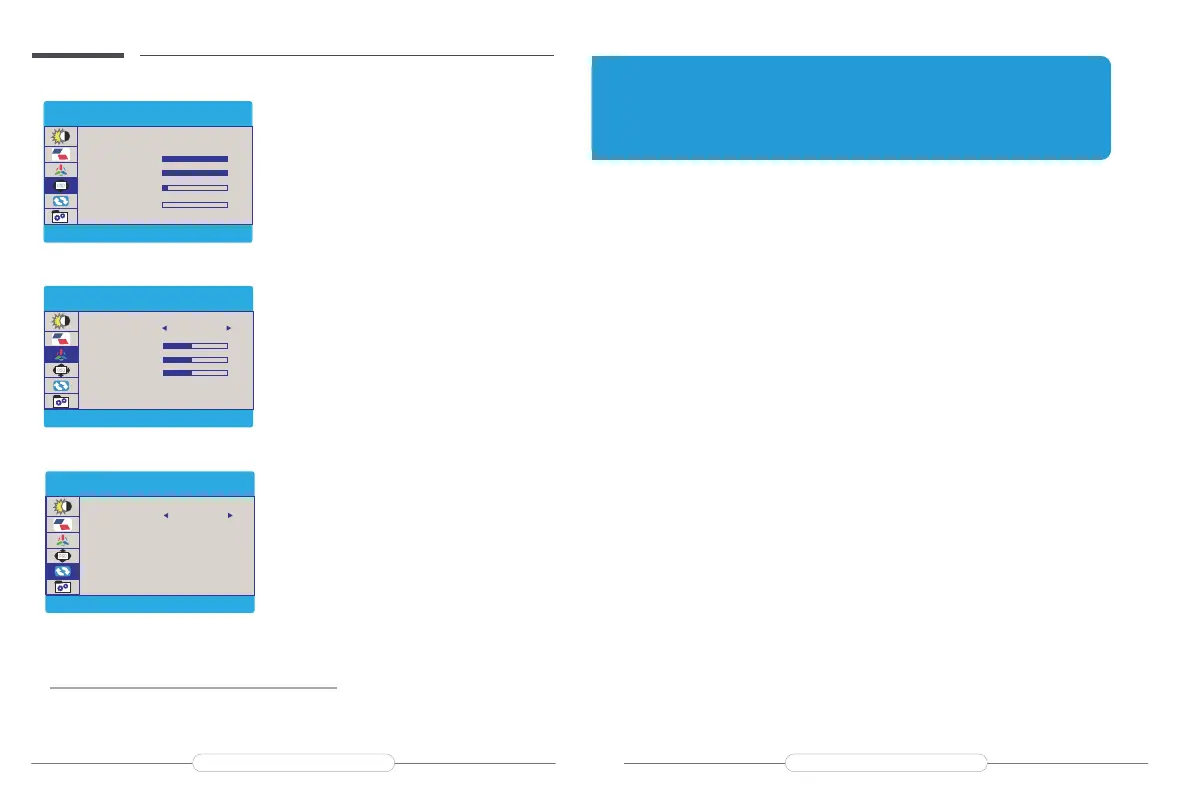
How to set language?
1.Press the MENU button to activate the setting.
2.Scroll the "+"/"-"button up and down to toggle
between options in the Menu, choose
“Language”.
3.Press the MENU button and choose the
language you need.
How to adjust the contrast/color
temperature?
1.Press the MENU button to activate the setting.
2.Scroll the "+"/"-"button up and down to toggle
between options in the Menu, choose “
contrast’’/’’color temperature”
3.Press the MENU button and choose the
contrast/color temperature you need.
How to turn on the HDR function?
1.Press the MENU button to activate the setting.
2.Scroll the "+"/"-"button up and down to toggle
between options in the Menu, choose “ HDR
MODE”
3.Press the MENU button and turn on the HDR
MODE.
Chapter 06
Q&A
Abnormalconditionsoccurred-likethesplashscreenorspotswhenusingthe
monitor.
1.Thissituationisgenerallycausedbyinsufficientvoltage;Pleasecheckwhetherthe
factory-packedcablesareused,andthencheckwhetheranexternalPDpowersupplyis
used.Thepowerconsumptionof2Kmonitorisrelativelylarger,andanexternalPDpower
supplyisrequired.
2.Iftheresolutionsabovedonotwork,pleasetryanothercomputerdevice.Ifitfailsplease
contactusforthereplacementofthecable.
ThedisplayisON,shows"NOSIGNAL"or"POWERSAVING".
1.PleasecheckifthemobilephoneorcomputersupportsUSB3.1./Thunderbolt3when
usingType-CtoType-Cconnection.IFNOT,AnHDMIAdapterisrequiredtotransferthe
signal(theComputer)or3in1USBTypeCHDMICableAdapterisrequiredtotransferthe
signal(themobilephone)
2.Pleasecheckwhethertheconnectioniscorrect.Pleaseusethegenuinecableprovided.
3.Themonitorbatteryislow,pleaseuse anexternalpoweradaptertosupply power
4.Pleasetryanothercomputer.Ifitfails,pleasecontactusforthereplacementofthetouch
cable.
MyphoneisGooglebrand,butIcannotconnectitdirectlytothedisplay?
SomeGooglephonescannot connectdirectlytothedisplay.
ThemobilephoneinterfaceneedstosupportUSB3.1inordertoconnectdirectlytothe
display.
Please confirmifyourmobilephonesupportsit.Ifnot,youneedtopurchasean"IOS/
AndriodtoHDTV"cable.Ifyouneed it,youcantellusandwewillsendittoyou.
Q:
A:
Q:
A:
Q:
A:
MISC
Q&A
RESET
RESET
HDR MODE
AUTO
OSD SETTING
RESET
Q&A
COLOR TEMP.
COLOR TEMP
RED
USER
GREEN
BLUE
OSD V. POS.
OSD T IMER
TRANSPARENCY
LANGUAGE
OSD SETTING
OSD H. POS.
100
100
10
0
50
50
50
Email: support@uperfectmonitor.com Email:support@uperfectmonitor.com
SAVE SETTINGS
How to save all the settings of the monitor?
1.If it is an HDMI signal source, the monitor settings can be directly
2.If it is a TYPE C signal source, the monitor need to connected to an external power supply rst, then
you can save the settings.



 To Next Page