Operation Notes:
1. Please operate the display by using the original accessories in the package.
2. When an external HDMI cable is connected, please connect the power
supply firstly, and then connect HDMI to ensure the signal transmitted smoothly.
3. When the single-line connection to the Type-C interface, the screen will flash, and under voltage will result in Black screen, so please
make sure to connect the PD power supply.
4. When connected with a Windows 10 system computer, if the screen displays abnormally, please turn o HDR in the computer system
settings or open HDR in the monitor menu.
Function introduction Function introduction
S8、S8+、S10、S10+、S10e、Note8、Note9、Mate10、Mate10 Pro、Mate20、Mate20 Pro、Mate 20X、Mate P20、
Mate P20 Pro、HonorNot10、Mate P30、Mate P30 Pro、
Continuous update...
Note:For Sansung phone,it is highly recommended to use an additional PD power supply.
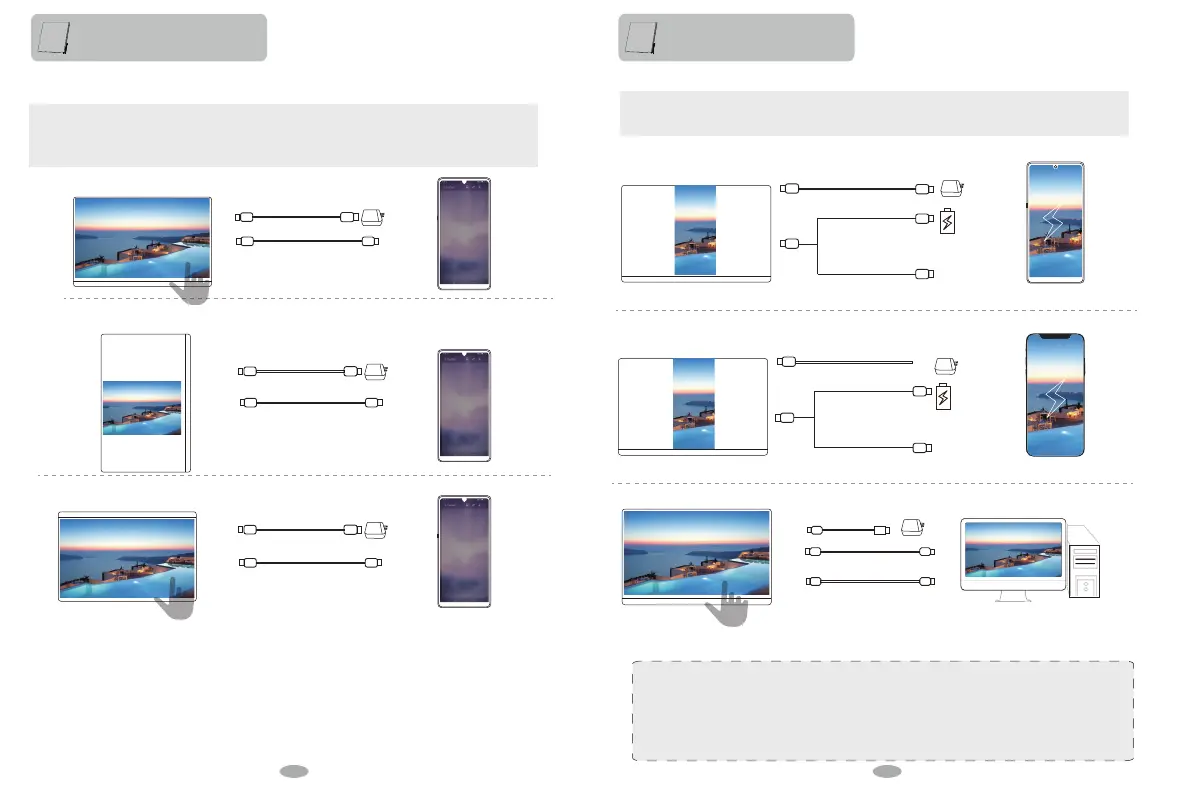
Mobile Phone which supports USB 3.1:
Rotate ± 90 °
External power is required when power is insufficient.
4K models require more stable voltage or above PD Power.
Type-C to Type-C
Front
Rotate 180 °
External power is required when power is insufficient.
4K models require more stable voltage or above PD Power.
External power is required when power is insufficient.
Type-C to Type-C
4. Connect to phone with Type-C interface which supports USB3.1 interface
Desktop Mode
Phone and monitor enter different using modes,
1, Phone and monitor do not affect each other. Work and play at the same time.
2, Phone make monitor become a computer, the mobile phone can be used as a touchpad to control the monitor.
Android to HDMI adapter
Android Phone
5. Connect to other device which don’t support USB3.1 and Thunderbolt3
Dual Screen
Phone and monitor,or desktop and monitor on the same screen.Dual screen shows mobile content simultaneously.
iPhone to HDMI adapter
iPhone
Desktop
Type-C to USB 3.0(For Touch)
Mini HDMI to HDMI
(Video/Audio signal)
Note:If you need the Android to HDMI adapter or iPhone to HDMI,we can deliver to you.Please contact us Service Team,
we will reply you in 12 hours.
Type-C to Type-C
Note:
The touch function can’t be achieved by phone which doesn’t support USB3.1.
Note:
The touch function can’t be achieved by phone which doesn’t support USB3.1.
12 13


 To Next Page