© UPLIFT Desk • 800-349-3839 • info@upliftdesk.com • upliftdesk.com
13
Desk Placement
When preparing to ip the desk, be aware of loose cables and
attached accessories, especially an accessory that might move on
a track like a Keyboard Tray or CPU Holder.
A. With one person located at each end of the desk, support the
desk frame and the desktop equally and begin to tilt it slowly
towards the back of the desk so that the Keypad is facing up
and the back of the Feet are touching the oor.
P9
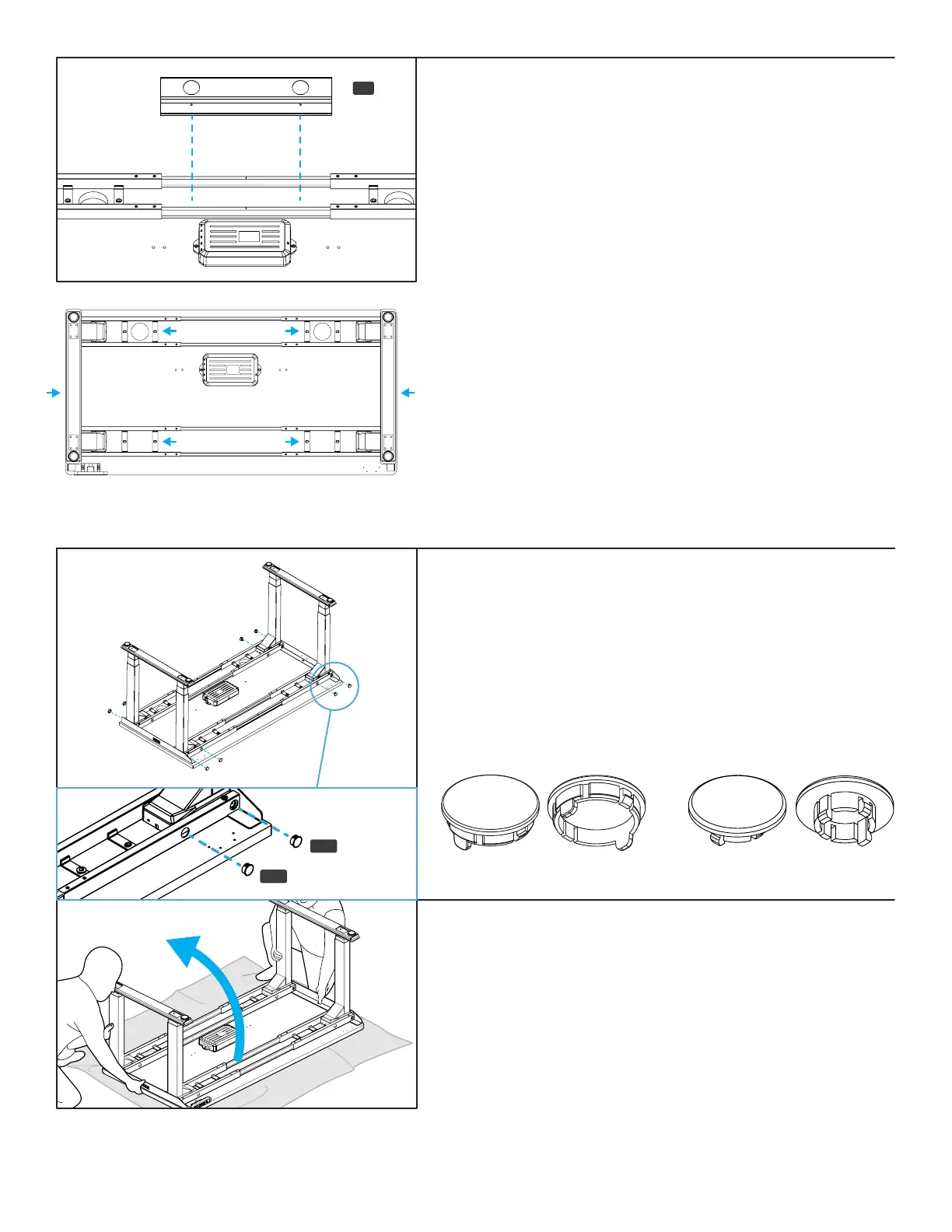
Wire Management Tray (optional)
Most UPLIFT desktops include two pre-drilled holes about 12” apart
located near the back of the desktop. If your desktop includes
grommets, these holes will be located between them. These holes
are meant for attaching the included Wire Management Tray
(P9). If you choose to place the tray in a different location, refer
to Step 4 to make pre-drilled holes for the Wire Management Tray
attachment; be careful not to drill through your desktop surface.
Attach the tray to your desktop using two #10x5/8” Wood Screws
(H14).
IMPORTANT:
Take this moment to double check that all of the screws indicated
with arrows are tight. This is an important step and it is much
easier to ensure they are tight now before ipping the desk
upright.
Also, the desk frame screws may not have been completely
tightened during the initial assembly. Since the desk is upside
down, take the opportunity to ensure all frame screws are tight
using the 4 mm Allen Wrench. We supplied Loctite pre-applied
to all screws to keep them tight over time, so if you tighten
thoroughly this one time you’re all set.
Hole Plugs (optional)
If you prefer to cover the four large holes in the front and back of
the upper frame section, use the provided Small Hole Plugs (H17)
and Large Hole Plugs (H18). The smaller plugs t in the holes that
are closer to the side of the desk and the frame Side Bracket while
the larger plugs t in the holes further away from the sides of the
desk. See images for reference.
H17
H18
Large Hole Plugs (H18).
Small Hole Plugs (H17).


 To Next Page