Page 6 113100-000 | MX15 / MX19 - Operator Manual
Operation
O
PERATION
Before operating the machine, ensure that the Pre-Operation Safety Inspection and System Function
Inspection has been completed and that any deficiencies have been corrected. Never operate a dam-
aged or malfunctioning machine. The operator must be thoroughly trained on this machine.
P
LATFORM
E
XTENSION
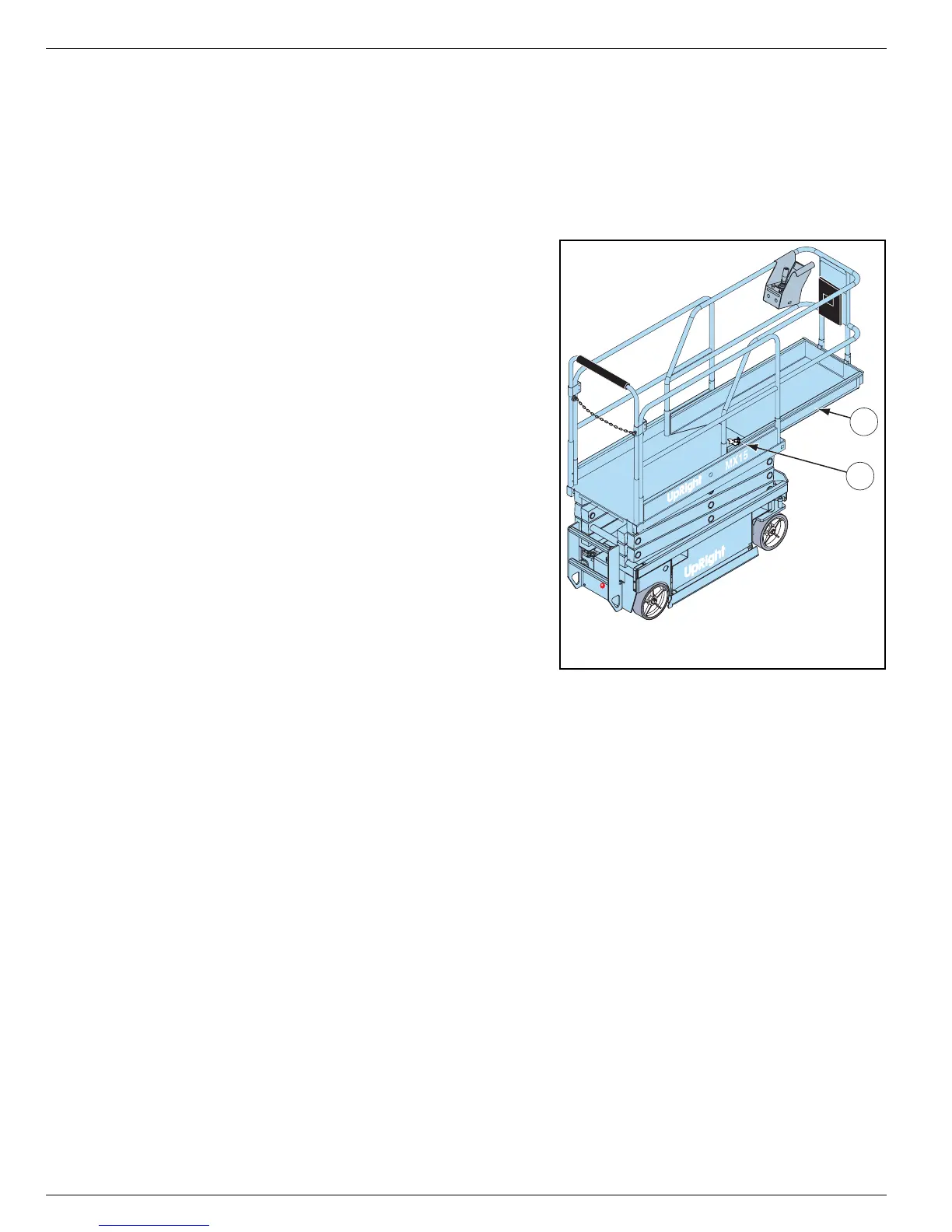
Figure 3:
Platform Extension
1. Mount the platform and properly close and secure the
entrance.
2. Depress the foot lever located at the rear of the plat-
form extension. Push the platform extension forward
until the pin engages the front stop.
3. To retract the platform extension, depress the foot
lever and pull the platform extension toward the rear
of the machine until the pin engages the rear stop.
T
RAVEL
W
ITH
THE
P
LATFORM
L
OWERED
1. Check that the route is clear of surface hazards such
as holes, drop-offs, bumps, curbs, or debris.
2. Check that the route is level, and is capable of sup-
porting the wheel loads.
3. Verify that the Chassis Key Switch is turned to DECK
and Chassis Emergency Stop Switch is ON (pulled
out).
4. Mount the platform and properly close the entrance.
5. Check clearances above, below, and to the sides of platform.
6. Pull the Platform Emergency Stop Switch out to the ON position.
7. Turn the Lift/Drive Switch to DRIVE.
8. Engage the Interlock Switch and move the Control Handle to FORWARD or REVERSE to travel in the
desired direction. The speed of the machine will vary depending on how far from center the Control
Handle is moved.
S
TEERING
1. Turn the Lift/Drive Switch to DRIVE.
2. While engaging the Interlock Switch, push the Steering Switch to RIGHT or LEFT to turn the wheels in
the desired direction. Observe the tires while maneuvering the machine to ensure proper direction.
NOTE:
Steering is not self-centering. Wheels must be returned to the straight ahead position by operating the Steering
Switch.
2
1
1. Platform Extension
2. Foot Lever


 To Next Page