Motor Controller Dip Switch Settings Section 3 - Troubleshooting
Page 3-4 113101-000 MX15 / MX19 | Service Manual
3-4 M
OTOR
C
ONTROLLER
D
IP
S
WITCH
S
ETTINGS
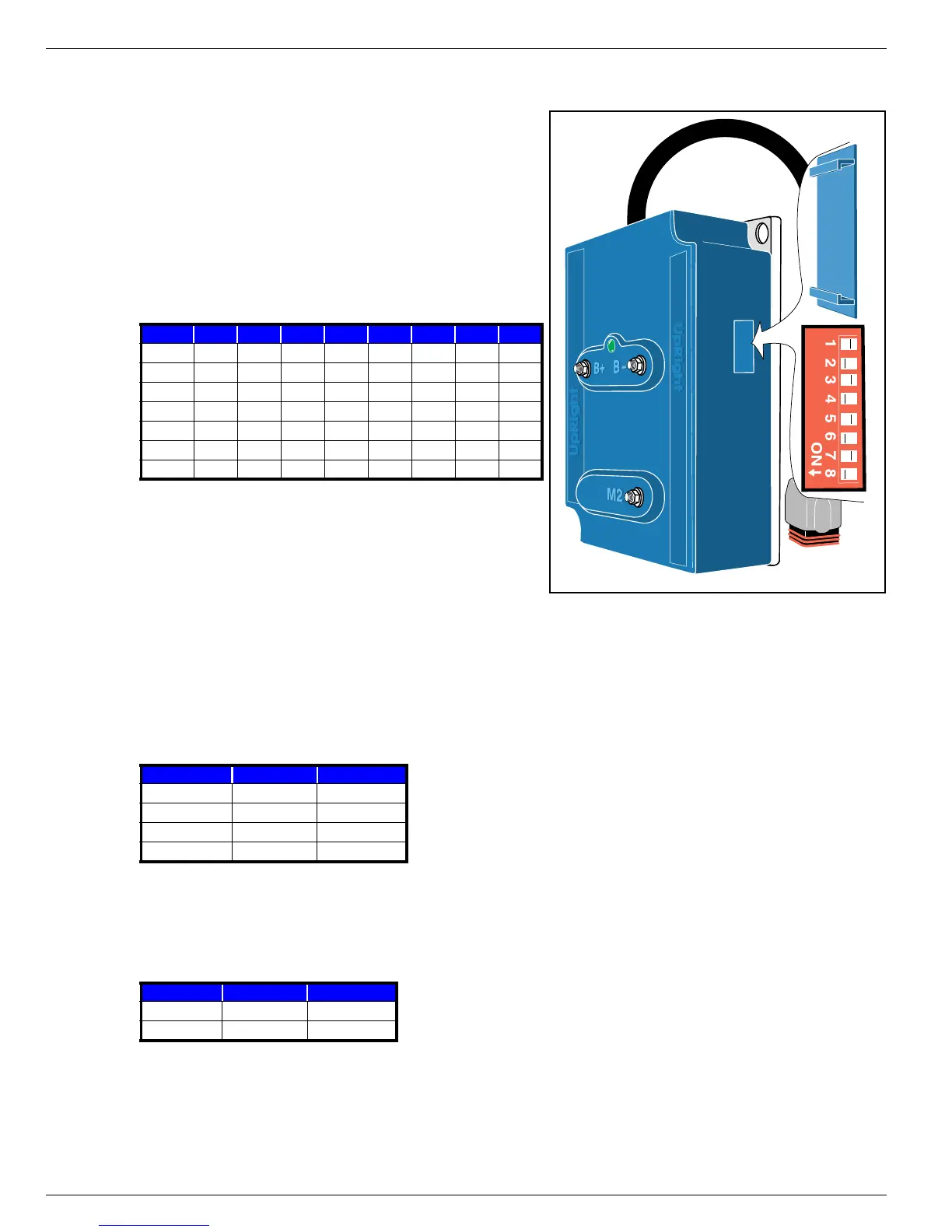
Figure 3-2:
Controller Dip Switch
The Dip Switch is located behind a snap-out cover on
the side of the Motor Controller. Slide your fingernail or
a small screw driver under the edge of the cover at the
middle and pry it off.
D
EFAULT
D
IP
S
WITCH
S
ETTINGS
The table shows the default dip switch settings on the
controller box when the machine leaves the factory.
A
DJUSTED
D
IP
S
WITCH
S
ETTINGS
The following adjustments may be made to the dip switch settings.
C
REEP
S
PEED
Switches 3 & 4 determine the elevated “creep” speed. If the machine does not operate at the specified
speed at the default settings, use the following table to adjust the dip switch settings.
D
ECELERATION
T
IME
Switches 5 & 6 determine the deceleration time.
• Switch 5 determines the deceleration rate while the platform is lowered.
• Switch 6 determines the deceleration rate while the platform is elevated.
1 2 3 4 5 6 7 8
MX15/19 OFF OFF OFF ON OFF ON OFF ON
SL20 ON OFF OFF ON OFF ON OFF ON
TM12 OFF OFF OFF ON OFF ON OFF ON
X20N ON OFF OFF ON OFF ON OFF ON
X20W ON OFF OFF ON OFF ON OFF ON
X26UN ON ON OFF OFF OFF ON OFF ON
X26/32 ON ON OFF ON OFF OFF OFF ON
Creep Speed 3 4
1 (slowest) OFF OFF
2 (slow) ON OFF
3 (default) OFF ON
4 (fastest) ON ON
DECEL 5 6
0.24 sec. OFF OFF
1.27 sec. ON ON


 To Next Page