Section 3 - Troubleshooting LEDs at I/O Board
113101-000 MX15 / MX19 | Service Manual Page 3-7
3-7 LED
S
AT
I/O B
OARD
G
REEN
LED ON
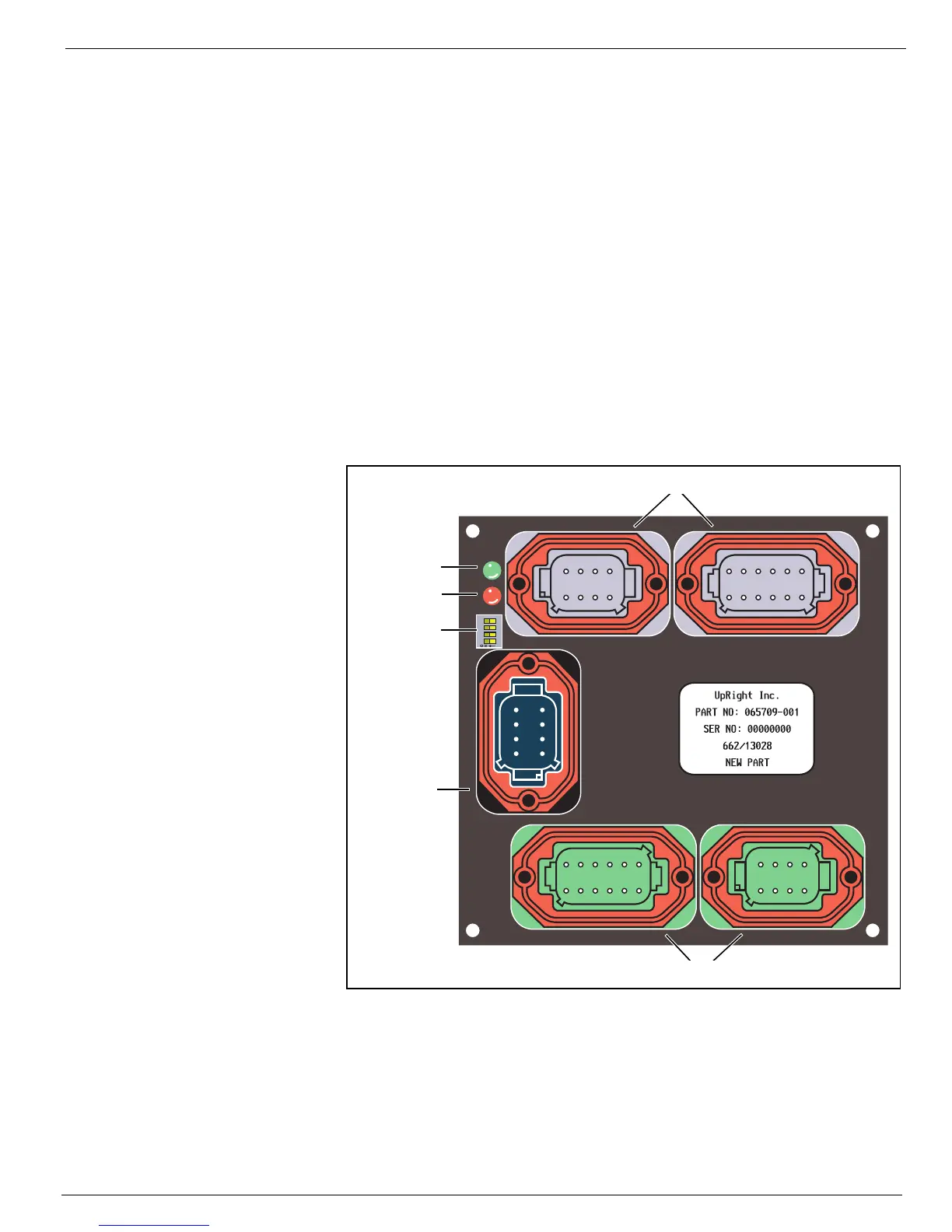
The Green LED indicates that power is present at the board.
R
ED
LED ON
The Red LED indicates a short in the system. To locate the problem;
1. Push both E-Stop switches to the OFF position.
2. Turn the Keyswitch to the OFF position, then to either Platform or Chassis.
3. Pull both E-Stop switches to the ON position.
• The Green LED should be ON.
• The Red LED should be OFF.
4. Perform all machine functions until the Red LED is ON. Determine which function activated the
Red LED and check all components that are active for that function.
Figure 3-5:
I/O Board Connections
1234
8765
1234
8765
1234
12 11 10 9
56
87
1234
12 11 10 9
56
87
1234
8765
4321
J2 J1
J5
J4
J3
Green LED
Red LED
Grey
Green
Black
Dip Switch



 To Next Page