Section 2 - Service and Repair Switch Adjustments
113101-000 MX15 / MX19 | Service Manual Page 2-11
P
ROXIMITY
S
WITCH
A
DJUSTMENT
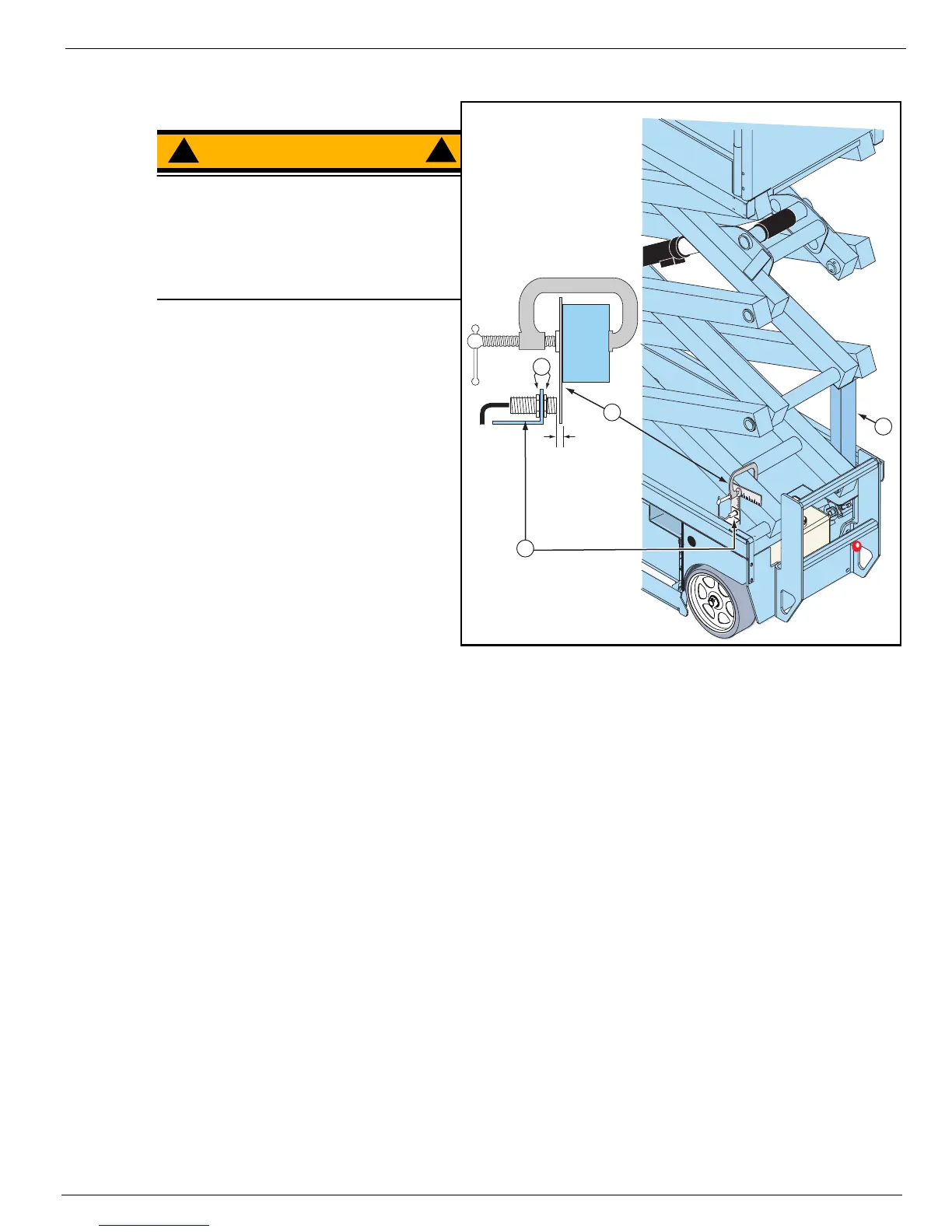
Figure 2-5:
Proximity Switch Adjustment
WARNING
!
!
Never perform service while the platform
is elevated without first blocking the
elevating assembly.
DO NOT stand in the elevating assembly
area while deploying or storing the
maintenance brace.
1. Deploy the maintenance brace (see
“Blocking the Elevating Assembly” on
page 2-6).
2. Use a clamp to attach a straight
guide to the elevating assembly tube.
3. Measure the gap between the face of
the Proximity Switch and the side of
the guide that faces the elevating
assembly tube.
4. Turn the adjusting nuts on the Prox-
imity Switch to set the gap to within
4,76 mm to 6,35 mm (3/16 to 1/4 in.).
5. Remove the clamp and guide and
repeat the test.
• If the test fails, the Proximity Switch
is defective and must be replaced.
4
(3/16 in. - 1/4 in.)
4,75 mm - 6,35 mm
3
2
1
1. Maintenance Brace
2. Guide
3. Proximity Switch
4. Adjustment Nuts



 To Next Page