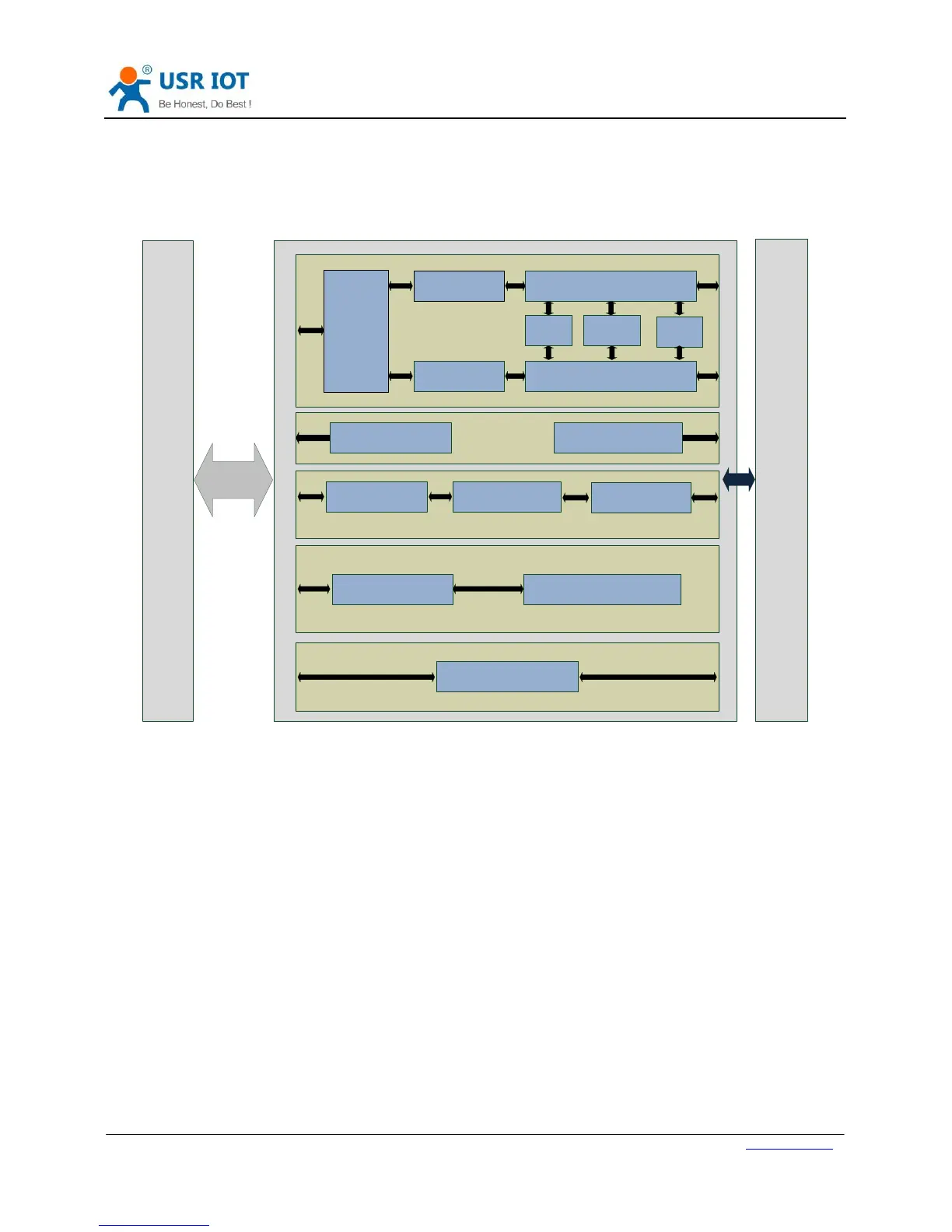
Serial
Port
Device
Network
Socket A
Socket B
TCPS/TCPC/UDPS/UDPC/HTTPD Client
TCPC/UDPC
Identity
Packet
Websocket
Serial port
packaging
Network data
transmission
AT Command Mode
Serial AT command Parameter Query/Set
Serial
port
Keep-Alive
USR
CLOUD
Serial
port
packaging
Serial Heartbeat packet Network Heartbeat packet
Webserver
Modbus Gateway
ModbusTCP Gateway
1
1
1
Figure 7 Product Functions diagram
2.1. Basic Functions
2.1.1. Static IP/DHCP
There are two ways for module to get IP address: Static IP and DHCP.
Static IP: Default setting of module is Static IP and default IP is 192.168.0.7. When user set module in Static IP mode,
user need set IP, subnet mask and gateway and must pay attention to the relation among IP, subnet mask and
gateway.
DHCP: Module in DHCP mode can dynamically get IP, Gateway, and DNS server address from Gateway Host. When
user connect directly to PC, module can’t be set in DHCP mode. Because common computer does not have the
ability to assign IP addresses.
User can change Static IP/DHCP by setup software. Setting diagram as follow:


 To Next Page