Multifunctional serial to Ethernet module user manual www.tcp232.net
Jinan USR IOT Technology Co., Ltd freda@usr.so
Page 10 /
/
/
/ 9
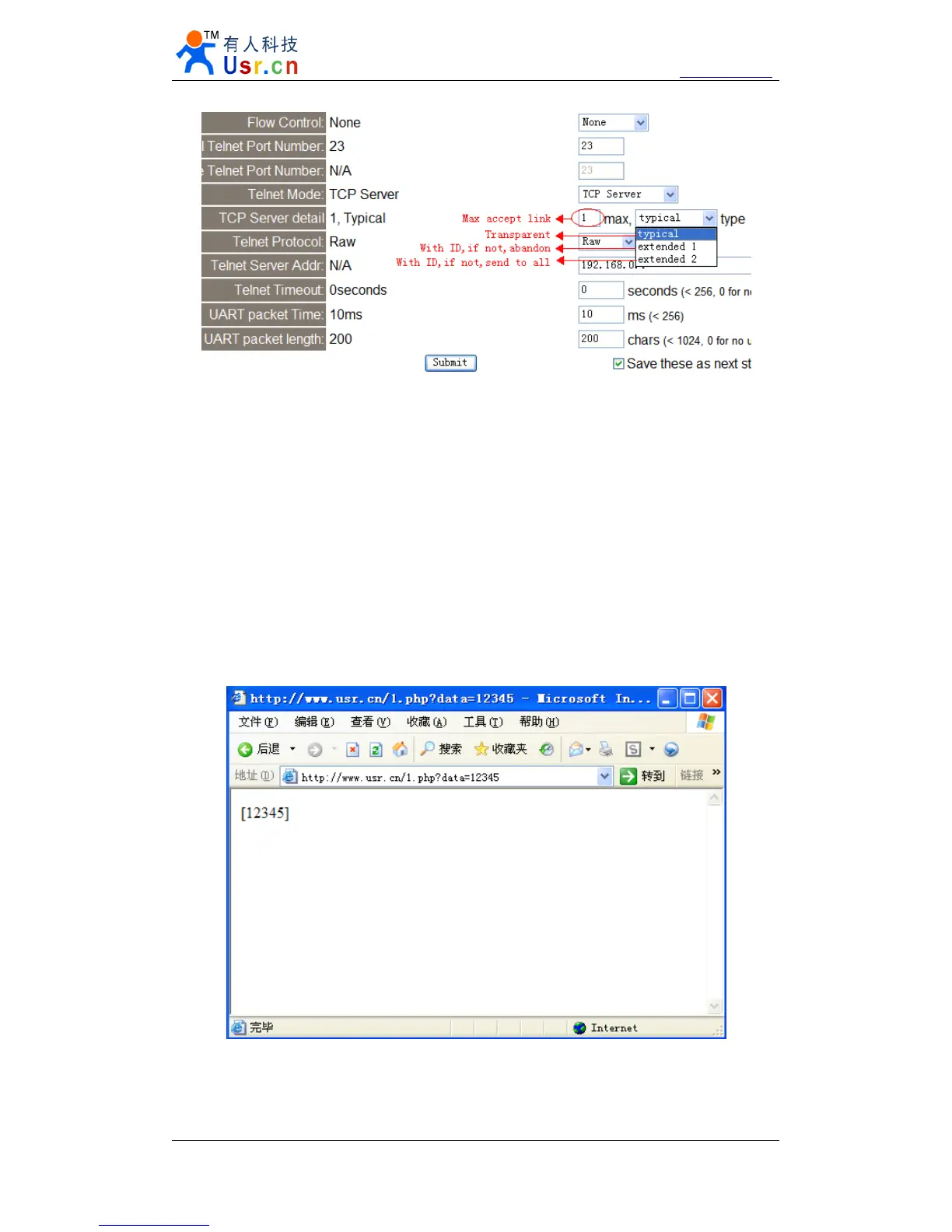
Diagram 2 - 8 web page configuration
2.6.
2.6.
2.6.
2.6. Httpd
Httpd
Httpd
Httpd Client
Client
Client
Client mode
mode
mode
mode
This function is easier used for web page developer.
We
establish one web server page, add
this:
[<?php echo $_GET['data']; ?>]
Means we can GET data from HTTP client
’
s request. Open this URL:
www.usr.cn/1.php?data=12345 , the web page is downbelow, we can see that the web server have
got the data(12345),
Diagram 2 - 9 Request www.usr.cn/1.php?
www.usr.cn/1.php?
www.usr.cn/1.php?
www.usr.cn/1.php? and upload data
Then we take another way, set USR-TCP232-E module Work mode HTTPD Client, Target
address www.usr.cn,
www.usr.cn,
www.usr.cn,
www.usr.cn, Target port 80,


 To Next Page