Multifunctional serial to Ethernet module user manual www.tcp232.net
Jinan USR IOT Technology Co., Ltd freda@usr.so
Page 22 /
/
/
/ 9
55 BA for write Port0 , 55 BC for read port0;
55 C1 for write Port1 , 55 C3 for read port1;
55 C2 for write Port2 , 55 C4for read port2(Port2 only for-500).
2. For further information, see <USR-TCP232-XX config protocol V3.doc>.
4.3.
4.3.
4.3.
4.3. network
network
network
network command(setup
command(setup
command(setup
command(setup software)
software)
software)
software)
1. through software USR-TCP232-E45 Setup V1.0.5.0;
2. Network command(need to ask for protocol before purchasing).
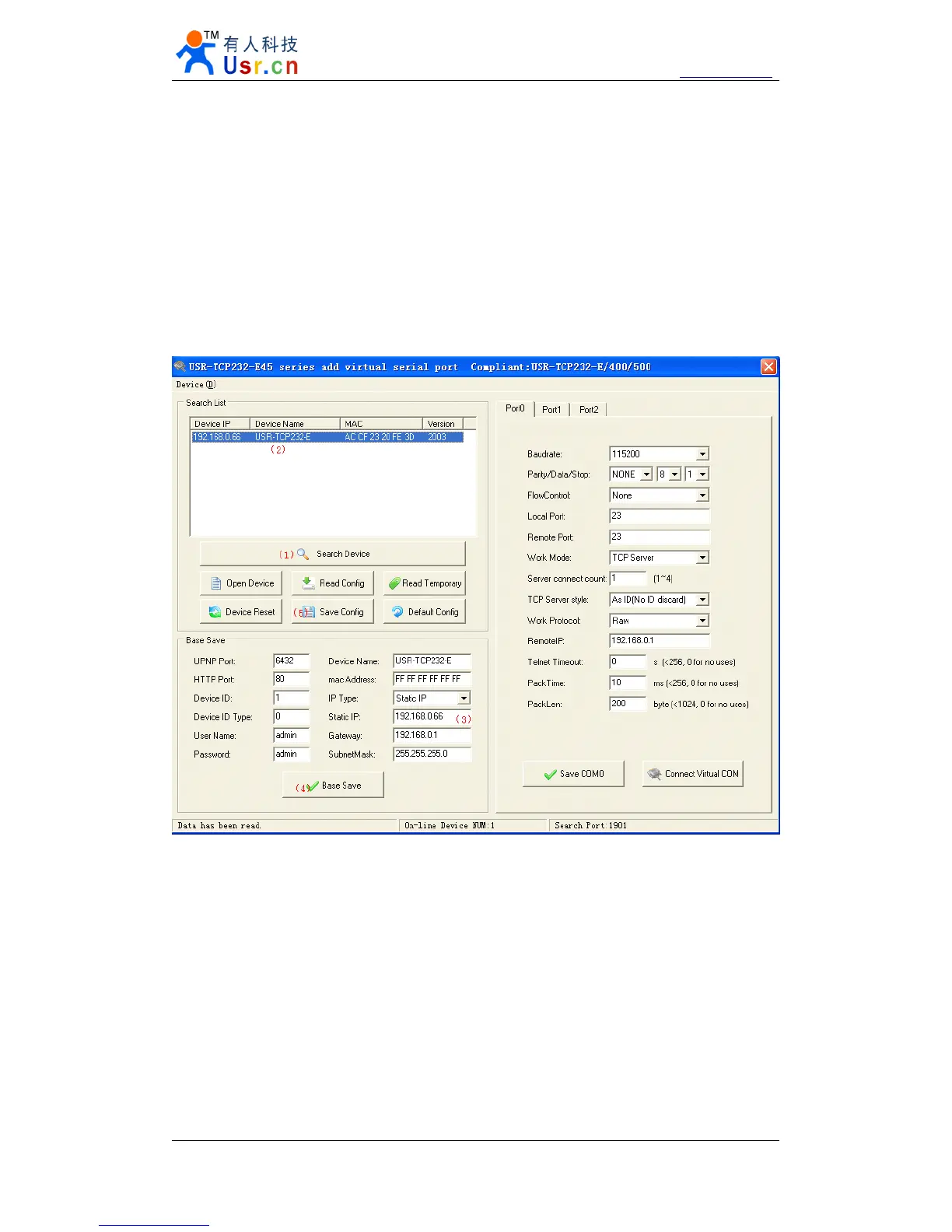
Downbelow is the Setup for USR-TCP232-E45,
Diagram 4 - 2 Setup software
(1) click
‘
Search Device
’
;
(2) Select device in search list;
(3) Modified paramters such as static ip;
(4) Click
‘
Base Save
’
, paramters will be saved;
(5) Click
‘
Save Config
’
, the paramters will take effect;
(6) Search again, module will appear in new paramters.
Note.
After modified paramters, need first
‘
Base Save
’
or
‘
Save COMX
’
, then
‘
Save Config
’
.
If not, the paramters will only be saved, but not take effect.


 To Next Page