Multifunctional serial to Ethernet module user manual www.tcp232.net
Jinan USR IOT Technology Co., Ltd freda@usr.so
Page 32 /
/
/
/ 9
6.4.2.
6.4.2.
6.4.2.
6.4.2. Ping
Ping
Ping
Ping is
is
is
is OK
OK
OK
OK but
but
but
but can
can
can
can not
not
not
not open
open
open
open web
web
web
web pages
pages
pages
pages
Some possible causes
1. Module is set
a
static ip and conflicts with another ethernet device.
2. Cross network and false subnet mask .
3. HTTP server port is modified(default 80).
Solutions:
1. Set another static or use DHCP.
2. Set correct subnet mask.
3. Set this port to 80 or open web page with correct port.
6.4.3.
6.4.3.
6.4.3.
6.4.3. After
After
After
After firm
firm
firm
firm update,
update,
update,
update, can
can
can
can not
not
not
not open
open
open
open web
web
web
web page
page
page
page
Reload this module back to factory settings.
6.4.4.
6.4.4.
6.4.4.
6.4.4. When
When
When
When connection
connection
connection
connection established,
established,
established,
established, server
server
server
server received
received
received
received serval
serval
serval
serval chars
chars
chars
chars
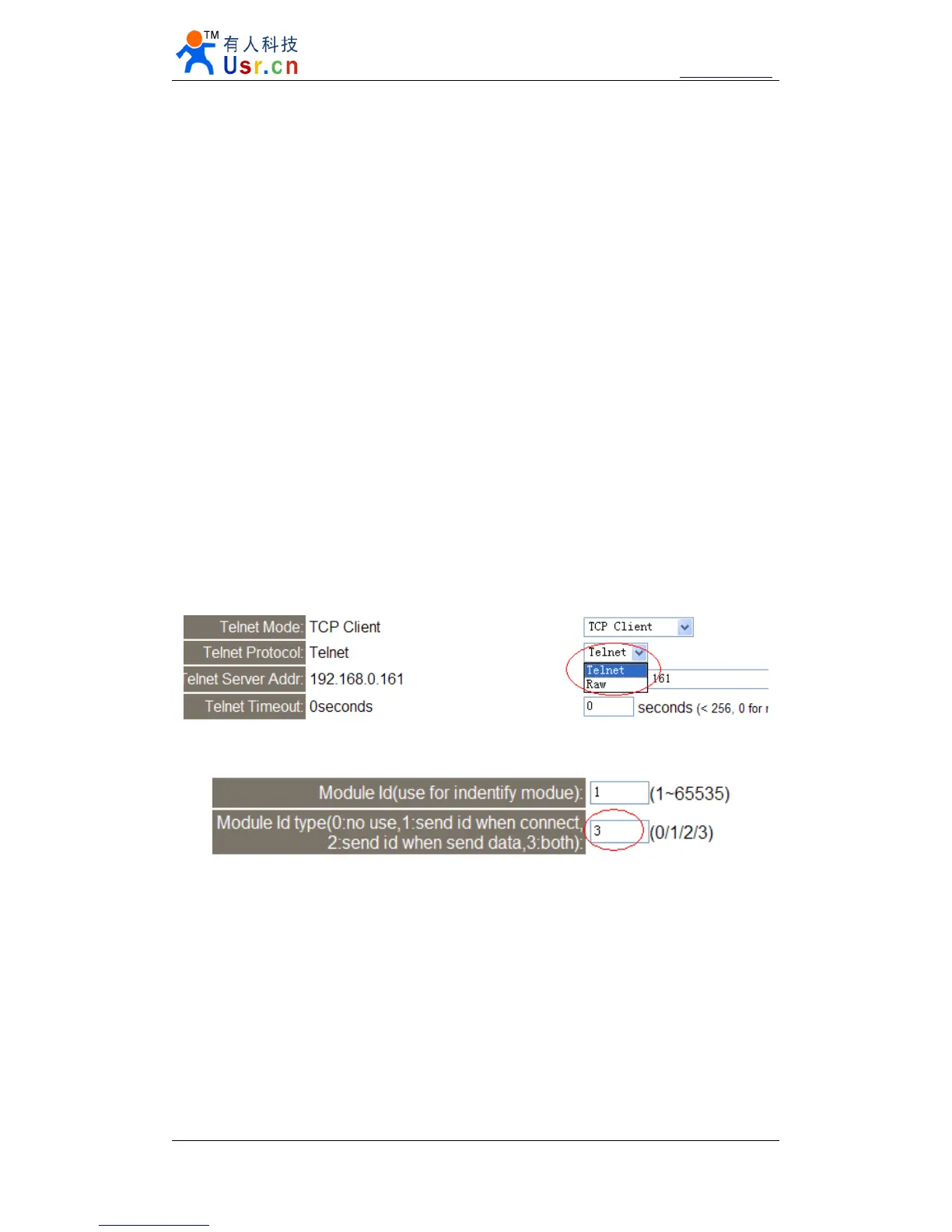
Possible causes.
1) Telnet Protocol use Telnet(usually should be RAW).
2) Module id type is not 0.
Diagram 6 - 6 Telnet Protocol
Diagram 6 - 7 Module id type
Solutions.
1) Telnet Protocol choose
RAW.
2) Module id type set 0.
6.4.5.
6.4.5.
6.4.5.
6.4.5. Every
Every
Every
Every serval
serval
serval
serval seconds,
seconds,
seconds,
seconds, module
module
module
module reconnect
reconnect
reconnect
reconnect
Telnet Timeout was set to none 0 value.
Solutions


 To Next Page