26
BREEZE has the following special feature:
If the preset service interval is exceeded by a relatively long period of time, the continuously
illuminated right decimal point (2-8/1) begins to flash and the BREEZE function is deactivated.
Please inform the salon personnel.
Connection to MP3 Player, iPod and cell phone
Operating elements
Spiral cable
Plug the spiral cable into the MP3 Player, or iPod. Thus the music
played on the central sound system is interrupted, and you can
hear your own music.
8. Service menu
8.1 Service module
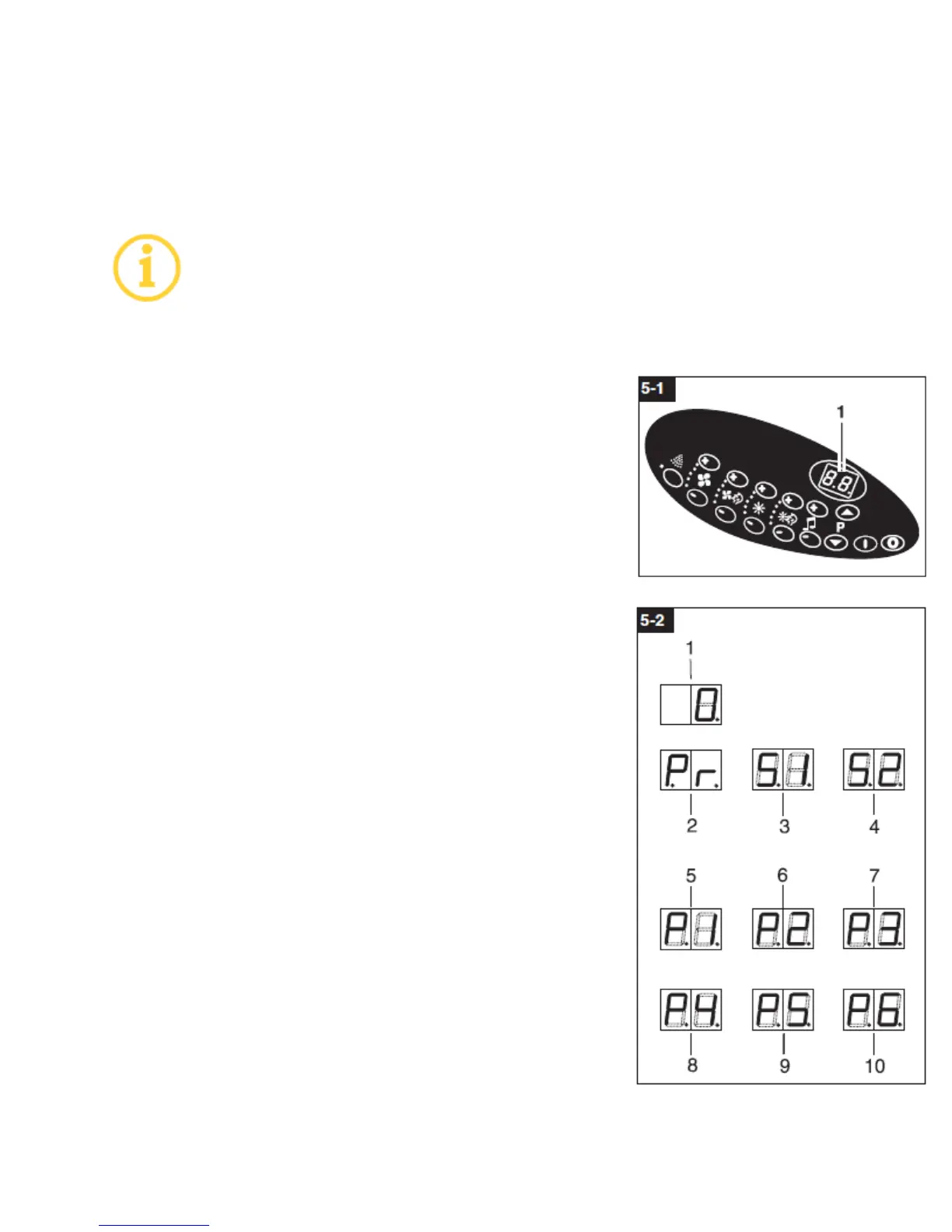
The operating unit (5-1) is used to display various operating states
and error messages and
provides service information. The unit is operated with the buttons
on the key pad.
In the standby mode, the display shows the value zero (5-2/1).
The service module includes three menus for calling up operating
states and for reading error messages on the display (5-1/1) and
(5-3/1):
Program menu Pr (5-2/2)
Service menu S1 (5-2/3)
Service menu S2 (5-2/4)
8.2 Operating the service module
(see chapter 8.6 Service menu diagram)
1. Simultaneously actuate [START] (5-3/2) and [STOP] (5-3/3) for
approx. 4 seconds
The program menu Pr (5-2/2) appears on the display.
2. Actuate [START] to change between the three menus. The
program menu Pr, service menu S1 or service menu S2 appears.


 To Next Page