ENGLISH
31
GATES WITH SINGLE PANELS
Installation of limit switch
• Connect the open limit switch to terminals K1 and K5
• Connect the close limit switch to terminals K2 and K5
Installation of encoder
• Connect the power source for the encoder to terminals
K5 and K6
• Connect the encoder output to terminals K3 and K4
Check that the two encoder wires have been correctly connected
and after installation proceed as follows:
1. Disable encoder operation (Enco menu)
2. Set a meaningful open delay (r.AP menu)
NOTE: The default settings in the controller satisfy points
1 and 2.
3. Give a START command:
- If the gate moves, the wires are connected correctly
- If Err7 appears on the display once the gate starts to move,
invert the wires connected to terminals K3 and K4
STOP
For a better safety, you can fit a stop switch that will cause the
immediate gate stop when activated. This switch must have a
normally close contact that will get open in case of operation.
In case the stop switch is operated while the gate is open, the
automatic closing function will always be disabled. To close the
gate again, you will need a start command (if the start function
in pause is disabled, it will be temporarily enabled to allow the
gate release).
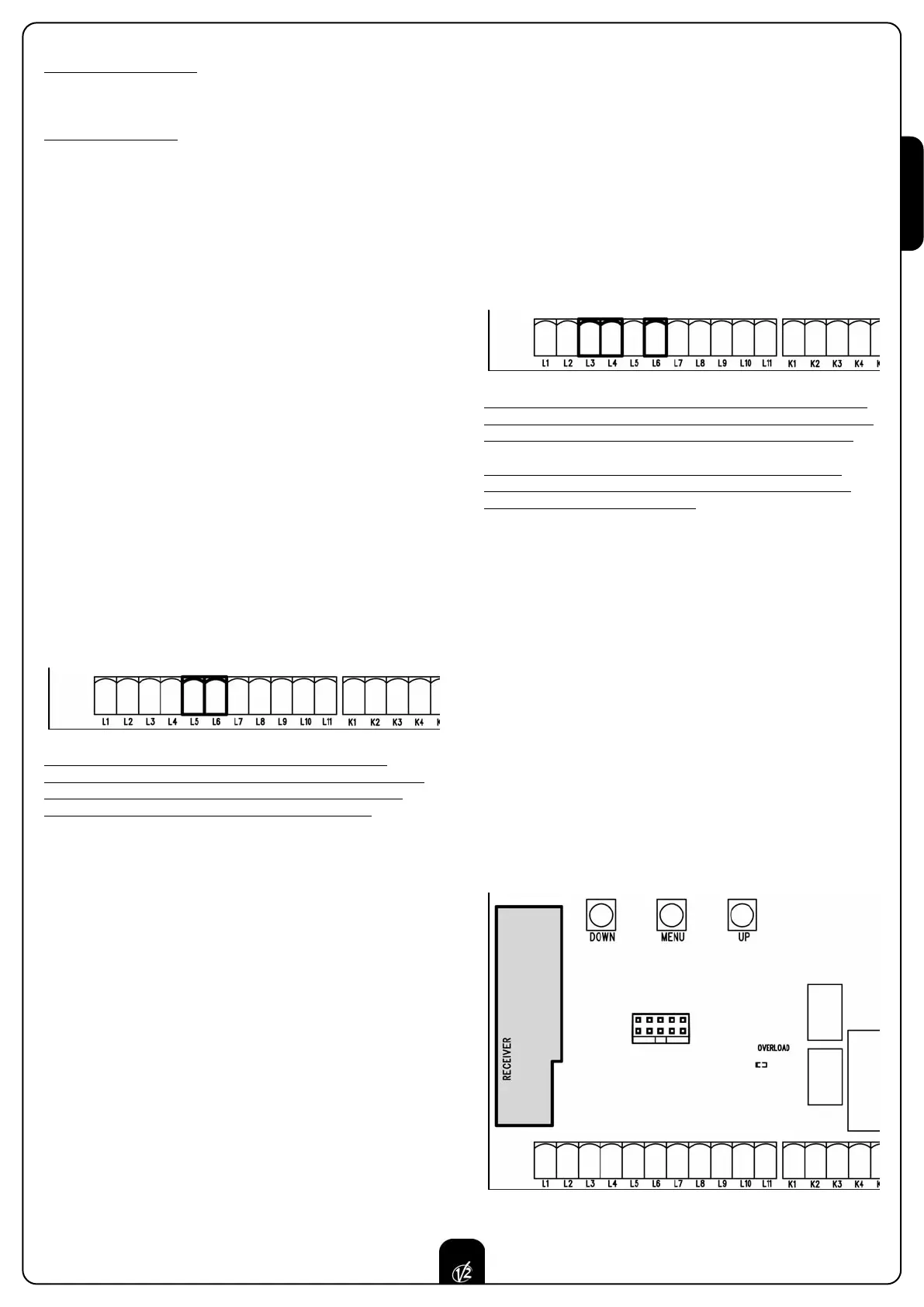
Connect the stop switch cables between terminal L5 and L6 of
the control unit.
The stop switch function can be activated by means of a
remote control stored on channel 3 (see relevant instructions of
MR1 receiver) The command STOP from remote is operative
also if the input STOP of the terminal board is disabled.
ACTIVATION INPUTS
CITY2+ control unit is equipped with two activation inputs,
whose operation depends on the programmed operation modes
(see Strt item of programming menu):
• Standard mode: a command being on the first input will
cause the complete opening of the gate (start); a command
being on the second input will cause the partial opening of
the gate (pedestrian start).
• Open/Close command and manned operation:
a command on the first input always controls the gate
opening, while a command on the second input always
controls the gate closing.
In Open/Close mode, there is an impulse command, that is
to say that an impulse will cause the complete gate opening
or closing.
In manned operation, there is a monostable command, that
is to say, the gate will be opened or closed as long as the
contact is closed and it will immediately stop as the contact
is open.
• Timer mode: it is similar to the standard mode but the gate
stays open (completely or partially) while the contact is
closed on input; as soon as the contact is open the pause
time count down will start, after which the gate will be
closed again. This function allows programming the gate
opening time during the day, by making use of an external
timer. Automatic closing must be enabled.
In all modes, inputs must be connected to devices having
normally open contacts.
Connect cables of device controlling the first input between
terminals L3 and L6 of the control unit.
Connect cables of device controlling the second input between
terminals L4 and L6 of the control unit.
The first input function can also be activated by pressing UP key
outside the programming menu or by means of a remote control
stored on channel 1 (see relevant instructions of MR1 receiver).
The second input function can also be activated by pressing
DOWN key outside the programming menu or by means of a
remote control stored on channel 2.
PLUG IN RECEIVER
CITY2+ control unit is suitable for plugging in a Personal Pass
MR1 receiver having a high-sensitivity super-heterodyne
architecture.
WARNING: it is necessary to turn off the control unit
power before doing the operations mentioned here below. Pay
attention to the way you connect the removable modules.
MR1 module receiver is provided with 4 channels and each of
them is suitable for a command of CITY2+ control unit:
CHANNEL 1
쩚쩚쩛쩛
STAR
T
CHANNEL 2
쩚쩚쩛쩛
PEDESTRIAN START
CHANNEL 3
쩚쩚쩛쩛
STOP
CHANNEL 4
쩚쩚쩛쩛
CO
URTESY LIGHT
WARNING: Before programming 4 channels and function
logics read carefully the instructions of MR1.



 To Next Page