AV Bridge MATRIX PRO
AV Bridge Matrix Pro Manual - Document Number 342-0915 Rev C Page 7 of 68
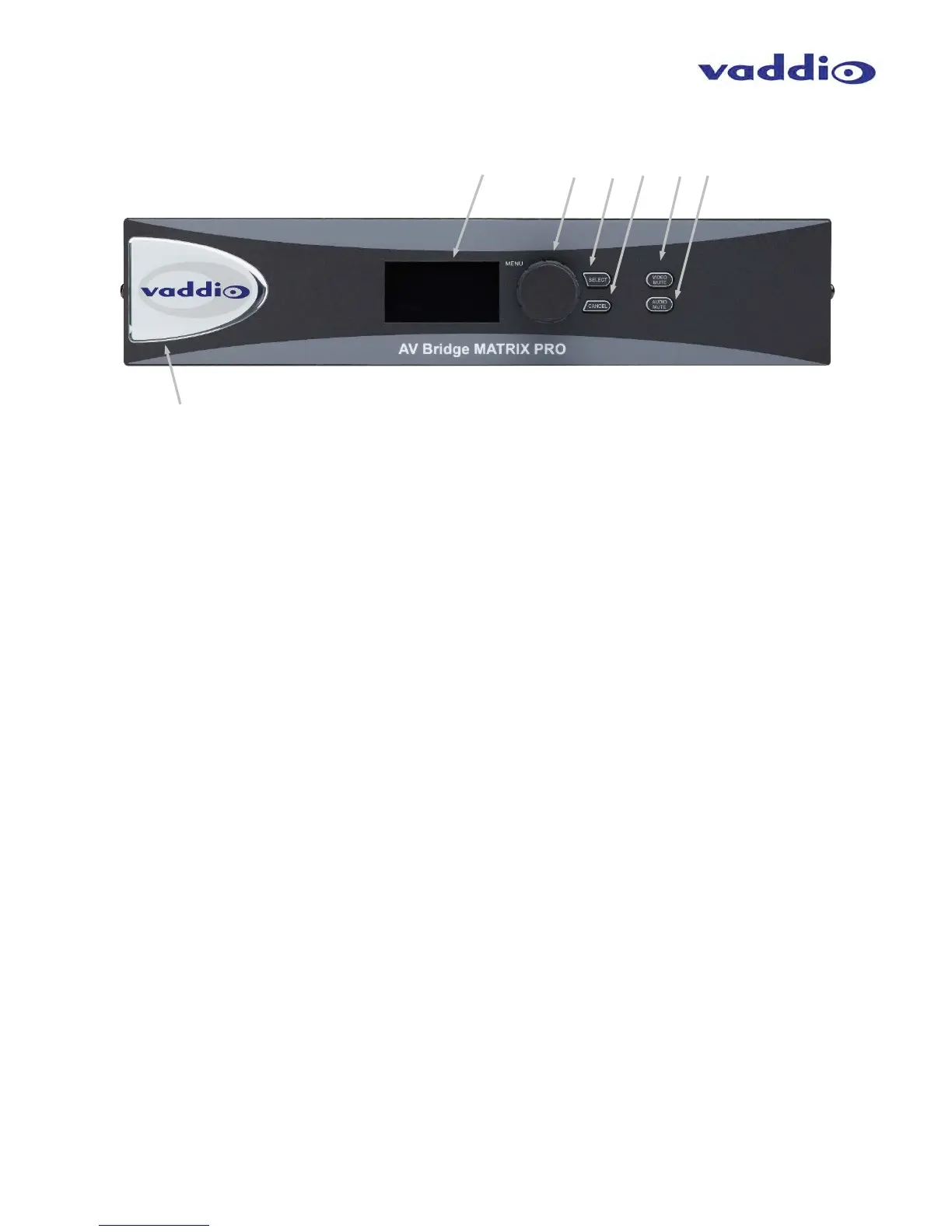
AV Bridge MATRIX PRO Front Panel with Feature Call-outs
1. Display Screen: Easy to read 8 line blue colored back-lit display, to show unit status and conveniently access
the most commonly used Menu functions of the MATRIX PRO.
2. Menu Knob: Rotary encoder used to navigate the selections in the Menu Display. Clockwise = numeric
increment (or up), Counterclockwise = numeric decrement (or down). In Menu, asterisk (*) = Selected or
Enabled.
3. Menu Select Button: Select button for setting or accessing items while navigating the user interface of the
front panel menu.
4. Menu Cancel Button: Button to exit out of sub-category menu selections while navigating the front panel
menu.
5. Video Mute Button: Mutes (stops) video for both streaming and local outputs, replacing selected input video
with a programmable video slate or bars. Pressing again will toggle the mute function off.
6. Audio Mute Button: Mutes the output audio when pressed. Pressing again will toggle the mute function off.
7. Dimensionally enhanced Puffy Badge: Unlike many offerings of competing products, Vaddio spares no
expense and provides a large 3 dimensional, visually delightful puffy badge to enhance the user’s experience.



 To Next Page