AV Bridge MATRIX PRO
AV Bridge Matrix Pro Manual - Document Number 342-0915 Rev C Page 29 of 68
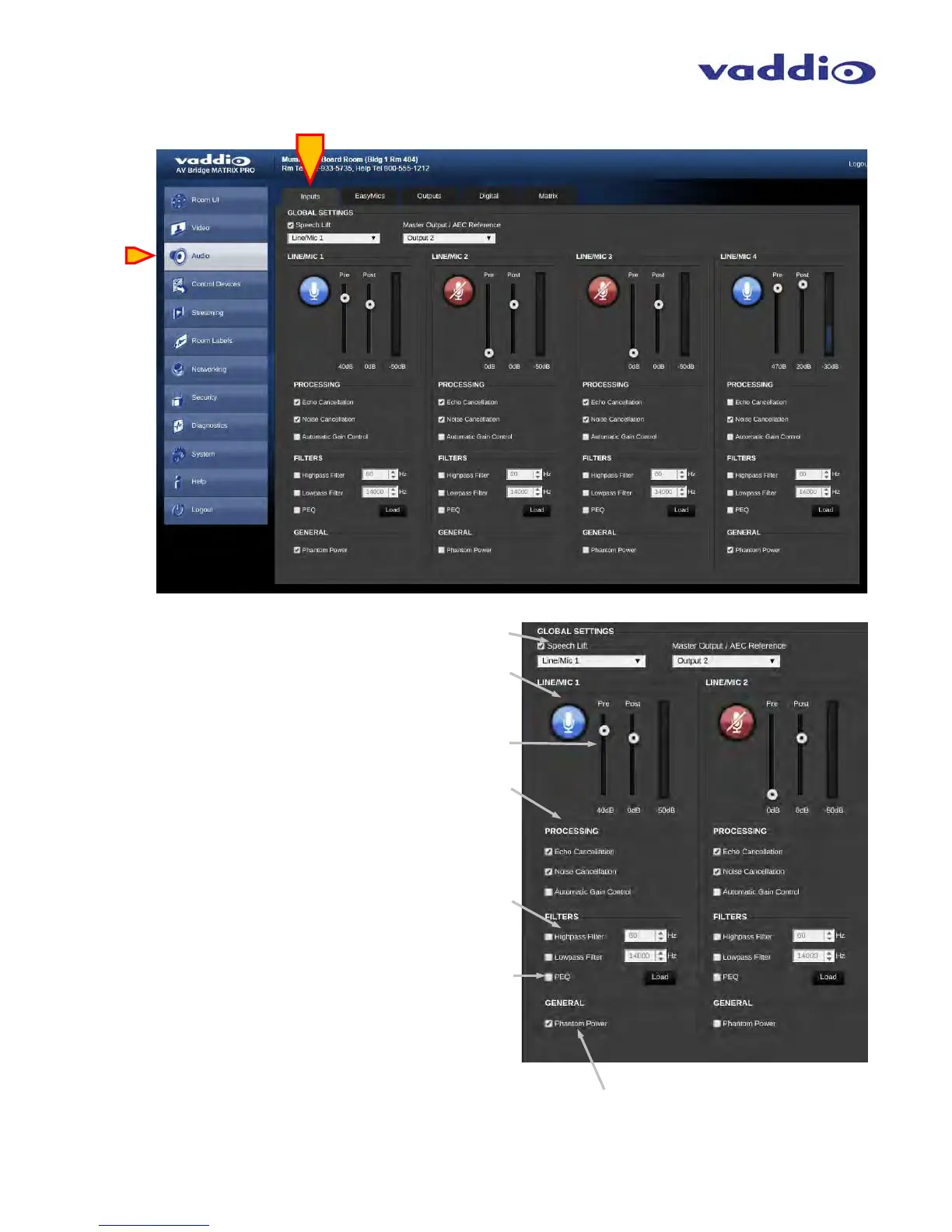
Screen Shot: Audio Settings
• Audio Inputs:
Speech Lift, Master Output/AEC Reference: Speech
Lift and Master Output functions described in the Audio
Matrix section.
Input channels: Audio Mute button for that specific input.
Blue = active, red = muted.
Input channels: Level control sliders for Pre and Post levels.
Up to 50 dB of analog Pre matrix gain available, up to 20 dB
of Post matrix gain available. Label indicates gain/attenuation.
VU Meter on right displays active average (RMS) audio on
that specific channel.
Input Channesl: Processing check boxes allow for Echo
Cancellation, Noise Cancellation for AEC, and Automatic
Gain Control. Checking the box = enabled.
Input Channels: Filter selection affords High Pass enabling
with adjustable knee point, and Low Pass enabling with
adjustable knee point. Checking the box = enabled.
Pop up window will appear. PEQ discussed in next section.
Input Channels: Enabling PEQ (parametric equalizer) Load
button will pop up a window with 3-band PEQ parameter
fine adjustments.
Input Channels: Phantom Power check box will enable 48 volt
DC Phantom power for the according input channel.



 To Next Page