AV Bridge MATRIX PRO
AV Bridge Matrix Pro Manual - Document Number 342-0915 Rev C Page 28 of 68
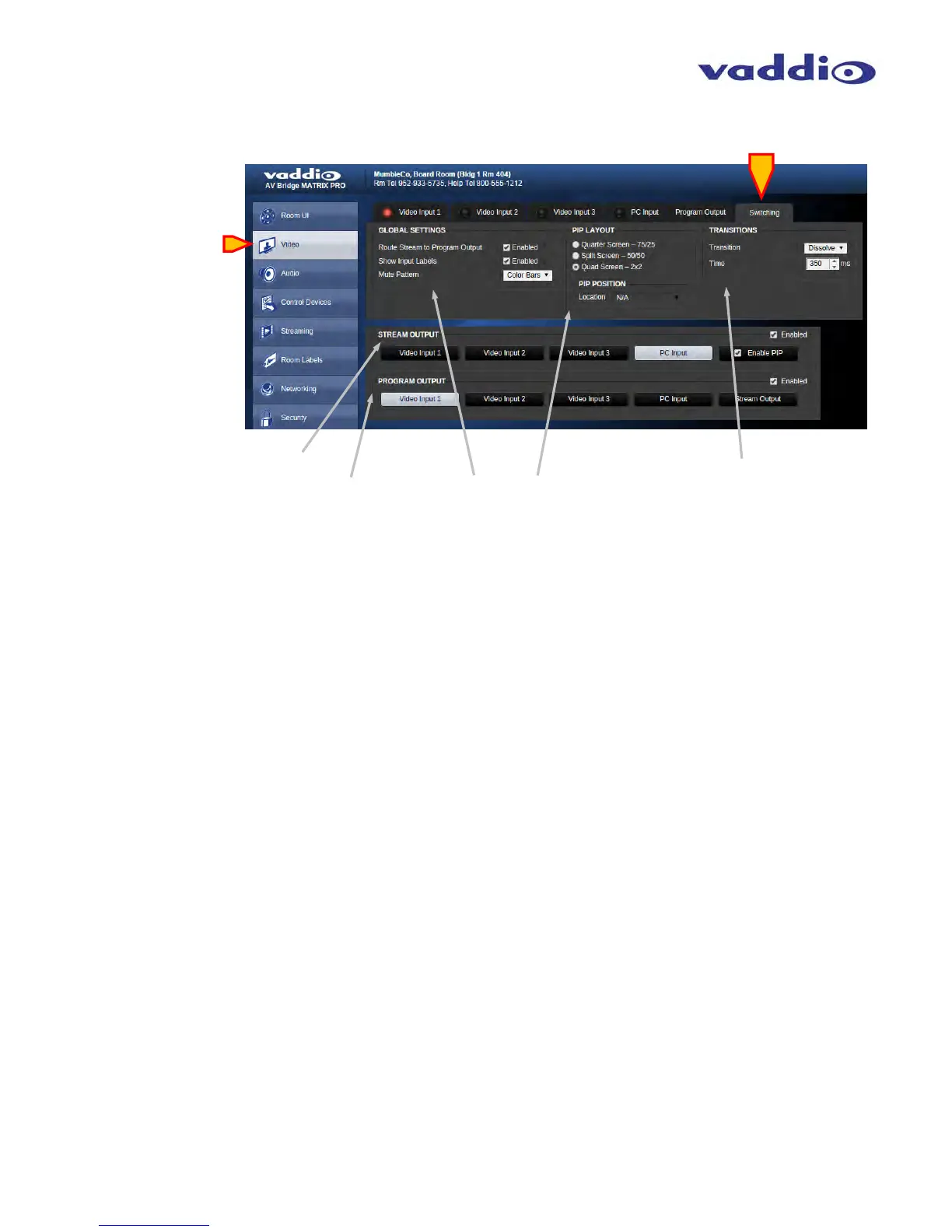
• Video Switching:
Stream Output: Select Streaming output source with buttons, the button highlighted white indicates selected source.
Locked checkbox prevents unwanted switching if desired.
Program Output: Select Program Output source with buttons, button highlighted white indicates selected source.
A red LED light on upper input tabs indicates tally, showing that source is live on the Program outputs.
If desired, the locked checkbox prevents unwanted switching.
Global Settings: Check box to enable input labels to be superimposed over video content sources. The lettering
background can be selected with the pull-down menu.
PIP Layout: PIP (Picture in Picture) style selection. Quarter Screen allows for PIP location in any of the four corners,
location adjustable when enabled. Also available are Split Screen (up/down) and Quad Split to show all 4 video sources
simultaneously.
Transitions: Select desired transition type: straight cut or cross-fade (dissolve). Transition time duration can be selected
with the up/down arrows on the right of the window, setting the duration of transition in milliseconds.



 To Next Page