AV Bridge
Vaddio AV Bridge - Document Number 342-0518 Rev C Page 16 of 36
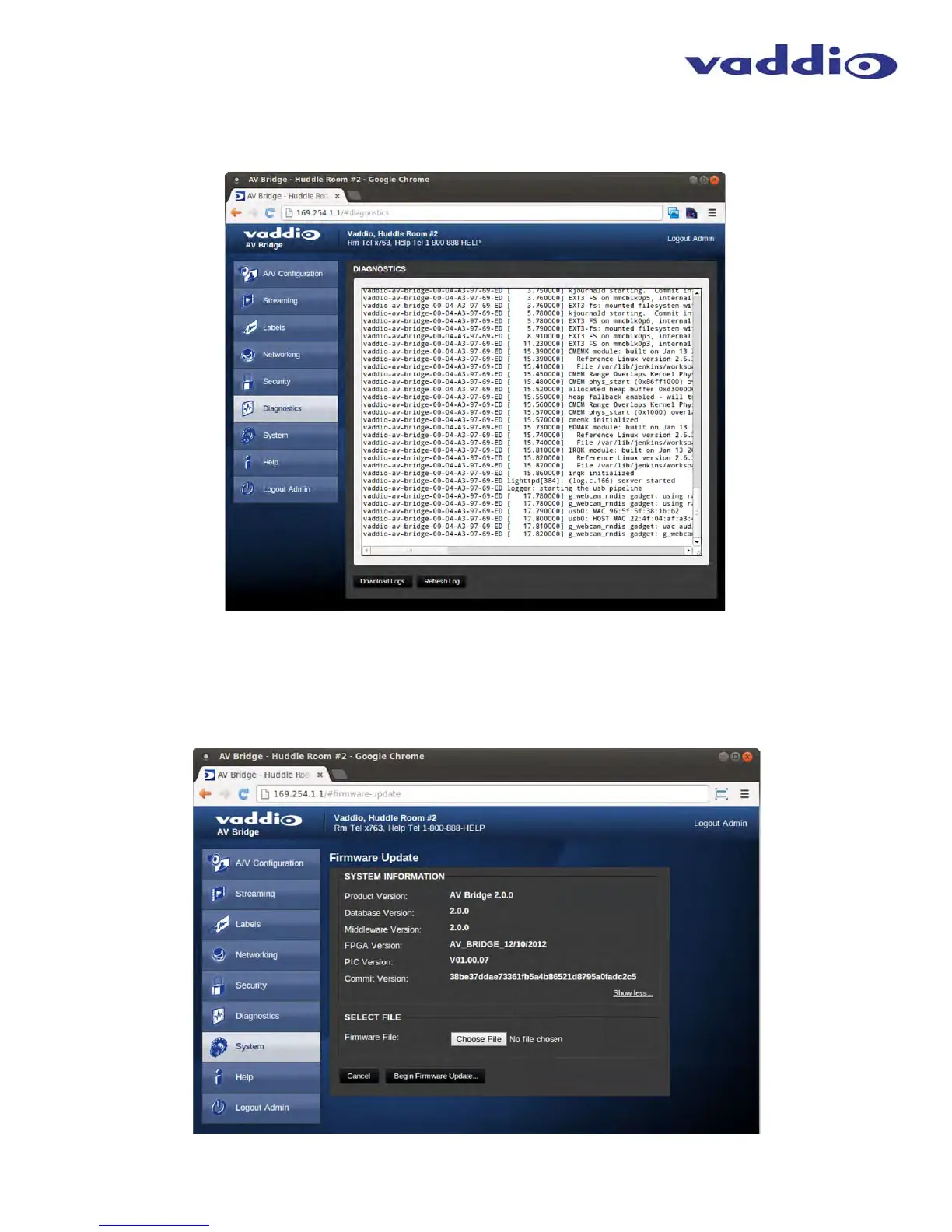
Screen Shot: Diagnostics
The diagnostics function within the AV Bridge is intended for advanced troubleshooting. It includes logging capabilities of key
events and error reporting during normal operations. The internal logging function is setup as a revolving FIFO with estimated
internal storage capabilities for up to one week. The administrator has the ability to clear the log or download the log to a local
PC.
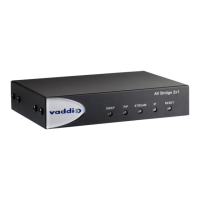
Screen Shot: System Menu
The system menu is intended to display the software versions and to provide for future firmware update operations. The
administrator can select the new firmware file from local or network drive. The ‘begin firmware update’ button is actuated once
desired firmware file is selected. The update process will include user notification of status. The “Show less” option closes
down to the version detail only.
➲
➲
➲
➲
➲
➲
➲



 To Next Page