Chapter 8 ________________________________________________________ Displays and Menus
VAISALA _______________________________________________________________________ 45
CHAPTER 8
DISPLAYS AND MENUS
This chapter describes the user interface.
Main View (In Measuring Mode)
Error limit
1 2 3 4 5 ↓
Selected quantities:
Displayed in gray =
value is set or inactive
Displayed in black =
value is measured
Starts/stops measuring
Shortcut to Measuring
settings
-menu
Shortcut to Self diagnostics-
menu
Shows the graphical trend
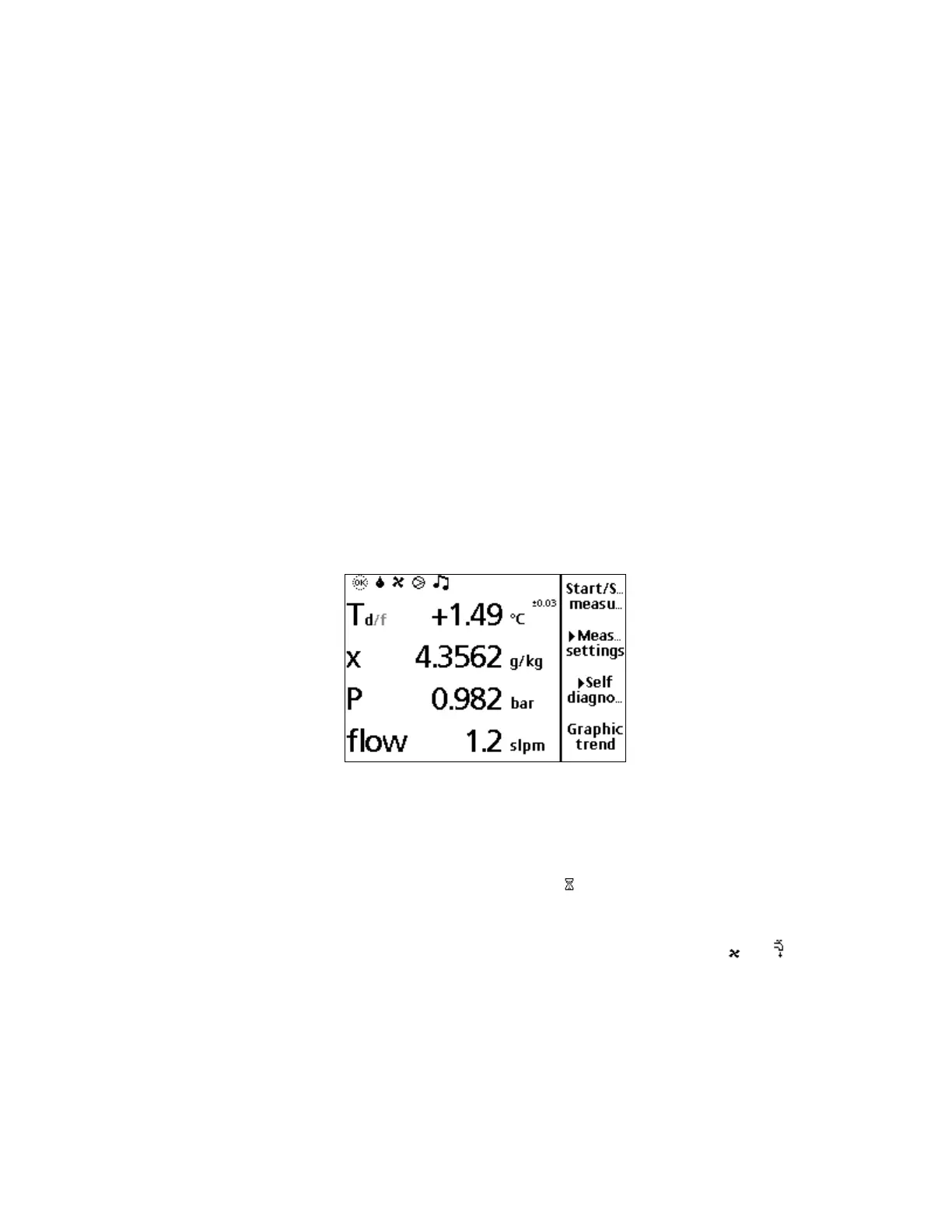
Figure 16 Main View Display
The following numbers refer to Figure 16 above:
1 = Symbol that indicates if the measuring status: active (OK),
stopped (STOP), wait (
).
2 = Symbol which indicates the form of the moisture on the
sensor 6 water, 7 frost.
3=
Symbol which indicates the cooling method, air, water
4 = Symbol which indicates that optional pump for the sampling
line is on. If this symbol is not shown, the pump is off.
5 = Shows that the alarming condition is valid.



 To Next Page